Cloudflare is my CDN. Is “your_cdn_url” identical to the public-facing, regular URL for my site?
Hello @nachocodoner! A question: by default, in rspack.config.js, jsc.target for builtin:swc-loader is set to es2015 (ref)
In our .swcrc config we have
{
  "jsc": {
    "target": "es2020"
  }
}
But the jsc.target option is explicitly omitted when .swcrc settings are merged into rspack.config.js (ref). There’s no info in the commit why is it so. Could you please explain why it’s important to keep it as es2015?
Obviously, we’re still able to override the jsc.target with Meteor.extendSwcConfig helper:
...Meteor.extendSwcConfig({
  jsc: {
    ...Meteor.swcConfigOptions.jsc,
    target: "es2020",
  },
}),
but curious what the consequences will be. Thanks!
1 Like
I rules I had to add the full rule to get to 2023. I copied it from the log I see in my debug console as the project starts. Even so, I still don’t know if this is this overwrites the default configuration entirely.
rules: [
      {
        test: /\.(?:[mc]?js|jsx|[mc]?ts|tsx)$/i,
        exclude: /node_modules|\.meteor\/local/,
        loader: 'builtin:swc-loader',
        options: {
          jsc: {
            baseUrl: '/Users/paulailincai/Projects/activitree/app',
            paths: { '/*': [ '*', '/*' ] },
            parser: { syntax: 'ecmascript', jsx: true, decorators: true },
            target: 'es2023',
            transform: {
              react: {
                development: true,
                refresh: true,
                runtime: 'automatic'
              }
            },
            externalHelpers: true
          },
          module: { type: 'es6', strict: true }
        }
      }
]
I was able to identify what the problem with my meteor app. It was a package.json option I had set to false “sideEffects”: false. I removed it, did a full reset and the app started fine!
However, a small detail I’m noticing is that now my server logs do not show timestamps on the left anymore, like Meteor 3.3 does.
Is there a way to add them back?
Thanks in advanced!
1 Like
The default es2015 target is there to ensure solid support across a wide range of browsers, including some that don’t fully implement newer ES20xx features yet. ES2015 is a reasonable, conservative baseline (maybe a bit too conservative nowadays) that already covers a lot of devices and is a safe default when you want broad compatibility.
Originally, I added this restriction because during the beta we saw some apps break on the client when users configured a target that real end-user browsers didn’t support. Also, .swcrc files affect both Meteor and the Rspack bundler. Besides client and server code, they also affect Meteor packages, not only the app code, and we saw incompatibility messages with modern targets during the beta. Setting a minimum target for Meteor apps helped avoid those situations.
That said, you’re right that, in principle, this is the responsibility of each app author: they should understand their audience and the impact of choosing a more aggressive target. We should not restrict everybody, changing that target is a risk each app author should account for. I understand the benefits on using modern targets to get thinner and performant bundles.
On the server, this restriction doesn’t really make sense, because Node 22.x already supports essentially all ES2020, ES2021, ES2022, ES2023, and most ES2024 features natively. There, we can safely align the output with what Node actually supports without needing such a conservative floor. Forcing es2015 is a mistake in the server.
I’m not sure if I will remove this restriction for the 3.4 final release, because changing it could introduce subtle issues in existing projects. As you stated, you can use the Rspack helper to override that right now with Meteor.extendSwcConfig , and only affect the Rspack bundler (your app code).
I’d rather keep the current behavior for 3.4 and take some time to remove these restrictions, see what happens across many scenarios over the next months, and have a new period of betas to understand the implications (3.4.x series or 3.5).
Thanks for pointing this out, it’s a completely valid question, and there has been a lot covered these months. We’ll consider being less restrictive.
2 Likes
This has been a change introduced by 100% consensus on the community and discussed here, Meteor Development Tiny Tip That Helped Me A Lot
We’ve addresed the change in the next PR.
In order to get timestamps back on your console, you should use --timestamps.
4 Likes
I just upgraded to rc.1 and I’m getting again:
tx8ns 12/08 8:31:22.487 AM Error: Could not find rspack.config.js, rspack.config.ts, rspack.config.mjs, or rspack.config.cjs. Make sure @meteorjs/rspack is installed correctly.
tx8ns 12/08 8:31:22.487 AM     at getConfigFilePath (packages/rspack/lib/processes.js:167:9)
tx8ns 12/08 8:31:22.487 AM     at runRspackBuild (packages/rspack/lib/processes.js:434:22)
tx8ns 12/08 8:31:22.487 AM     at module.wrapAsync.self (packages/rspack/rspack_plugin.js:305:9)
tx8ns 12/08 8:31:22.487 AM     at processTicksAndRejections (node:internal/process/task_queues:105:5)
Then even reverting back to beta.14 it’s throwing the same error (very weird).
Nobody else is getting this error?
I have had cache false for all of these tests, so its unrelated
I have now simplified my test. If I have a single client test my server unit tests fail.
If I don’t it is able to run as normal, even if my test is as simple as this:
describe("Test ObjectHelpers", () => {
  describe("isObject", () => {
    console.log("SUCCESS");
  });
});
Is there anyway to dive into exactly what is in the unit test client bundle? It should be just this file by itself
These are the failing logs:
--------------------------------
----- RUNNING SERVER TESTS -----
--------------------------------


  AI Workflows
=> Started your app.

=> App running at: http://localhost:3050/
RedisOplog - Connection to redis ended
Killed

Exited with code exit status 137
I am really stumped, and would love to finish validating my app, but not being able to run unit tests is pretty big issue for us.
Edit:
Other random thing my tests uncovered. The executing context of the files is happening at much different time.
I have in my tests something that ends up looking like this:
const date = new Date()
describe("Test Date", () => {
  describe("is within 1 min", () => {
    isWithin1Min(date, new Date())
  });
});
This has never failed before, but is consistently being off by an additional minute. I can fix this because the minute was just to be able to handle this case, but it is weird and a maybe not insignificant change for some people’s test.
And my functional tests are getting memory errors now, that was not happening before.
Question for legacy decorators usage. If anyone managed to get it working?
I’ve tried adding source.decorators in the config, but that didn’t seem to work.
rspack.config.js:
const { defineConfig } = require('@meteorjs/rspack');

module.exports = defineConfig((Meteor) => {
  return {
    source: {
      decorators: {
        version: 'legacy',
      },
    },
  };
});
I think Meteor’s just using Rspack and not Rsbuild, so you’ll want to configure the SWC loader I believe.
I haven’t done this myself yet (but I did briefly use SWC with Vite), the answer should be somewhere in these docs:
Rspack docs
Swc docs - legacy decorator
https://swc.rs/docs/configuration/compilation#jsctransformlegacydecorator
(Then somehow blend that with how Meteor does config - not sure if you could also use an .swcrc file?)
2 Likes
Could you try again adding this to your image? Adding it and testing locally with your image made it work in my case.
RUN meteor npm i --no-audit \
  && (meteor build --directory ../app-build \
      || (meteor npm i --no-audit && meteor build --directory ../app-build))
There is likely a mismatch between the Meteor checkout version and the published one that still doesn’t solve your problem, and that makes it hard to debug and confirm a final fix. With the Meteor checkout version I was able to reproduce the issue and see it fixed. If we can find a workaround for you now, we’ll revisit a final fix later.
As @ceigey mentioned, that is through Rsbuild, but Meteor currently supports only Rspack. I explained some of the differences between Rspack and Rsbuild in this post:
The way to enable this directly in Rspack is by using SWC (using jsc.transform.legacyDecorator). You can either:
1 - Update .swcrc at the root of your Meteor app and add:
{
  "jsc": {
    "parser": {
      "decorators": true
    },
      "transform": {
        "legacyDecorator": true
      }
  }
}
2 - Or use Meteor.extendSwcConfig at rspack.config.js:
const { defineConfig } = require('@meteorjs/rspack');

module.exports = defineConfig(Meteor => ({
  // Extend SWC config
  ...Meteor.extendSwcConfig({
    jsc: {
      parser: {
        decorators: true,
      },
      transform: {
        legacyDecorator: true,
      },
    },
  }),
}));
The first option enables it for both Meteor packages and app code. The second applies only to your app code, including client and server.
3 Likes
I’d love to keep debugging your use case, but I really need a way to see it reproduced in a public repository, ideally in a public GitHub Actions CI setup where I can experiment, find the issue, and test a solution. Could you try that?
What I can say is that when running the modern E2E tests in GitHub Actions (tests in Meteor core that validate different Meteor-Rspack integration setups across skeletons using Jest and Playwright test tools), I randomly got Exited with code exit status 137, which means the OS/CI killed the process due to high memory usage. This flakiness seems related to GitHub Actions default runners: even though they have enough RAM and CPU, they are shared VMs and can hit random instability when resources are overloaded. I worked around this by adding a retry mechanism so random machine conditions don’t cause false negatives. These tests are new and use advanced tools like Jest, Playwright, and Meteor/Rspack, which can add up in resource consumption. I don’t have a baseline from the previous setup, but it’s likely that Rspack’s test tooling is consuming more resources, or the test eager mechanism. By the way, the new E2E test in the Meteor core tests project runs using the different configurable modes of eager tests, by entrypoint, etc., with just a few examples, so it should be similar to what you just did to reduce the problem.
However, the issue could also be related to your specific setup and plugins. I noticed that even after adding retries in CI, only one of the job categories (Typescript Meteor-Rspack apps) kept failing constantly, and all attempts failed. After some research, I found that the ts-checker-rspack-plugin is very resource-intensive and a common cause of memory spikes and CI failures on low-resource machines. Once I disabled this plugin, the check passed consistently, even without worrying about GitHub’s default runner stability. I still plan to look for a configuration that is less resource-intensive.
Now that you have isolated the problem to a single test and the issue still happens, could you try to reduce the number of plugins and configs used in your rspack.config.js? One of them might be causing this constant process killing. From my experience, this often comes from specific non-optimized plugins.
Another debugging direction is to temporarily disable the eager test mechanism. Add a testModule config in your package.json and run your single test as an entry point. Does it still fail consistently, even after re-running the check?
If you can reduce the problem to the minimum, it will be easier to reproduce, gather more signals, and find a fix. Then I can help further if there’s anything needed on the core side.
Annoyingly I can’t easily come up with a repro because this is only happening in circleci context. So I’m guessing its a linux only issue that I can’t mimic on any of my devices…
Is there a full documentation for the testModule options somewhere?
Like I mentioned before, there are 4 different contexts we would want to load and its really unclear how to convert my eager loaded test infrastructure into a module based one
(Client unit tests, Server unit tests, Full App Tests, Full App Client [this one might just be normal client])
I see at most 2 options, so I just don’t know how to manage this, and I am going to assume I’m not the only one who is going to have this issue.
Edit:
I did force it to be not eager loaded, and I still get the crash, so I think there is just a general memory issue going on. It seems that sometimes you also get a memory issue, so you might have something to investigate? Recreating this memory issue is going to be pretty hard so I’m not sure I’m going to have a small reproduction
I think I can see the core problem on my local device:
When we are running the normal server we run 3 services, node, 2 rspack-nodes. This is already almost 3GB for my app.

Then when I run the unit tests, its 4 services. 2 node and 2 rspack-nodes. This ends up being right around 4 GB, which with other stuff I need running causes circle ci to run out of memory.

Meteor 3.3 makes 1 node instance that takes just under 2 Gb

And unit tests just run two instances of node at just over 2GB
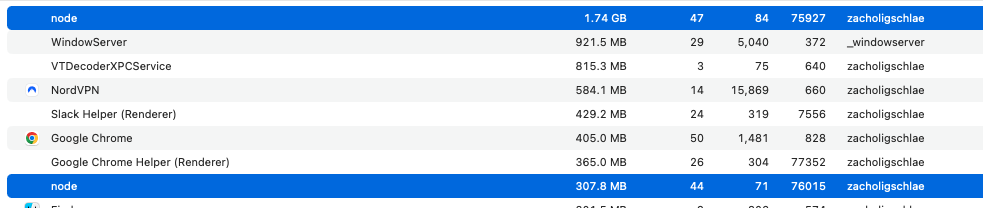
So we are being just purely additive with memory with the rspack server. I’m not sure if there is any way to resolve this or reduce the memory impacts. But even locally now I’ve noticed running the unit-tests can slow down my computer.
Thanks a million, will grab a look.
I see. It looks like Rspack is a high RAM consuming process and impacts the experience a lot. Could reports like this one be related on Rspack’s side? Or even this one with persistent cache? That is why asked cache’s removal, but you did and it didn’t change. Did you confirm the cache config was false with the verbose mode (both cache and experiments.cache)?
Project size could also matter on having those Rspack instance consuming high RAM. And Rspack plugins or the rspack.config.js configs may change RAM consumption in my experience as well, so it would be good to try to reduce these to see if something changes.
The problem with test mode in Meteor is that if we want to keep the same behavior and a well integrated process, the watch mode for tests needs to open Rspack instances for both client and server app compilation and keep them running in order to react to changes and retrigger compilations. This should not happen when running --once, where we only need to run the Rspack build once per client and server, and later run the Meteor/Node process to run the tests. But the only way to ensure Meteor test specifics, which you helped to get into this accurated state, has been considering Rspack remains active when necessary.
I will pay further attention to activity monitors for these processes in order to identify patterns that could affect this, but it may be an issue with Rspack itself.
Has anyone else adopting Rspack in Meteor run into similar RAM issues when running tests as @schlaegerz?
I took the plunge and got this working on a project. Only one thing that jumped out at me. Why does the client get built twice? Is that expected?
[Rspack Server] [server-rspack]:
  [server-rspack] compiled successfully in 1.66 s

[Rspack Client] [client-rspack]:
  [client-rspack] compiled successfully in 2.18 s

[Rspack Client] [client-rspack]:
  [client-rspack] compiled successfully in 1.10 s
I tried those fixes in there and I still get memory crashes,
I’ve gotten my unit tests to pass more often than not, but now I’m having trouble with the functional tests as I am seeing 3 rspack node instances running, and my node binary gets all the way up to 5GB before it hard crashes
Definitely, it shouldn’t. It has never been my case. The only recompilation I can think of is when moving to a new Meteor version and a Rspack bump at package.json or node_modules reinstallation happens as part of meteor run, it could trigger it. But definitely not all time.
Does this recompilation happen every time for you, or only under specific circumstances?
It’s a surreal experience coming back to a Webpack-style interface after being in the Vite world for so long, I don’t know if I’m doing the right thing but I somehow managed to get this working (in local dev).
Issue with public - resolved?
Originally I had a big issue with all the public/**/*.{svg,ttf,etc} files referred to in CSS files by their absolute path (e.g. /my/fancy.svg) not being found by Rspack, I forgot about externals in the last 6 years but I’m not sure if this is intended? I expected public to just work the same way as before with Meteor but I guess this is an ambiguous situation.
In any case I got ChatGPT to draft me up an ExternalsPlugin callback which seems to work. I feel like I’m missing something obvious that would have saved me this confusion and extra config though.
Current Rspack config
const { defineConfig } = require('@meteorjs/rspack')
const { VueLoaderPlugin } = require('vue-loader')
const { VuetifyPlugin } = require('webpack-plugin-vuetify')
const rspack = require('@rspack/core')
const { RsdoctorRspackPlugin } = require('@rsdoctor/rspack-plugin')

const CSS_EXT_REGEX = /\.(less|sass|scss|css)$/i

/**
 * Rspack configuration for Meteor projects.
 *
 * Provides typed flags on the `Meteor` object, such as:
 * - `Meteor.isClient` / `Meteor.isServer`
 * - `Meteor.isDevelopment` / `Meteor.isProduction`
 * - …and other flags available
 *
 * Use these flags to adjust your build settings based on environment.
 */
module.exports = defineConfig((Meteor) => {
	return {
		experiments: {
			css: true,
		},
		plugins: [
			new RsdoctorRspackPlugin(),
			// Courtesy of ChatGPT
			new rspack.ExternalsPlugin('module', (data, callback) => {
				const req = data.request

				// Webpack provides dependencyType === "url" for CSS url() deps.
				// Rspack is webpack-compatible here, but keep this tolerant.
				const isUrlDep = data.dependencyType === 'url'
				const issuer = data.contextInfo?.issuer ?? ''
				const fromCss = CSS_EXT_REGEX.test(issuer)

				if (req && req.startsWith('/') && (isUrlDep || fromCss)) {
					// Keep the URL as-is (served by your server from /public)
					return callback(undefined, `asset ${req}`)
				}

				callback()
			}),
			new VueLoaderPlugin(),
			new VuetifyPlugin({ autoImport: true }),
			// https://forums.meteor.com/t/3-4-rc-1-release-candidate-faster-builds-smaller-bundles-and-modern-setups-with-the-rspack-integration/64124/132?u=ceigey
		].filter(Boolean), // use this filter to conditionally exclude things
		resolve: {
			alias: {
				'#shared': '/shared',
				'#client': '/client',
				'#server': '/server',
				'#imports': '/imports',
				'#tests': '/tests',
				'~~': '/',
				'@': '/app',
			},
		},
		module: {
			rules: [
				{
					test: /\.vue$/,
					loader: 'vue-loader',
					options: {
						experimentalInlineMatchResource: true,
					},
				},
			],
		},
		externals: {},
	}
})
Font & CSS workarounds
I had to give up on using unplugin-fonts because it seemed to cause a chain reaction with Vue files’ associated scoped CSS fragments being misidentified as JS imports or something weird, and instead I’m using fontsource directly as a replacement.
I also found for some reason that a unovis graph refused to have the correct width, I just had to add a fix for that in CSS:
.unovis-xy-container {
    width: 100%;
}
I don’t know why that appeared, maybe I’ve accidentally uncovered a CSS issue that was hidden while using Vite.
Galaxy deployment
Also, deploying to Galaxy, I need to comment out the new RsdoctorRspackPlugin() line (and un-comment it back in when I want to simulate a production build locally, I guess), otherwise rspack seems to keep working indefinitely without swapping to Preparing to upload your app....
(I’m still testing the deployment, will report back…)
EDIT:
Looks like deployment worked, but something I forgot to test was that accounts still worked (for this particularly deployment, they’re not really that necessary, so it’s easy to overlook them). Funnily enough they broke.
Turns out when I was running:
Accounts.validateLoginAttempt(verifyLoginAttempt)
verifyLoginAttempt was actually a promise from a dynamic import that I forgot to await. Somehow that never caused an issue before! Huh… I have no idea how that only just came up.
Vite config
If anyone’s curious, this is (roughly) my old Vite config (e.g. using jorgenvatle:vite):
/// <reference types="vitest" />

import { defineConfig, Plugin } from 'vite'
import { meteor } from 'meteor-vite/plugin'
import vue from '@vitejs/plugin-vue'
import path from 'path'
import vuetify from 'vite-plugin-vuetify'
import UnpluginFonts from 'unplugin-fonts/vite'
import {} from 'lodash'
import { analyzer } from 'vite-bundle-analyzer'

export default defineConfig({
	test: {
		globals: true,
		root: './',
		include: [
			'server/modules/**/*.spec.ts',
			'shared/domains/**/*.spec.ts',
			'imports/features/**/*.spec.ts',
			'server/features/**/*.spec.ts',
		],
	},
	plugins: [
		analyzer({
			openAnalyzer: true,
			fileName: '.bundle-report.html',
			analyzerMode: 'static',
		}),
		meteorIsServerPlugin(),
		meteor({
			// assetsBaseUrl: '/',
			// assetsDir: 'public',
			clientEntry: 'client/main.js',
			// Optionally specify a server entrypoint to build the Meteor server with Vite.
			serverEntry: 'server/main.js',
			enableExperimentalFeatures: true, // Required to enable server bundling.
			externalizeNpmPackages: ['react', 'react-dom'],
			stubValidation: {
				warnOnly: true,
				ignorePackages: ['meteor/mongo', 'meteor/modules'],
				ignoreDuplicateExportsInPackages: ['react', 'react-dom'],
			},
			meteorStubs: {
				debug: false,
			},
		}),

		vue({
			template: {
				transformAssetUrls: false,
				compilerOptions: {
					whitespace: 'preserve',
				},
			},
		}),

		vuetify({
			// https://www.npmjs.com/package/vite-plugin-vuetify
			autoImport: true,
		}),

		UnpluginFonts({
			fontsource: {
				families: ['Inter Variable', 'IBM Plex Sans Variable'],
			},
		}),
	],
	resolve: {
		alias: {
			// Project internal
			'#shared': path.resolve(__dirname, './shared'),
			// '/app': path.resolve(__dirname, './app'),
			'#client': path.resolve(__dirname, './client'),
			'#server': path.resolve(__dirname, './server'),
			'#imports': path.resolve(__dirname, './imports'),
			'#tests': path.resolve(__dirname, './tests'),
			'~~': path.resolve(__dirname, '.'),
			'@': path.resolve(__dirname, './app'),
		},
	},
	css: {
		preprocessorMaxWorkers: true,
	},
	logLevel: 'silent',
	build: {
		minify: true,
	},
})

// https://github.com/JorgenVatle/meteor-vite/issues/282
function meteorIsServerPlugin(): Plugin {
	return {
		name: 'meteor-isserver-plugin',
		enforce: 'pre',
		transform(code, id) {
			if (code.includes('Meteor.isServer')) {
				console.log('transforming Meteor.isServer', id)

				return {
					code: code.replace(
						/\bMeteor\.isServer\b/g,
						'import.meta.env.SSR',
					),
					map: null,
				}
			}
			return { code, map: null }
		},
	}
}
1 Like