3.4-rc.1 Release Candidate, Faster Builds, Smaller Bundles and Modern Setups with the Rspack integration ⚡

Just some more details about the circleci issue:

It does look like this is using a full 4GB of RAM and all of the CPU usage:
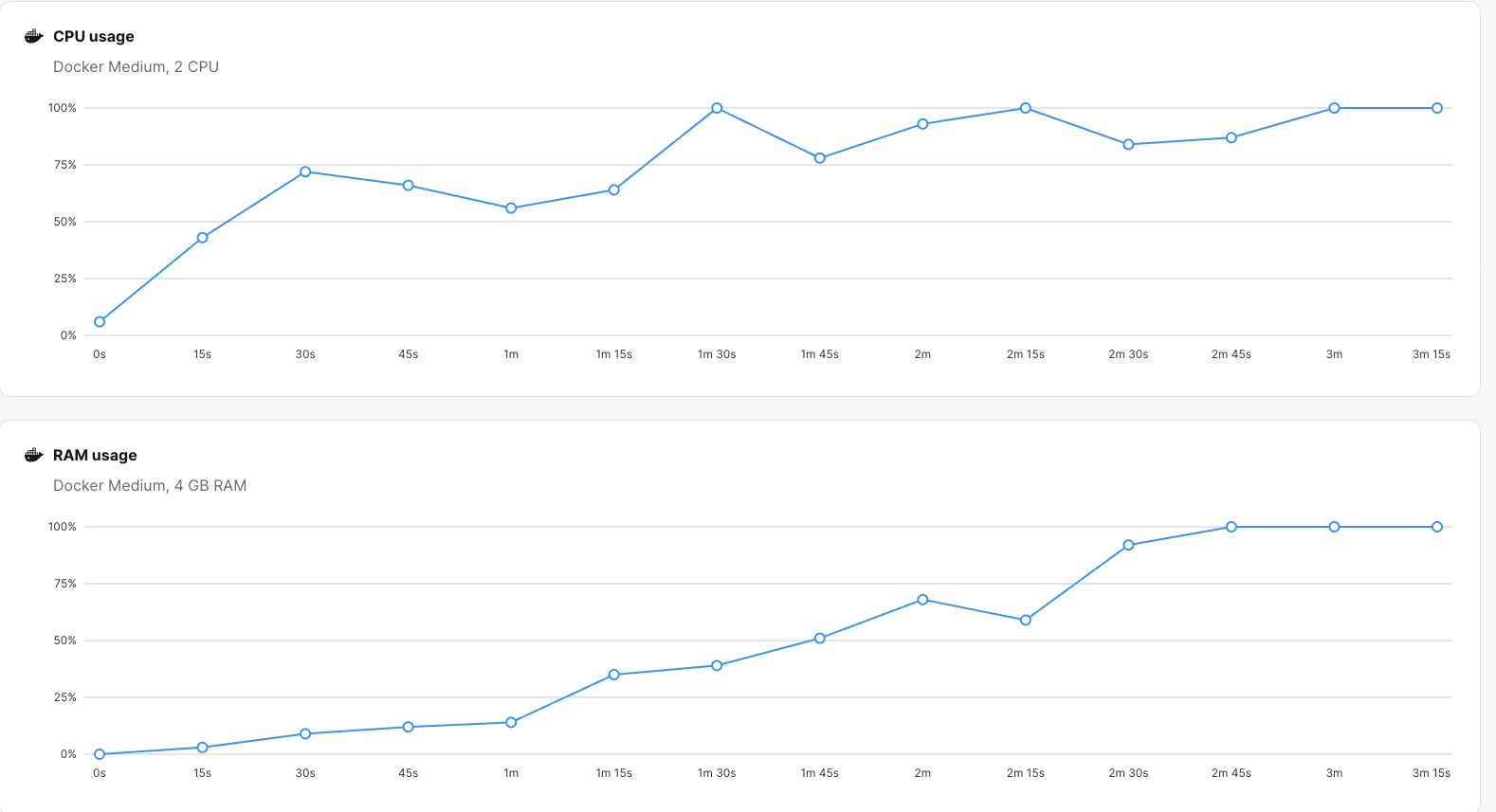
I paired down the number of tests added (to only 3 server tests) and got this

Rspack Test failed in Client with exit code 1
meteor://💻app/packages/rspack_plugin.js:1449
              const error = new Error("Rspack ".concat(label, " failed in ").concat(endpoint, " with exit code ").concat(code));
                            ^

Error: Rspack Test failed in Client with exit code 1
    at Object.onExit (packages/rspack/lib/processes.js:485:25)
    at ChildProcess.<anonymous> (packages/tools-core/lib/process.js:51:33)
    at ChildProcess.emit (node:events:519:28)
    at maybeClose (node:internal/child_process:1101:16)
    at Socket.<anonymous> (node:internal/child_process:456:11)
    at Socket.emit (node:events:519:28)
    at Pipe.<anonymous> (node:net:346:12)
    at Pipe.callbackTrampoline (node:internal/async_hooks:130:17)

Node.js v22.21.1

Exited with code exit status 1

Edit:
I figured out at least part of the issue.
In meteor 3.3:
server unit tests would load only stuff under /server folders
client unit tests would load only stuff under /client folders
That means other files would not be loaded at all

In meteor 3.4
server unit tests load anything not under /client folders
client unit tests load anything not under /server folders
That means other files would be loaded in both contexts

I’m working to see what exactly is making this fail on my end
2 Likes

Remember that with .meteorignore / METEOR_IGNORE you can set exclusions that will affect the test eager loading mechanism as well. You could, for example, ignore only in the CI context or when running tests in specific heavy paths.

In meteor 3.3:
server unit tests would load only stuff under /server folders
client unit tests would load only stuff under /client folders
That means other files would not be loaded at all

Are you sure? If so, how would it load tests from imports/, tests/ or other folders?

Meteor 3.4 with Rspack ensures it can eagerly load from all contexts, with the exception of the client folders when running server tests, and the server folders when running client tests.

Let us know what you find.

By the way, I also had some issues with GitHub Actions CI exiting with code 137. Since these instances are shared, I added a retry mechanism, as sometimes could randomly killed there. After some research I found that one specific test coverage job using the full Rspack setup (Jest and Playwright) also used ts-checker-rspack-plugin, which turned out to be very resource intensive, and being killed almost all time. Disabling it made the job pass consistently. Saying this in case your project may also use this plugin. It could be better to disable it for the purpose of passing runtime app tests.

Hello there, I’m trying out 3.4-rc.1. Thanks for all the latest updates to Meteor

I have a problem with an app, it seems not to be running fine.

Server does not seem to print some logs I have for startup, also it is warning about some imports but these are packages installed, so I can’t really fix the code (is there a way to fix these warnings)

And client, when loading via browser, is fully blank, like it has crashed or router was not working

=> Started proxy.                             
[Rspack Server Error] [.swcrc] Ignored custom "jsc.target" — reserved for Meteor-Rspack integration.

[Rspack Client Error] [.swcrc] Ignored custom "jsc.target" — reserved for Meteor-Rspack integration.

[Rspack Client] <i> [webpack-dev-server] Project is running at:

[Rspack Client] <i> [webpack-dev-server] Loopback: http://localhost:8081/, http://[::1]:8081/
<i> [webpack-dev-server] On Your Network (IPv4): http://192.168.1.39:8081/
<i> [webpack-dev-server] Content not from webpack is served from '/home/ferjep/yourdnafamily/admin/public' directory

[Rspack Client] [client-rspack]:
  [client-rspack] compiled successfully in 82 ms

[Rspack Server] [server-rspack]:package ...  -
  WARNING in ./node_modules/bullmq/dist/esm/classes/child-processor.js
    ⚠ Critical dependency: the request of a dependency is an expression
      ╭─[26:58]
   24 │         let processor;
   25 │         try {
   26 │             const { default: processorFn } = await import(processorFile);
      ·                                                           ─────────────
   27 │             processor = processorFn;
   28 │             if (processor.default) {
      ╰────
  

  WARNING in ./node_modules/express/lib/view.js 81:13-25
    ⚠ Critical dependency: the request of a dependency is an expression
      ╭─[81:21]
   79 │ 
   80 │     // default engine export
   81 │     var fn = require(mod).__express
      ·                      ───
   82 │ 
   83 │     if (typeof fn !== 'function') {
      ╰────
  

  [server-rspack] compiled with 2 warnings in 319 ms

=> Started your app.                          

=> App running at: http://localhost:3001/

Which error logs are you getting on the client browser console?

Ideally, I would like to have a minimal reproduction in a repository. A project that triggers these errors on both server and client would help me understand them and explore possible solutions for each case if needed.

These are the DEV console logs. Nothing suspicious

image

Yeah I think the best is to create a repo and try to get it replicated. I’ll let you know.

Thanks for your help!

Are you sure? If so, how would it load tests from imports/ , tests/ or other folders?

It just wouldn’t, which means my tests were silently hiding.

     Error: Timeout of 30000ms exceeded. For async tests and hooks, ensure "done()" is called; if returning a Promise, ensure it resolves.
      at listOnTimeout (node:internal/timers:588:17)
      at processTimers (node:internal/timers:523:7)


--------------------------------
----- RUNNING CLIENT TESTS -----
--------------------------------

Killed

Exited with code exit status 137

I got my server tests to run on circle ci (there are a bunch of unexpected failures I will have to investigate) but the client tests still exit with status 137.

I actually do not have a single client test left.

On my personal computer I am still often getting into a case where I am getting this error

=> Started MongoDB.                           
[Rspack Test Client] [test-client-rspack]:.  /
  [test-client-rspack] compiled successfully in 387 ms

[Rspack Test Server] [test-server-rspack]:.  -
  [test-server-rspack] compiled successfully in 813 ms


<--- Last few GCs --->

[39303:0x138008000]    66602 ms: Mark-Compact 4014.2 (4131.7) -> 3999.8 (4132.9) MB, pooled: 0 MB, 881.75 / 0.00 ms  (average mu = 0.419, current mu = 0.014) allocation failure; scavenge might not succeed
[39303:0x138008000]    68014 ms: Mark-Compact 4020.9 (4144.0) -> 4012.6 (4147.3) MB, pooled: 0 MB, 1241.75 / 0.00 ms  (average mu = 0.273, current mu = 0.121) allocation failure; GC in old space requested


<--- JS stacktrace --->

FATAL ERROR: Reached heap limit Allocation failed - JavaScript heap out of memory
----- Native stack trace -----

I have to delete the _build folder to resolve it.

Is there anyway to debug this more effectively?

I never had these issues on 3.3

I will need more time to dive into your use case and pay attention to resource consumption as well. I just see it working, and I’m not sure what causes the high resource usage in some environments. This might be due to the project size, test eager mode, Rspack, or a mix of all of them.

Something I have noted are issues related to cache. Have you tried running rspack.config.js with: …Meteor.setCache(false)

This is the same as using:

cache: false, // disable cache
experiments: {
  cache: false // disable persistent cache (experimental flag)
}

Does this help with the issues? I don’t think test eager mode would use it, but it may still be affected by other problems we’ve seen around cache usage and resources. I also saw these were supposedly solved in the latest Rspack versions. But who knows… it may be worth to try if improves without it. If with cache the experience improves, we can consider disabling it by default when running tests in eager mode.

Ok @nachocodoner I seem to have managed to fix the issue with large memory usage in production. Looks really good now both client and server side.

Up until 3.3 it was not possible to cache split code via a CDN because thouse were fetched with a POST call.
With 3.4 … SURPRISE :smiley: “Hit from cloudfront.”
It is now fine to throw those massive libraries in the main bundle and split the code and not worry that your Node server turns into a file server.

I am really happy with where we are now.

5 Likes

Was any particular rspack.config.js utilized to enable this?

Indeed, this is another benefit of embracing standards established in bundlers for a long time, where the Meteor bundler had fallen behind. Every split of chunks you create using Rspack generates files as assets and serves them through the standard HTTP protocol. So you get the same benefits you would get from any other asset, like the one you mentioned.

Rspack’s split chunks are now loaded via standard HTTP GET requests, just like any other static asset, meaning:

  • A CDN (CloudFront, Cloudflare, etc.) can now cache these chunks.
  • When the client requests a dynamic chunk, the CDN returns it instead of your Node server.
  • As a result, the server no longer uses memory or CPU serving large JS files.
  • You finally get the real performance benefits of code-splitting: smaller initial bundles and offloaded traffic.

And the same advantage applies if you use a Service Worker: because chunks are now standard HTTP assets, a Service Worker can intercept and cache them efficiently as well. This gives you offline support and near-instant reloads of cached chunks, further reducing load on the server and improving the perceived performance of your app.

Glad you shared this example with all of us, so anyone can see what this means in practice.

By the way, I recommend checking the Rspack docs to understand the different ways to split your chunks. Besides that, we added Meteor helper for the rspack.config.js to easily split your vendor chunk (node_modules) with Meteor.splitVendorChunk. But there are customized way to act on these with Rspack’s SplitChunksPlugin.

6 Likes

I tried to get it done from the rspack.config.js but for some reasons that configuration was not passed to the “global” settings which were considered for building production.
I then used the official Rspack documentation, and that led me to success.

This didn’t work:

export default {
  output: {
    // this is the default value when `target` is `'web'` or `'webworker'`
    publicPath: 'auto',
  },
};

This worked:

__webpack_public_path__ = "your_cdn_url"

I already had a CDN serving my bundle files, so the final solution was literally 1 line of code. This line of code came after 3 hours of AI useless chatting :))). I would think I use the best tools for AI, the RouteLLM inside ChatLLM of Abacus.ai which selects the most “competent” AI provider depending on the nature of the conversation. These tools are moving too fast and make all LLMs pretty much useless. I learnt again that the official documentation is still the best source of information.

  • I created a new file in /app/client.
  • I added this to the file __webpack_public_path__ = "your_cdn_url"
  • I imported the file at the top of /app/client/main.js
3 Likes

Oh, I think I accidentally blocked publicPath from being overrided in the rspack.config.js config. Did you get a message saying Ignored custom "output.publicPath", reserved for Meteor-Rspack integration.?

In a future release I will remove this restriction. It should be fine for you to set publicPath as you need, at least for the production build. Because in development you don’t have the publicPath set, right? But you might need it for debugging purposes.

1 Like

I didn’t get any message. Got help from AI to create a pluging and printed out the configuration involved in the production build.

import { defineConfig } from '@meteorjs/rspack'
import { DefinePlugin } from '@rspack/core'
import fs from 'fs'
import path from 'path'

// const FALLBACK_CDN = 'https://cdn.activitree.com'
// const cdn = process.env.CDN_URL || FALLBACK_CDN

// Custom plugin to dump the final config
class DumpConfigPlugin {
  apply(compiler) {
    compiler.hooks.afterEnvironment.tap('DumpConfigPlugin', () => {
      const finalConfig = compiler.options
      const targetLabel = finalConfig.target || 'unknown'
      
      console.log(`\n========== FINAL RSPACK CONFIG (${targetLabel}) ==========`)
      console.log(JSON.stringify(finalConfig, null, 2))
      console.log('========== END CONFIG ==========\n')
      
      // Optionally write to file
      const filename = `rspack-final-config-${targetLabel}.json`
      fs.writeFileSync(
        path.join(process.cwd(), filename),
        JSON.stringify(finalConfig, null, 2)
      )
      console.log(`[DumpConfigPlugin] Config written to ${filename}`)
    })
  }
}

export default defineConfig(Meteor => {
  // const isProd = Meteor.isProduction === true
  // const assetPrefix = isProd ? `${cdn}/` : undefined

  return {
    output: {
       // this is the default value when `target` is `'web'` or `'webworker'`
       publicPath: // this is where you add cdn url for production and 'auto' or '/' or undefined for development 
       // some AI sources suggested the use of 'assetPrefix' instead of publicPath
    },
    parser: { javascript: { dynamicImportMode: 'lazy' } },
    plugins: [  
      // Add this plugin to dump final config
      new DumpConfigPlugin(),
    ]
  }
})

Separate log files for server and client are being created in the root directory.
In the client side, publicPath always shows ‘/’

Ok, I will do some tests. But I’m pretty sure that the publicPath always showing / is caused by an override on Meteor Rspack plugin. I’ll review to overcome this and let anyone set it here in any value they like. Thanks to bring this up!

1 Like

Cloudflare is my CDN. Is “your_cdn_url” identical to the public-facing, regular URL for my site?

Hello @nachocodoner! A question: by default, in rspack.config.js, jsc.target for builtin:swc-loader is set to es2015 (ref)

In our .swcrc config we have

{
  "jsc": {
    "target": "es2020"
  }
}

But the jsc.target option is explicitly omitted when .swcrc settings are merged into rspack.config.js (ref). There’s no info in the commit why is it so. Could you please explain why it’s important to keep it as es2015?

Obviously, we’re still able to override the jsc.target with Meteor.extendSwcConfig helper:

...Meteor.extendSwcConfig({
  jsc: {
    ...Meteor.swcConfigOptions.jsc,
    target: "es2020",
  },
}),

but curious what the consequences will be. Thanks!

1 Like

I rules I had to add the full rule to get to 2023. I copied it from the log I see in my debug console as the project starts. Even so, I still don’t know if this is this overwrites the default configuration entirely.

rules: [
      {
        test: /\.(?:[mc]?js|jsx|[mc]?ts|tsx)$/i,
        exclude: /node_modules|\.meteor\/local/,
        loader: 'builtin:swc-loader',
        options: {
          jsc: {
            baseUrl: '/Users/paulailincai/Projects/activitree/app',
            paths: { '/*': [ '*', '/*' ] },
            parser: { syntax: 'ecmascript', jsx: true, decorators: true },
            target: 'es2023',
            transform: {
              react: {
                development: true,
                refresh: true,
                runtime: 'automatic'
              }
            },
            externalHelpers: true
          },
          module: { type: 'es6', strict: true }
        }
      }
]

I was able to identify what the problem with my meteor app. It was a package.json option I had set to false “sideEffects”: false. I removed it, did a full reset and the app started fine!

However, a small detail I’m noticing is that now my server logs do not show timestamps on the left anymore, like Meteor 3.3 does.

Is there a way to add them back?

Thanks in advanced!

1 Like

The default es2015 target is there to ensure solid support across a wide range of browsers, including some that don’t fully implement newer ES20xx features yet. ES2015 is a reasonable, conservative baseline (maybe a bit too conservative nowadays) that already covers a lot of devices and is a safe default when you want broad compatibility.

Originally, I added this restriction because during the beta we saw some apps break on the client when users configured a target that real end-user browsers didn’t support. Also, .swcrc files affect both Meteor and the Rspack bundler. Besides client and server code, they also affect Meteor packages, not only the app code, and we saw incompatibility messages with modern targets during the beta. Setting a minimum target for Meteor apps helped avoid those situations.

That said, you’re right that, in principle, this is the responsibility of each app author: they should understand their audience and the impact of choosing a more aggressive target. We should not restrict everybody, changing that target is a risk each app author should account for. I understand the benefits on using modern targets to get thinner and performant bundles.

On the server, this restriction doesn’t really make sense, because Node 22.x already supports essentially all ES2020, ES2021, ES2022, ES2023, and most ES2024 features natively. There, we can safely align the output with what Node actually supports without needing such a conservative floor. Forcing es2015 is a mistake in the server.

I’m not sure if I will remove this restriction for the 3.4 final release, because changing it could introduce subtle issues in existing projects. As you stated, you can use the Rspack helper to override that right now with Meteor.extendSwcConfig , and only affect the Rspack bundler (your app code).

I’d rather keep the current behavior for 3.4 and take some time to remove these restrictions, see what happens across many scenarios over the next months, and have a new period of betas to understand the implications (3.4.x series or 3.5).

Thanks for pointing this out, it’s a completely valid question, and there has been a lot covered these months. We’ll consider being less restrictive.

2 Likes

This has been a change introduced by 100% consensus on the community and discussed here, Meteor Development Tiny Tip That Helped Me A Lot

We’ve addresed the change in the next PR.

In order to get timestamps back on your console, you should use --timestamps.

4 Likes
