Update: Just deleted the default Cordova icons under iOS 5,6 in the Xcode and resubmitted build. Hope this works. Will look into an automated solution later this week.
I solved my problem by replacing Cordova’s icons with my icons of appropriate sizes at iOS project generated by Meteor. Eventually, Apple approved this version.
2 Likes
By the way, you can easily automate this process by adding to your build script (if you are using one) something like this:
 function sync_missing_assets {
     local sync_from=$1 # original assets folder e.g. "/resources/icons"
     local sync_to=$2 # e.g. "../build/ios/project/${AppName}/Images.xcassets/AppIcon.appiconset"

     if [[ -d "${sync_from}" ]]; then
       echo "Syncing assets from '${sync_from}'"
       rsync -a -v "${sync_from}/." "${sync_to}/."
     fi
  }
1 Like
I used sketch and hand drawn the sizes necessary rather that using meteor/Cordova’s build tool to generate icons. There are few icon sizes missing from the doc as well.
As far as I know Cordova doesn’t generate any icons. You should provide all asset’s sizes you’d like to support manually.
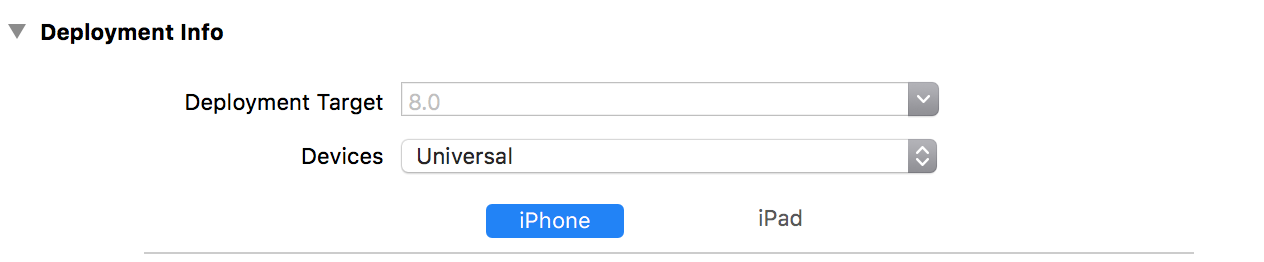
I had problems like these when occasionally target IOS version dropped from 8 down. Double-check your project settings.
Just to update on this - my apps were approved after removing the ‘standard’ Cordova graphic for the iOS 5,6 icons.
1 Like
Hi guys. I had the same problem today. lots of sizes missing from meteor documentation. I hope we can get an update from moderator on this. The docs are missing lots of sizes. I could just select to leave older devices like virtual light told us, but I choose to update this on Xcode. But it is suppose that we could set all of icons sizes on app.icons, if not, than it defeats the purpose of it. Any of you guys have settings update for all icons sizes ?
here is my set:
App.icons({
“ios_settings”: “resources/icons/ios/AppIcon.appiconset/Icon-App-29x29@1x.png”, // 29x29
“ios_settings_2x”: “resources/icons/ios/AppIcon.appiconset/Icon-App-29x29@2x.png”, // 58x58
“ios_settings_3x”: “resources/icons/ios/AppIcon.appiconset/Icon-App-29x29@3x.png”, // 87x87
“ios_spotlight”: “resources/icons/ios/AppIcon.appiconset/Icon-App-40x40@1x.png”, // 40x40
“ios_spotlight_2x”: “resources/icons/ios/AppIcon.appiconset/Icon-App-40x40@2x.png”, // 80x80
“iphone_2x”: “resources/icons/ios/AppIcon.appiconset/Icon-App-60x60@2x.png”, // 120x120
“iphone_3x”: “resources/icons/ios/AppIcon.appiconset/Icon-App-60x60@3x.png”, // 180x180
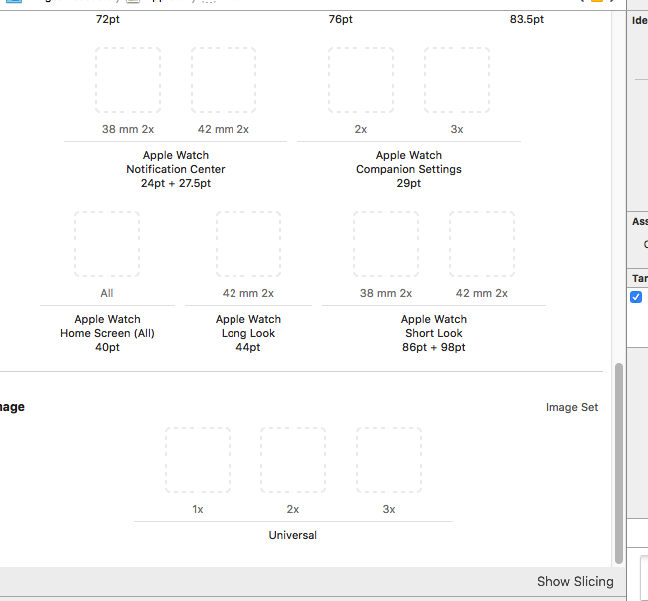
we are missing:
iPhone notification IOS 7-10 20pt
Iphone iOS 5,6 57pt
iPad app iOS 5,6 72pt
and all those on the attached image.
You don’t need to worry about iOS 5,6
Notifications could be helpful. We do it manually in Xcode for now but maybe you can use cordova-custom-config to set them in mobile-config.js (via App.appendToConfig)
Hi
Did you get any solution?
Thanks.
No update to this in Meteor 1.5? Having to manually edit the xcode project isn’t great…
Run into the same issue. Here’s a proposal (possibly for a feature request):
App.icons(object)
object should contain two special keys, ‘ios’ and ‘android’ as follows:
object = {
'ios': [{target: 'iphone_3x', file: '.../icons/my_iphone_3x.png']}, { ... }, ... ],
'android' : [{}],
// any of the current allowed keys can still be used, if desired
}
this would not break the current signature (no compatibility issue) and would enable developers to specify any required sizes, as they keep on changing…)
Hi @jakobw and others; I also faced this issue on a few apps. I wrote a little cordova plugin as a stop-gap measure, hopefully you’ll find it useful.
npmjs.com/package/meteor-ios-icon-fix
It does two things: (1) removes the default cordova square-sheep icons from the iOS image asset library; and (2) adds a 1024x1024 marketing icon.
Note that (1) is not so necessary in meteor 1.5.2.2.
2 Likes
It seems that in Meteor 1.6 there are new keys to support these legacy icons:
it seems to be super useful, but i haven’t yet tried it. I will try i soon but before i start i wanted to ask you if you could assist me in case i am going to have some questions a bit later, now i’m unable to think because of a drug that i took. i see that you know these things much better. thanks and please respond back
Meteor 1.6 has a fix for missing icons 
I came across this issue, it was added to Meteor todos, and resolved. Please update to 1.6, rebuild the app for xcode, open it up, and see if the error persists.
We need a complete mobile sample app that has working icons and splash screens for submission to app stores.
It is REALLY PROBLEMATIC that Meteor does not provide a working example of how to create an actual mobile app. We’ve spent hours, and hours, and hours – as we do each time and everyone else must as well – trying to get all of the right icons, splash screens, names, and keys to make everything actually work. The current sample apps, including todos, do not include the right content for a successful app store submission. Meteor is billed as an easy way to make mobile apps. Well… doesn’t that include the ability to actually create one that you can submit to the app store? PLEASE create a sample app or modify one of the existing ones with a mobile-config.js that includes all of the relevant icons and splash screens for iOS and Android. Please have the image files named according to one of the various tools that will automatically generate the image needed image sizes online, eg http://pgicons.abiro.com/
Thank you
Given that you have now succeeded (?) - could you submit a PR, even if only to the docs?
Hi cdc
A bit late I know, but I just used this successfully to get all images set in my iOS app.
Really easy to use, and also gives the required icons and splashes lists to paste straight into your mobile-config.js
hi-
i think your problem might be that you are using an outdated version of Xcode and the Application Loader for your submission.
Make sure that you are upgraded to the newest non-beta version of Xcode and lmk and see what happens may be you are able to publish your ios app.