I love you. I really, really love you for this.
6 Likes
I’ll argue with you this is not that awkward. This is client code you are running on the server for SSR 
I love how everyone is willingly trying a new way to use Meteor. Thank you!
1 Like
Yeah thats true for components and routes which are only required from server for SSR.
But my preferred, modularized package structure introduces server-only code at the same level as client-only code. Having server-only code in the client/ directory feels awkward.
But I think this structure has its advantages. It’s almost the same as the package based structure the Telescope Meteor app is using (Only without the package.js files but plain js entries instead)
Can you share me on github your structure? I think most people are looking for something like this.
2 Likes
Sure!
I’m still playing with your kickstart. I’ve been using the one by @jedwards until now - and I’m not yet sure if I want to switch to yours as I like having full control over npm, webpack config, watchers… But having multiple choices is not a bad thing.
Anyway I really like what you have build and will do a sample with my preferred structure on github.
4 Likes
Anyone got this to work on Windows?
I’m getting:
C:\MyFiles\Meteor\kickstart-simple>meteor
[[[[[ C:\MyFiles\Meteor\kickstart-simple ]]]]]

=> Started proxy.
=> Started MongoDB.
npm-container: updating npm dependencies -- react-mixin, babel-loader,
null-loader, url-loader, file-loader, style-loader, css-loader,
sass-loader, style-collector-loader, webpack-hot-middleware,
babel-plugin-react-transform, react-transform-hmr,
react-transform-catch-errors, redbox-react...
webpack built 657bbd699dc4db0dc1e4 in 5804ms /
Hash: 657bbd699dc4db0dc1e4
Version: webpack 1.12.2
Time: 5804ms
        Asset     Size  Chunks       Chunk Names
       web.js  39.4 kB    0, 1       main
common.web.js  23.1 kB       1       common
chunk    {0} web.js (main) 12.3 kB {1} [rendered]
    [0] multi main 40 bytes {0} [built] [1 error]
    [1] ./packages/npm-container/.npm/package/~/webpack-hot-middleware/client.js
?path=http://localhost:3500/__webpack_hmr 3.27 kB {0} [built]
    [2] (webpack)/buildin/module.js 251 bytes {0} [built]
    [3] ./packages/npm-container/.npm/package/~/webpack-hot-middleware/~/queryst
ring/index.js 127 bytes {0} [built]
    [4] ./packages/npm-container/.npm/package/~/webpack-hot-middleware/~/queryst
ring/decode.js 2.4 kB {0} [built]
    [5] ./packages/npm-container/.npm/package/~/webpack-hot-middleware/~/queryst
ring/encode.js 2.09 kB {0} [built]
    [6] ./packages/npm-container/.npm/package/~/webpack-hot-middleware/~/strip-a
nsi/index.js 161 bytes {0} [built]
    [7] ./packages/npm-container/.npm/package/~/webpack-hot-middleware/~/strip-a
nsi/~/ansi-regex/index.js 145 bytes {0} [built]
    [8] ./packages/npm-container/.npm/package/~/webpack-hot-middleware/client-ov
erlay.js 883 bytes {0} [built]
    [9] ./packages/npm-container/.npm/package/~/webpack-hot-middleware/process-u
pdate.js 2.93 kB {0} [built]
chunk    {1} common.web.js (common) 0 bytes [rendered]

ERROR in C:/MyFiles/Meteor/kickstart-simple/client/entry.js
Module build failed: ReferenceError: Unknown plugin "react-transform"
  at PluginManager.subnormaliseString (C:\MyFiles\Meteor\kickstart-simple\packag
es\npm-container\.npm\package\node_modules\babel-loader\node_modules\babel-core\
lib\transformation\file\plugin-manager.js:147:13)
  at PluginManager.add (C:\MyFiles\Meteor\kickstart-simple\packages\npm-containe
r\.npm\package\node_modules\babel-loader\node_modules\babel-core\lib\transformat
ion\file\plugin-manager.js:190:40)
  at File.buildTransformers (C:\MyFiles\Meteor\kickstart-simple\packages\npm-con
tainer\.npm\package\node_modules\babel-loader\node_modules\babel-core\lib\transf
ormation\file\index.js:237:21)
  at new File (C:\MyFiles\Meteor\kickstart-simple\packages\npm-container\.npm\pa
ckage\node_modules\babel-loader\node_modules\babel-core\lib\transformation\file\
index.js:139:10)
  at Pipeline.transform (C:\MyFiles\Meteor\kickstart-simple\packages\npm-contain
er\.npm\package\node_modules\babel-loader\node_modules\babel-core\lib\transforma
tion\pipeline.js:164:16)
  at transpile (C:\MyFiles\Meteor\kickstart-simple\packages\npm-container\.npm\p
ackage\node_modules\babel-loader\index.js:12:22)
  at Object.module.exports (C:\MyFiles\Meteor\kickstart-simple\packages\npm-cont
ainer\.npm\package\node_modules\babel-loader\index.js:69:12)
 @ multi main
=> Started your app.

=> App running at: http://localhost:3000/
   Type Control-C twice to stop.
Hey this is pretty nice!! Feels like a built in feature! I wouldn’t be surprised if MDG forks this 
I don’t have a chance to drop in my current project to see if I can find any limitations but as long is there is somewhere to opt into complexity when needed.
In general i’m a big fan of simple by default, opt into complexity 
4 Likes
You are one step away from making this work. I will add a note on the readme but here is what you need to do.
If you are under Windows, the node_modules symbolic link on the root folder will not work. To make that work, you need to remove it and create a Windows symbolic link. Here is the command:
- Go in the root folder of your Meteor project
- Remove the node_modules unix symbolic link
MKLINK /D node_modules packages\npm-container\.npm\package\node_modules
@manuel can you let me know if it works? I’ll add it to the readme.
@benoitt how did you get it to run the Webpack compiler on Meteor startup if the webpack.conf.js file was already “built”? When I tried to make a similar plugin, isobuild wouldn’t run my build plugin on the file if it hadn’t changed since last time it ran the build plugin (it assumes using the previous output of the plugin is the right thing to do), so it would never end up starting the webpack --watch or webpack-dev-server until I edited the file.
I think you can import in es6 module without a variable.
for ex:
import ‘./style.css’;
import ‘./methods.js’;
…
Yes, though I don’t think that would prevent Meteor from loading the css files
Looks like css file handling by Meteor can’t be prevented completely - The sample apps of this project use *.import.css ending for css. So I think es6 style import of *.import.css files should be possible.
Idk what I’m doing wrong, but hmr is not working nor meteor’s default reloader but the message Client modified -- refreshing appears on console.
What I also noticed is that webpack default message is being supressed?
=> Started your app.

=> App running at: http://localhost:3000/
webpack building...
webpack built b1d81b645d9317c30e22 in 696ms
=> Client modified -- refreshing
Those messages are normal. The client modified – refreshing is blocked because you have HMR. It means it doesn’t need to browser to reload the page. Go look at your browser console. You will see what’s going on and if your config is correct, you will see your page updated.
Ok, gonna try to debug it. Thanks
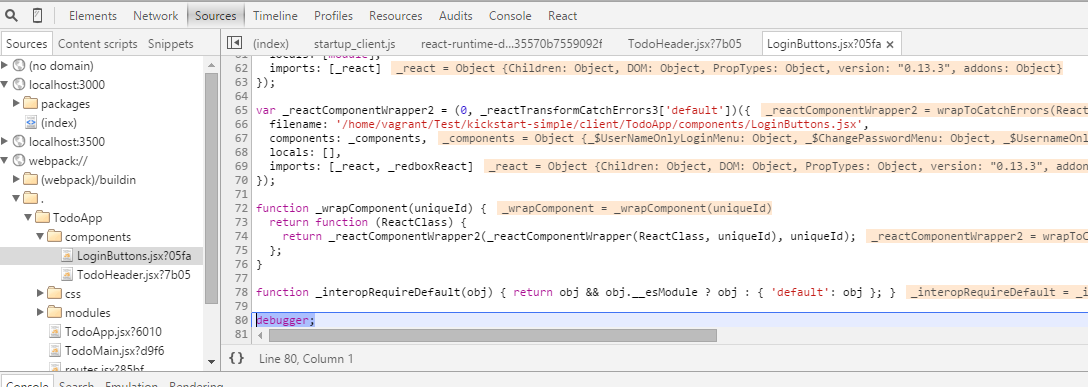
Add the following line to your client webpack config:
// client/webpack.conf.js
...
module.exports = {
  entry: './entry',
  devtool: 'cheap-module-eval-source-map', // Add this
  externals: {
   ....
This should fix sourcemaps for you.
What you see are simple, fast, readable sourcemaps generated by the cheap-eval-source-map devtool. Unfortunately line numbers are wrong and you see the transpiled JS instead of the original code.
I’ll do a pull request to get better sourcemaps by default.
1 Like
This is great. I think MDG is moving in the direction to adopt Webpack. The sooner we can have the most amount of weight behind this the better, and if MDG can jump on board on getting this as the official system then the better off we’ll be as a community.
2 Likes
Though it would be even cooler if we could remove the packages.json and keep all of that inside the required packages. So that it looks more like a clean meteor project. 
1 Like