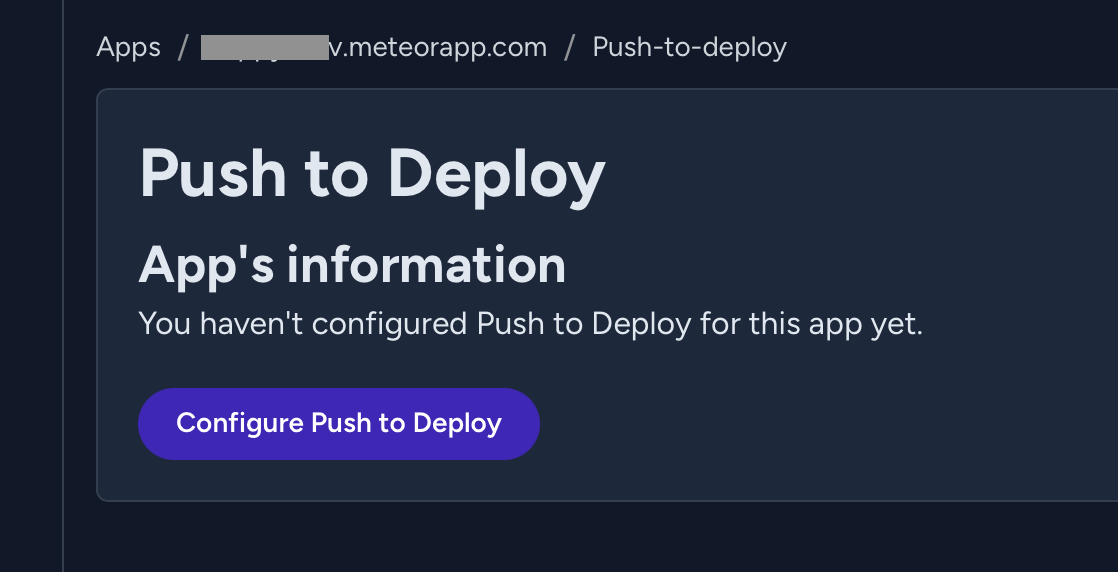
Hello! Sometime recently, Push To Deploy stopped working. I no longer see Push To Deploy enabled for apps, and I can no longer select any repos in the Galaxy UI. GitHub shows the connection/authorization is still active.
Did something change with Push To Deploy that could have broken?
In the meantime, I could not get meteor deploy to work, it would keep having an error that the app size is too big to upload. However the app size was fine when using Push To Deploy.
I also tried to meteor deploy a modified bundle, but that did not work, seems like meteor unpacks it, and tries to do something with dev dependencies that I don’t need and then fails.
And there’s no documentation anywhere that indicates how to deploy without web.browser.legacy (which no one needs these days).
Overall, I’m having a hard time trying to manually deploy (in case something like Push to Deploy is not working), and there are so few docs that average AIs cannot answer questions properly in this area.
I haven’t tried running an instance of Copilot on GitHub, that might have better results if it inspects source code, but still I feel the docs are too lacking here.
Reported to the Galaxy platform team the issue with Push To Deploy.
The OSS Meteor-related question is answered in the other post: How to prevent web.browser.legacy from being built with meteor build?. The issue is likely tied to try that config in an older Meteor versions, before the modern .meteor/platforms config existed. That was introduced in Meteor 3.3 (docs)
Regarding the Push to Deploy settings being lost, this issue is affecting some of our Galaxy users. We have a fix in the final staging of testing and should be available very soon. It’s a big update for Galaxy that brings new features and bug fixing.
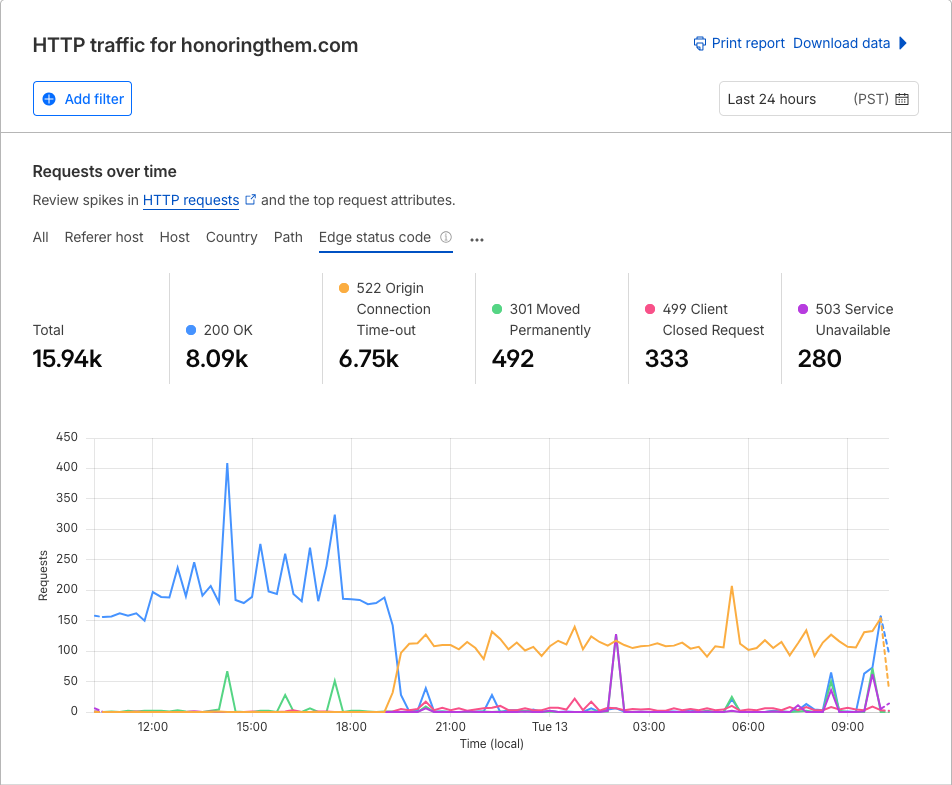
Same thing happened to me out of nowhere. I haven’t bothered re-configuring it and just deploy via CLI now. Something else is going on with Galaxy infrastructure because my app is loading extremely slow, and sometimes not at all. I hadn’t deployed anything in 6 days but suddenly 200 responses plummeted and as you can see, Cloudflare is showing tons of 522 and 503 errors. I can’t even stop my container because the status reports “Unavailable”.
I would like to mention that @mikeTT reached out to us via support chat, and after troubleshooting, we identified that the issue wasn’t Galaxy infrastructure. It turned out to be two application-level problems: aggressive Content Security Policies that were heavily analyzing every request (including static assets), and an external API that had gone down without proper error handling in place, which caused it to become a bottleneck for the entire app.
Once those were addressed on the application side, everything returned to normal performance. These kinds of issues can definitely look like platform infrastructure problems from the surface, but they’re typically application-level concerns that can be diagnosed and resolved on the app side.
On the Push to Deploy front, we’ve fixed a number of issues already, but we’re aware there are still some bugs that need attention. Our development team is actively working through those now, and we appreciate your patience as we get everything stable.
Yes, I neglected to come back and give an update (and certainly didn’t mean to leave my post there without one), but ultimately my aggressive CSPs were hurting my own app. Took a while to diagnose but I did appreciate you communicating on the same day that I was reaching out. Thanks again!
Galaxy beta is buggy af! I don’t understand why they make these kind of stuff since github integraytion works in every other environment but not in galaxy! Problems all the time and they never fix those.
Yesterday i tried to enable push to deploy. After fighting a while i got finally atleast some error “Error message i got several times was “Github Connection Failed Something went wrong during authentication. System2 API error (undefined): Meteor.userId can only be invoked in method calls or publications. [API Error]””
We verified that you opened a support case inside Galaxy. We have received your ticket internally and are already investigating what might be happening with the Push to Deploy integration for your organization. We will provide an update as soon as we have more information.
We appreciate your patience, and we apologize for the trouble this caused. We’ve identified the root cause of the GitHub connection issue and deployed a fix, so Push to Deploy should be working normally again.
Could you please try reconnecting your GitHub account and trigger a new deploy? This will confirm that everything is back to normal on your end.
Feel free to reach out via support if you run into anything else, and we’ll be happy to help.