You can put it behind a load balancer like any other node.js app, you just need to enable “sticky session” support. I believe digitalocean has this exact service available without needing to built it yourself too.
Edit: Almost forgot you can run 2 instances on the same server if it’s dual core! (Different ports)
Response to 1: There is a good chance you can run a Meteor app production bundle on that arm64 CPU running Linux as long as certain conditions are met:
You must have the correct arm64 Linux-compiled Node.js version installed
Any NPM packages your app uses must be free of native pre-compiled binary code, otherwise they will need to be rebuilt.
Very good insights, thank you. I used the --architecture: 'os.linux.aarch64' but this probably does nothing or not much. I will need to dig deeper into the build tool and see if it does anything.
I compiled NPMs with Docker with the exact env I am deploying to, added them back to the project and pushed with MUP. I just don’t seem to nail down the right way with all the proper configurations. My next step is to build the whole project in Docker.
To generate a bundle and send it to a bare machine, everything seems straight forward for me. But when I have to push to the elastic environment of AWS, I miss visibility over so many things. For instance, if the machine doesn’t start, I cannot pull logs.
On Response 2, the same situation. I learned a lot from your shares, but again … when I have to do it in my environment, nothing works.
First, I had to discover myself that I cannot put the cluster script in Meteor startup. Right now I am not yet convinced that it actually works with Meteor. I first need to cluster.fork() and then start everything else so that nothing runs on the Master (now cluster.isPrimary). Most examples I’ve seen show this setup:
if (cluster.isPrimary) {
  console.log(`Master ${process.pid} is running`);

  // Fork workers.
  for (let i = 0; i < numCPUs; i++) {
    cluster.fork();
  }

  cluster.on('exit', (worker, code, signal) => {
    console.log(`worker ${worker.process.pid} died`);
  });
} else {
  // Worker processes have a http server.
  http.createServer((req, res) => {
    res.writeHead(200);
    res.end(`Hello from worker ${process.pid}\n`);
  }).listen(3000);

  console.log(`Worker ${process.pid} started`);
}
My understanding from the example above: I first fork and once the cluster is forked I can start the webserver per fork. But the webserver in Meteor starts before the startup files, or the entry point main.js (server).
Add to my lack of understanding (or perhaps trust) in your example (in startup) vs these examples on the web, I was not able to find the right configuration to send the NGINX configurations to Elastic Beanstalk.
Part of the problem is that servers are ephemeral and all configurations need to be sent and done in the deployment process as well as when autoscaling and starting new machines.
The thread and code commits you shared are from 7 years ago, and the cluster part seems theoretical. I am curious if you actually deployed Meteor to any kind of servers in cluster mode.
As for the UNIX socks, that seems to be the recommended way to connect behind NGINX (which I never knew). My focus is now on finding the right configuration for Elastic Beanstalk. When you deploy with MUP to a Linux machine, you can add the full proxy configuration. For Elastic Beanstalk … it is complicated :(.
I am learning a lot from your git thread on UNIX ports.
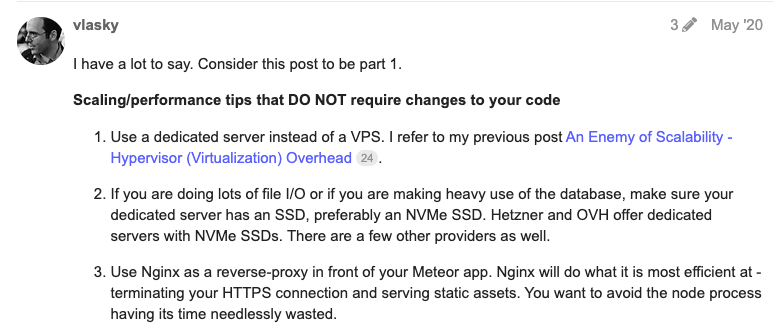
Your struggle justifies my love of dedicated Linux servers where you can control and monitor everything and no management layer interferes with you.
This is actual code taken from a Meteor app that uses node cluster . You will see the important detail that the PORT environment variable has to be passed to the fork() call. That’s how each worker Meteor instance knows to listen on a different port to the master/primary Meteor process.
Thanks for sharing an example and all the info about your take on multiple workers for Meteor, out of curiosity, what kind of strategy do you think is the best for zero downtime deployments when you use dedicated linux servers?
We run our meteor apps on caprover (docker swarm) on top of Oracle Cloud arm64 servers quite successfully. The always-free tier allows for quite a lot of compute and enough memory on Ampere (arm64).
The essence of it is to build the node version elsewhere, like github actions, (meteor build --server-only --server https://yourdomain.com) and then use a Dockerfile like this:
# https://github.com/productiveme/meteor-docker
FROM productiveme/meteor
USER app
WORKDIR /built_app
COPY --chown=app:app . .
# Uncomment additional npm steps below if needed
RUN cd /built_app/programs/server \
	&& npm install \
	# && npm rebuild --build-from-source \
	&& true
# RUN cd /built_app/programs/server/npm \
#   && npm install \
#   # && npm rebuild --build-from-source \
#   && true

HEALTHCHECK CMD curl --fail http://localhost:3000/healthz || exit 1
The healthz endpoint helps docker swarm to deploy with zero downtime.
You will need a NODE_VERSION env variable for the productiveme/meteor image to start correctly
After 2 days of struggles I finally made it to find a solution for Reason 2 for my 2-core server. I will need to test the solution with multiple cores and see if results are consistent or not.
My environment is AWS Elastic Beanstalk, and I deploy with MUP with the beanstalk plugin for MUP. The challenge was to send the configurations to the elastic environment. At least 1.5 days I spent to try to make Meteor work with UNIX sockets. It just won’t do it.
I managed to do every configuration I wanted, but Meteor would just not listen on that port no matter what I did. I don’t know if this has something to do with Express which was recently added. I am curious if anyone can confirm they are running UNIX sockets between Node and NGINX on Meteor 3.
Another challenge was with AI chats. Different models provide different answers, and in general, it took me a while to differentiate between pre Linux 2 configurations and post as EC2 (linux machines) handle configuration updates differently.
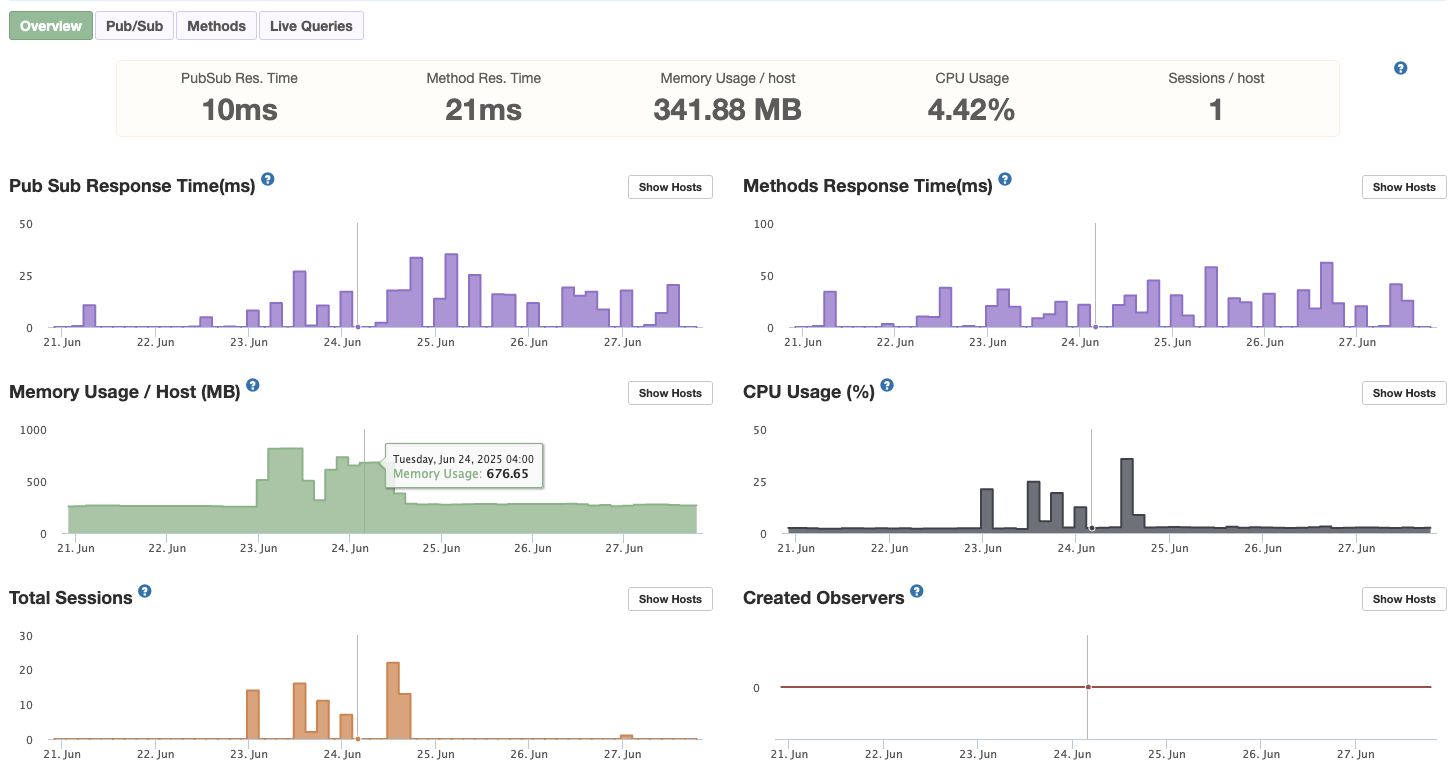
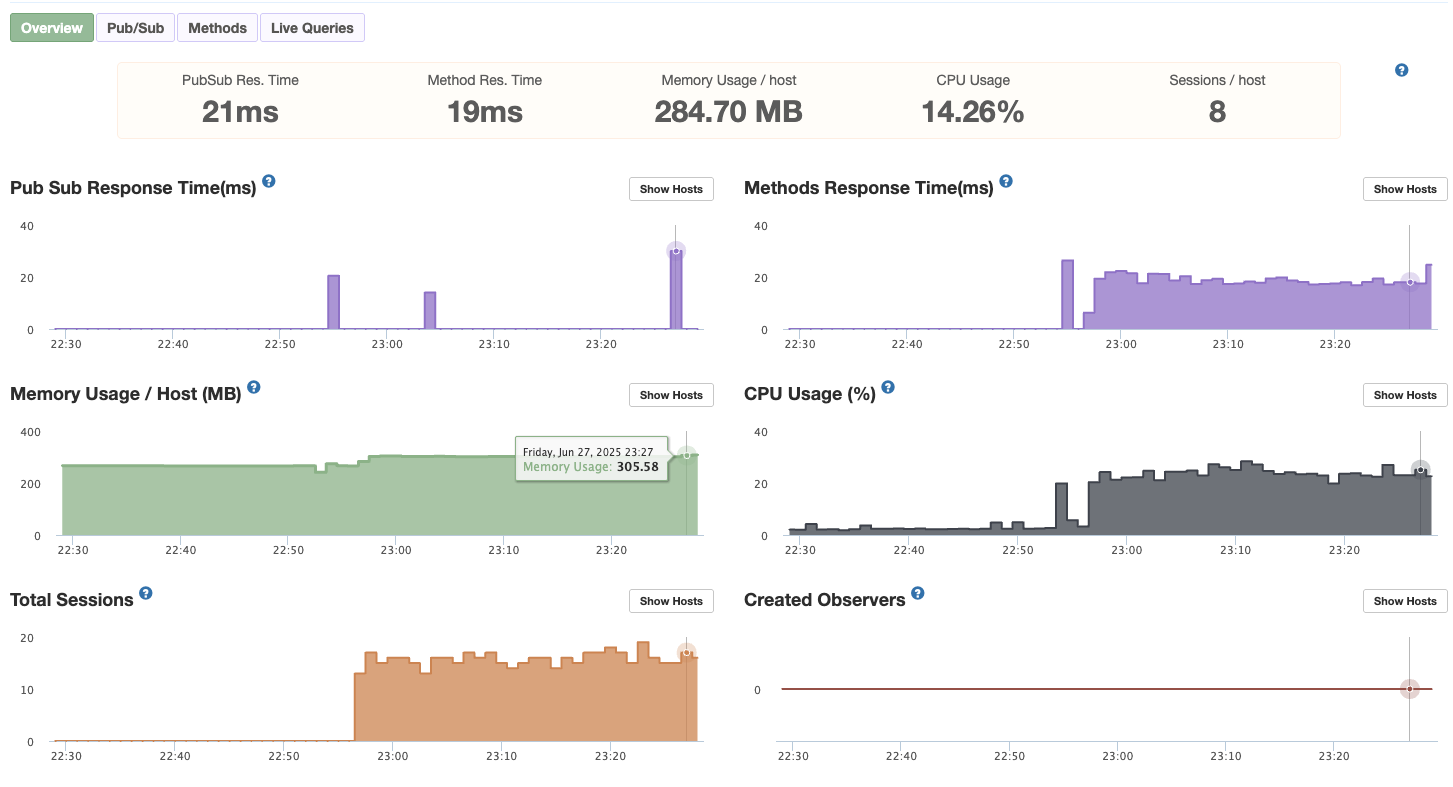
The result:
At the time stamp on Memory Usage is when I am hammering the server with multiple methods per second and multiple users.
The exact same test after implementing the cluster, shows half of everything, because APM only sees one process. The real load is 2x, like in the previous test screenshot.
@vlasky I didn’t manage to use UNIX sockets. I am pretty sure I do everything right in Meteor (not much to do here anyway) and in NGINX but my Linux skills are almost 0.You mentioned it above in the thread and back in 2020 too … go simple, one dedicated server. Unless you want to have a look together at your convenient time, I will have to abandon this venue. I managed to make the cluster work with http ports, and the NGINX is using a round robin algorithm to send to the ports.
Thanks for sharing the idea, I agree that the start of new processes/workers would be something that meteor should support in the core, since adding things on top of the meteor build makes it a little messy for deployment. Also it would be great to be able to define multiple entry points so there can be different “files in the project” that can be started separately without having to create multiple bundles and “orchestrating” everything manually. I know there was a feature request about this at some point, not sure if with Meteor 3 this would be easier to implement.
(Also, I know there was a workaround to create entrypoints by storing files in the private folder, but then imports to npm could fail and generally it was not a perfect solution.)
Would there be a way to easily detect whether meteor uses the full available amount of processors and resources? I think many have no idea, if there would be some kind of package / simple script to measure and monitor it would give a lot of insight for many people.
Many things read in this topic are highly interesting and also highly technical on the server side which is not common knowledge for many developers.
We might be surprised about the amount of unused resources I guess.
My understanding is that you could build your production bundle in a Docker with a similar environment/image as the server you deploy to.
For instance, on a Mac, you pull something like this in Docker ECR Public Gallery and run your build and deploy on the local Docker instead of your “local machine”.
Or if you use containers for your Meteor in production you could take from here: Looking for solutions to make Meteor cheaper - #17 by jacoatvatfree
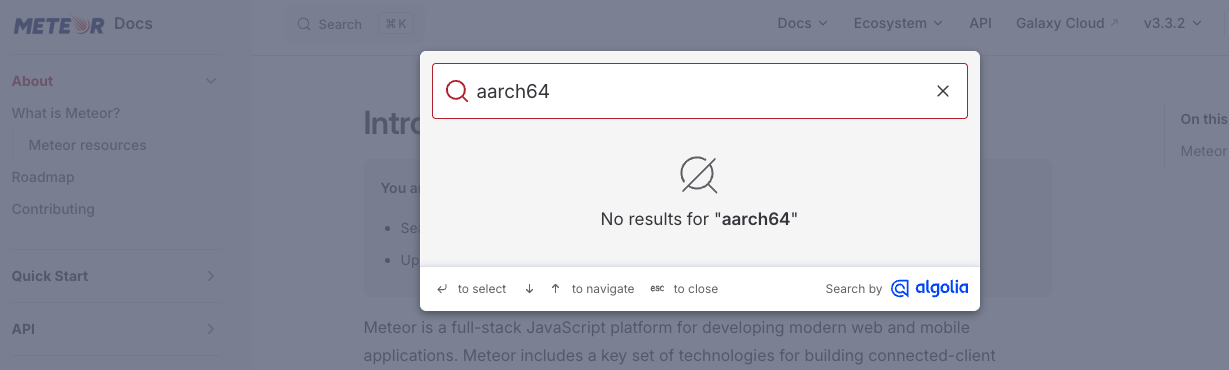
Unfortunately, the documentation makes no reference to aarch64.
I actually have several meteor apps, all with low traffic, running on a single linux box. Am I correct to assume that each meteor app is running on its own core, and if not, is there a way to ensure each has its own core?
Meteor = Node so this from google searches applies:
Yes, if you deploy multiple, independent Node.js applications on a multi-core Linux server, the operating system’s scheduler will generally distribute these processes across the available CPU cores. However, they do not necessarily get exclusive ownership of a core; the OS will balance them based on load.
Here is a detailed breakdown of how this works and how to optimize it:
Default Behavior
By default, Node.js is single-threaded and uses only one CPU core, regardless of how many cores are available.
Without Special Configuration: If you run two different Node apps (App A and App B), Linux will likely place them on different cores, but if one app is very busy, it might consume 100% of one core while others sit idle.
With Multiple Apps: If you have 4 cores and 4 independent Node apps, Linux will typically distribute them to run in parallel.
How to Utilize All Cores (Clustering)
If you have one high-traffic application and want to use all cores, you should use the Node.js Cluster Module or a process manager like PM2.
Master-Worker Model: The cluster module creates a “master” process that forks “worker” processes (usually one per core).
Shared Port: All workers share the same network port.
Parallelism: Each worker acts as an independent instance of your app running on its own CPU core.
Key Considerations
OS Scheduling: Linux is designed to maximize CPU utilization by distributing threads across all cores. It does not mean each application is locked to a specific processor, but it does mean they can run in parallel.
Process Isolation: Each Node app runs in its own process, meaning they have separate memory spaces.
I/O vs. CPU Tasks: Because Node is non-blocking, it handles I/O (database, network requests) very efficiently. Clustering is most critical for heavy CPU-bound tasks (e.g., encryption, image processing).
Recommendation for Production
To maximize performance on a multi-core Linux server:
Use PM2: PM2 can easily cluster your applications using pm2 start app.js -i max.
Use a Reverse Proxy: Use Nginx to distribute traffic to your app instances.
Containerization: If using Docker/Kubernetes, each container will typically be scheduled on a specific core by the underlying node’s Linux scheduler.