Meteor 3.4 + rspack: Cordova builds appear not to include client entry point JavaScript code

Hi, Me and Claude have struggled to get a cordova build to work on my android device (all good for the web app…eventually). It seems like the entry app code is simply not getting invoked.

Any ideas? Here’s what Claude thinks might be relevant:

Description:

  • Meteor 3.4 with rspack integration and “modern”: true
  • Cordova Android builds bundle HTML templates but not the client/main.js entry point code
  • The auto-generated client-meteor.js in the Cordova bundle only has template imports, no actual application JavaScript
  • This causes the app to load but never execute any application code
  • mainModule is correctly configured in package.json but ignored for web.cordova architecture

To Reproduce:

  1. Create a Meteor 3.4 project with rspack and “modern”: true
  2. Add mainModule config to package.json
  3. Build for Cordova: meteor run android-device
  4. Check .meteor/local/cordova-build/www/application/app/app.js - client/main.js code is missing

Expected: The bundled app.js should include the rspack-generated JavaScript code from client/main.js

Actual: Only HTML templates are bundled, no application JavaScript code

And further, my Rspack.config.js reads:

const { defineConfig } = require('@meteorjs/rspack');
const NodePolyfillPlugin = require('node-polyfill-webpack-plugin');

/**
 * Rspack configuration for Meteor projects.
 *
 * Provides typed flags on the `Meteor` object, such as:
 * - `Meteor.isClient` / `Meteor.isServer`
 * - `Meteor.isDevelopment` / `Meteor.isProduction`
 * - …and other flags available
 *
 * Use these flags to adjust your build settings based on environment.
 */
module.exports = defineConfig(Meteor => {
  const config = {
    devtool: Meteor.isDevelopment ? 'cheap-module-source-map' : false,
    module: {
      rules: [
        {
          test: /\.scss$/,
          use: [
            {
              loader: 'sass-loader',
              options: {
                // Dart Sass
                implementation: require('sass'),
                sourceMap: Meteor.isDevelopment,
                sassOptions: {
                  // Suppress deprecation warnings from Bootstrap Sass and other legacy SCSS
                  silenceDeprecations: [
                    'import',           // @import rules
                    'slash-div',        // / division operator
                    'color-functions',  // lighten(), darken(), etc.
                    'global-builtin',   // Global built-in functions
                    'if-function',      // if() function syntax
                  ],
                },
              },
            },
          ],
          type: 'css',
        },
      ],
    },
    plugins: [
      // Add Node.js polyfills for browser builds
      ...(Meteor.isClient ? [new NodePolyfillPlugin()] : []),
      // Bundle analyzer - run with RSDOCTOR=true meteor
      ...(process.env.RSDOCTOR && Meteor.isClient ? [
        new (require('@rsdoctor/rspack-plugin').RsdoctorRspackPlugin)()
      ] : []),
    ],
    resolve: {
      fallback: Meteor.isClient ? {
        crypto: require.resolve('crypto-browserify'),
        stream: require.resolve('stream-browserify'),
        buffer: require.resolve('buffer/'),
      } : {},
    },
  };

  // Enable HMR in development
  if (Meteor.isDevelopment && Meteor.isClient) {
    config.devServer = {
      hot: true,
    };
  }

  // Add server-specific externals for native modules
  if (Meteor.isServer) {
    // Use function-based externals for more control
    config.externals = [
      function({ request }, callback) {
        // Externalize zlib-sync and any .node files
        if (request === 'zlib-sync' || /\.node$/.test(request)) {
          return callback(null, 'commonjs ' + request);
        }
        callback();
      }
    ];
  }

  return config;
});
Weird. I tested the Cordova scenarios myself through the betas and they worked well.

Do you get a white screen? Is nothing rendered?

Could you share a repository that mimics the project you’re working on, with the issue happening? Since you provided a custom rspack.config.js, I’d like a reproduction that’s as close as possible. I’ll try your steps and see what happens, but an exact reproduction would work best to iterate the understanding of all edges and fix later if needed.

I just tested it, and Cordova works well with the Rspack integration. I used the minimal React skeleton for the test.

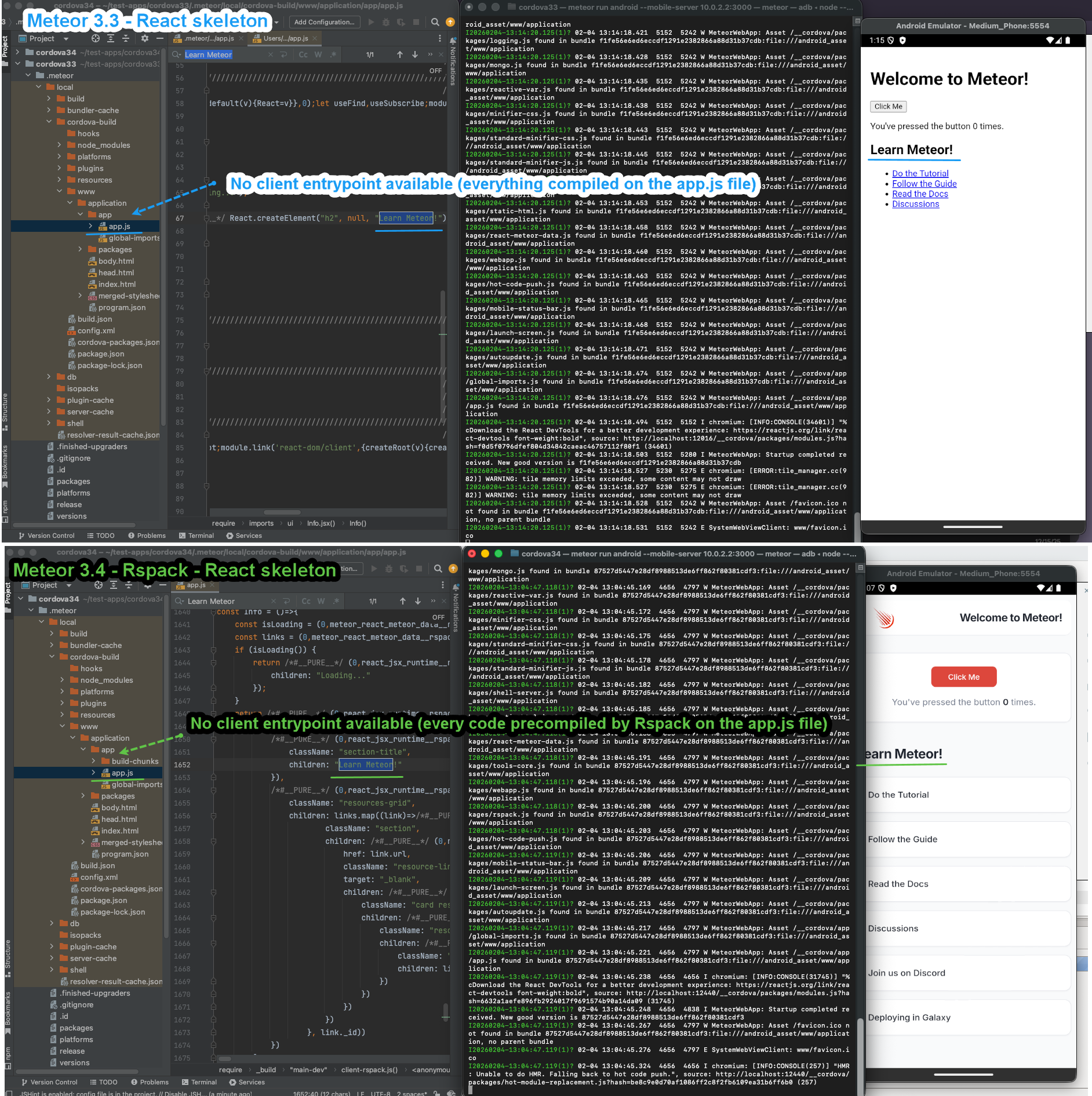
Regarding the expectation, I now get what you mean, and Claude is wrong on that expectation. In Meteor 3.4, the app code is precompiled by Rspack, so client/main.js entrypoint is not expected to appear there. Instead, you see the final output in app.js. This behavior is preserved from previous versions.

As shown in the picture below, I used an app in Meteor 3.3.2 (without Rspack) and another in 3.4 (with Rspack), and the client entrypoint never appear nor any of the source code. That is not the expected behavior. The app code from the entrypoint is still present, but compiled into the app.js single file within the Cordova app context (I highlighted ‘Learn Meteor!’ within that file so it’s easy to spot).

If your app doesn’t load when using Meteor Rspack in 3.4, the reason may be something else. We’d need more info and a way to reproduce it. If you can share a reproducible repository, we can help investigate.

2 Likes

Many thanks - I will investigate further based on your useful feedback and revert

Hi @nachocodoner ,

Perhaps I could ask for your guidance before trying to create a sharable reproduction that may take some time.

In your last comment you stated

That is not the expected behavior

Does that mean there is a problem? With respect to the entry point and source code not appearing - this appears to be my issue - I cannot find any of my source code in that app.js file! Just the HTML (Blaze). And when the app loads and runs on my device it certainly behaves like all is well except that it’s got no code to run! There’s not a single error in the chromedev console. Until, after a while, I start getting regular socket connection timeouts (presumably the server pings?) as per below:

GET http://192.168.1.73:3000/sockjs/info?t=1770284421125 net::ERR_CONNECTION_TIMED_OUT

I guess that must be related. I can confirm my android device can see 192.168.1.73:3000 and finds the site (but does not work because I believe the web bundle is not present on the server when I “run android-device”).

If you don’t mind, I’ll share my full server log. Perhaps you could cast your expert eye if there is anything untoward there as well - it all looks dandy to me!

I’m pretty hazy on this whole process, I’m afraid

Many thanks

p.s. Claude is out of its little depth now :slightly_smiling_face:

Did you ever get to the bottom of this? I had exactly the same issue, and got really stuck, so I also burned a lot of Claude Tokens, and the fix for me was simple in the end, after lots and lots of debugging - I’m putting the summary here:

To recap the actual bug for the record: meteor run android-device sets Meteor’s isNative flag for the entire build (not just the Cordova target), which made the generated client-meteor.js skip its direct import './client-rspack.js' — expecting a separate lastImports mechanism to add it instead. But that mechanism only activates when isProd is also true, so in plain dev mode the import was silently dropped everywhere, and your actual app code (routing, Meteor.startup , Blaze registration) never ran — hence blank with zero console errors. Adding --production to run-android /run-ios realigns both halves of that logic onto the same (working) code path.

We are working on fixing some Blaze-specific issues and edge cases for Meteor 3.5.x and 3.6. These may also affect mobile and could occur in other Blaze projects.

Since these issues happen in your environment and you have used AI to find workarounds, could you ask it to create a minimal reproducible app that you can share with me? I think some of the fixes currently reported may already solve it, not yet published though, but having the exact minimal setup extracted from your app would help us verify it accurately.

I will also try to reproduce it based on your insights, but I haven’t been able to do so yet. Testing against a minimal version of your exact setup would be the most reliable approach, and AI can help us here to abstract from the problem.

1 Like