 Meteor 3.5 is Here: Change Streams, Pluggable DDP Transport & Performance
Hello everyone! We’re thrilled to announce that Meteor 3.5 is now officially released. A huge thank you to everyone who tested the betas and release candidates and reported issues along the way — your feedback got us here.
3.5 is heavily focused on MongoDB Change Streams and a new pluggable DDP transport architecture, alongside a long list of performance and quality-of-life improvements.
For a deep dive into the “why” behind Change Streams, check out our detailed discussion here.
 Getting started with 3.5
Since 3.5 is now the recommended release, you can get going with the usual commands:
Create a New App
meteor create my-app
You can also pin the release explicitly:
meteor create my-app --release 3.5
Update Your App
meteor update --release 3.5
 Change Streams — now on by default
In 3.5, Change Streams are the default reactivity mechanism — you don’t need to do anything to enable them. The minimum requirement is a MongoDB 6+ replica set or sharded cluster. On older MongoDB versions Meteor automatically falls back to oplog or polling.
If you want to roll back to the previous reactivity system, add the following to your settings.json:
{
  "packages": {
    "mongo": {
      "reactivity": ["oplog", "polling"]
       // you can also use ["changeStreams", "oplog", "polling"]
       // Meteor will try Change Streams first, then oplog,
       // and if that doesn't work, fall back to polling.
    }
  }
}
Refer to the docs for further technical details.
ChangeStreams are transparent for you
Once you’re on 3.5, Meteor takes care of the rest automagically 
Meteor.publish('links', function () {
  // This uses Change Streams ONLY for the LinksCollection
  // and ONLY for documents matching { my: 'query' }
  return LinksCollection.find({ my: 'query' });
});
Different from oplog — which observes ALL changes from a collection whether you use them or not — Change Streams only care about the changes you are actually querying.
Highlights
 40% More Scalability with Change Streams (#13787)
The traditional Oplog driver works by tailing all database changes and performing a “diff” process against client-side documents. As connections scale, this architecture hits a critical bottleneck: processing capacity.
In our tests, we discovered that while Oplog manages memory well under normal loads, it struggles to deliver data to clients fast enough during high traffic. This creates a backlog of pending queries and connections that eventually leads to Out of Memory (OOM) crashes.
Change Streams solve this by handling data on-demand (streaming). Instead of accumulating data locally, it processes it as it flows, allowing the system to maintain stability. Even under extreme stress, the system experiences simple timeouts rather than a fatal process crash.
A nice bonus: Change Streams also unlock real-time reactivity on managed and serverless MongoDB tiers (Atlas Shared, serverless) where oplog access isn’t available — no more being forced into expensive polling.
Preliminary Benchmarks
The following data was captured using an artillery script in a dedicated machine (2 vcpu with 8 GB of RAM) running a standard Meteor app (otel) hosted in galaxy (using premium instance - 1 container of 8 vcpus with 8GB ) with high-frequency add/delete operations:
 Oplog: Maxed out at 1200 VUs (10 VUs/s for 120s). Beyond this, the process suffered from persistent timeouts followed by an OOM crash.
 Change Streams: Handled up to 1680 VUs (14 VUs/s for 120s). Beyond this, we observed only timeouts, but the process remained stable with no OOM.
Each VU ran 10 connections, one connection each 0.5s doing an insert.
VU = Artillery Virtual User
Conclusion: Change Streams offer a 40% increase in connection capacity and significantly better resilience, effectively eliminating OOM errors caused by high data transfer volume.
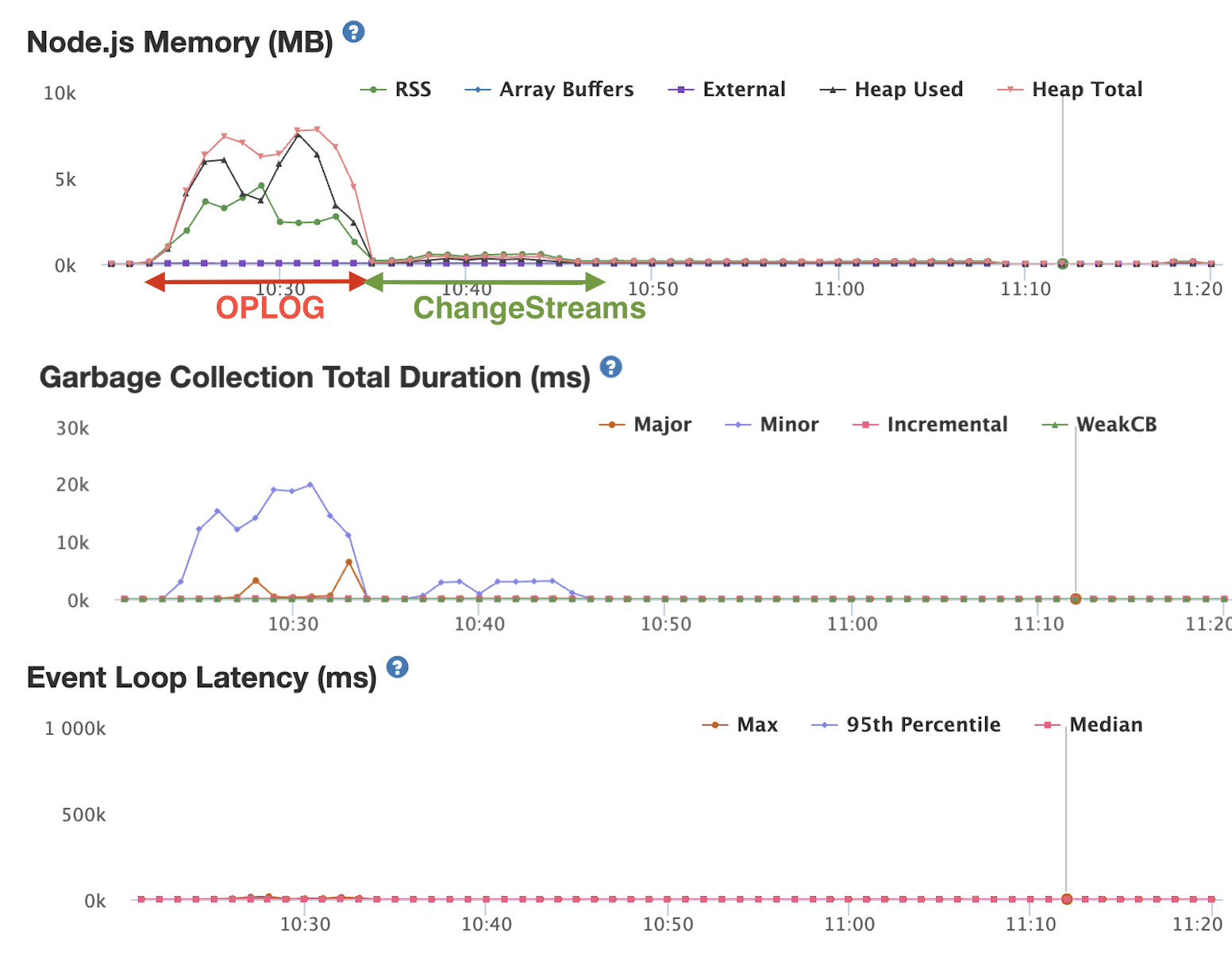
(Image from montiAPM)
 Reproducing the benchmark
> git clone git@github.com:meteor/performance.git
> cd otel
> git checkout otel
> docker-compose up -d mongo-replica

# edit your settings.json enabling changeStreams or Oplog
# then run the meteor app

> MONGO_OPLOG_URL="mongodb://localhost:27017,localhost:27018,localhost:27019/local?replicaSet=rs0" MONGO_URL="mongodb://localhost:27017,localhost:27018,localhost:27019/?replicaSet=rs0" METEOR_NO_DEPRECATION=true  meteor run --settings ./settings.json --port 8080 --inspect

# in another shell, run the artillery

> npx artillery run tests/artillery/add-task.yml
 Pluggable DDP Transport Architecture + uWebSockets (#14231)
DDP now has a pluggable transport layer, letting you pick the right trade-off for your app:
 Maximum compatibility with
 sockjs(the default) for public traffic behind strict proxies.- Lower latency and higher throughput with
uws(uWebSockets) for internal/controlled deployments — noticeable latency wins on hot reconnects and higher message throughput per server, especially valuable for dashboards and chat-like workloads.  Switch with a single env var or settings flag — no application code changes, easy to A/B and roll back.
 Future-proof — additional transports can be added without touching app code or DDP itself.

 DDP Session Resumption (#14051)
When a client loses its network connection and reconnects within the grace period (default: 15 seconds), Meteor now resumes the existing DDP session instead of creating a brand new one.
What this means in practice:
- onConnection callbacks are not re-triggered on resume
- The client keeps its original connection ID
- No full session re-initialization and data re-fetch — significantly reducing CPU spikes on reconnect (e.g., after load balancer timeouts on platforms like Google Cloud Run)
- Only ungraceful disconnects (network drops, browser close) are resumable. Intentional disconnects (explicit logout, server kick) are not.
Two new server-side options are available:
Meteor.server.options.disconnectGracePeriod(default: 15000ms)Meteor.server.options.maxMessageQueueLength(default: 100)
Big thanks to @vlasky for the comprehensive implementation and test coverage.
 Authenticated REST endpoints with
 accounts-express (#14091)
The new accounts-express package ships out of the box and makes authenticated REST/Express endpoints first-class citizens of a Meteor app:
- Protected routes can read
Meteor.userId()andMeteor.user()exactly like methods and publications, removing a long-standing gap between DDP-based auth and REST surfaces.  Drop-in
 Accounts.auth()middleware to gate routes on authentication or your own custom conditions — no more bespoke token-parsing code. A new client helper sends the auth token automatically on requests to protected endpoints, so you can consume your own authenticated APIs from Meteor clients without manual header juggling.
 DDPRateLimiter Now Supports Async Rule Matchers (#14182)
DDPRateLimiter rule matchers can now be asynchronous functions, enabling use cases like database lookups inside rate limiting rules — gate methods and subscriptions by user role, billing tier, or feature flag, something that wasn’t possible before.
As a bonus, the internal logic was refactored to evaluate matching rules only once instead of twice, making rate limit checks slightly faster when your matchers do async work.
DDPRateLimiter.addRule({
  type: 'method',
  name: 'sendMessage',
  async userId(userId) {
    const user = await Meteor.users.findOneAsync(userId);
    return user && user.role !== 'admin';
  }
}, 10, 1000);
TypeScript type definitions and documentation examples have also been updated to reflect the new async-first approach.
Thanks to @9Morello for this contribution.
 MongoDB Collation Support (#14188)
Reliable case-insensitive search and locale-aware sorting are now available out of the box:
- International/accented text behaves the way users expect — no custom regex tricks or duplicated lowercase fields.
 Consistent results client-side and server-side — optimistic UI in Minimongo matches what the server returns, eliminating “looks right offline, wrong after sync” bugs.
- Performance-friendly — case-insensitive queries no longer silently fall back to polling, keeping reactivity fast on busy collections.
 Fully Functional
 DISABLE_SOCKJS Mode (#14206)
Drop the SockJS layer entirely on deployments that don’t need polling fallback — smaller client bundle, fewer handshake round-trips, and a cleaner network path end-to-end.
 Async-first Accounts on the Client (#14069, #14070)
Client-side accounts-base calls were asyncified to align with Meteor’s async API model, and two new promise-based login helpers were added so authentication fits naturally inside async/await code:
Meteor.loginWithPasswordAsyncMeteor.loginWithTokenAsync
 Email Warning When
 Accounts.emailTemplates.from Is Not Set (#14044)
Meteor has historically used no-reply@example.com as a default sender when Accounts.emailTemplates.from is not configured. Since example.com is a reserved domain, most SMTP providers silently reject these emails, making it very hard to debug. Meteor now logs a clear warning at startup when this default is detected.
Thanks to @harryadel for tracking down this long-standing pain point.
 Node.js 24.15.0 & NPM 11.12.1 (#14176, #14399)
Meteor 3.5 ships with Node.js 24.15.0 (LTS) and NPM 11.12.1, bringing all the stability, performance, and security improvements from the Node 24.x line. This has been a long-running effort led by @StorytellerCZ — huge thanks for keeping the runtime up to date.
EJSON Performance Optimizations
A batch of allocation-reducing optimizations across EJSON and DDP serialization:
- Zero-clone
stringifyDDPto reduce allocations in DDP message serialization (#14213) - Copy-on-write
toJSONValue/fromJSONValue(#14209) - Fast-path primitive comparisons in
EJSON.equals(#14208) - Early bail-out on key count mismatch in
EJSON.equals(#14205) - Avoid array allocation in
lengthOfutility (#14204)
 Under-the-hood improvements & fixes
- Replaced deprecated
url.parse()with the WHATWGnew URL()API across packages and tools (#14248) - Replaced
node-2fawithOTPAuthinaccounts-2fa(#14321) - Replaced
http-proxywith the actively-maintainedhttp-proxy-3(#13916) - Updated
emailpackage dependencies (#14028) - Bumped
uWebSockets.jsto v20.66.0 inddp-server(#14330) - Upgraded
@mapbox/node-pre-gypfrom 1.0.11 to 2.0.3 (#14101) - Removed the legacy
isMeteorPre144shim and thesemverdependency frombabel-compiler(#14382) - Added TypeScript type declarations for the
accounts-expresspackage (#14433) - Closed race conditions in
ChangeStreamObserveDriverso events are no longer dropped during snapshot, restart, orwatch()setup — preventing stuck DDP write fences and missingadded/changedmessages (#14389) - Fall back to polling for change-stream cursors that use
skip/limit(#14389) - Preserve all
uwstransport listeners across close/data events inddp-server(#14389) - Stopped forwarding
METEOR_ALLOW_SUPERUSERasNPM_CONFIG_UNSAFE_PERMin the CLI (#14389) - Improved change-streams synchronization by passing a specific fence to writes (#14362)
- Fixed
ObjectIDfields sent as binary when using projection with change streams (#14238) - Fixed the race condition in Accounts HttpOnly cookie login completion that could leave a session unauthenticated (#14469)
- Fixed the DDP connection latency regression from dynamic SockJS import (#14229) and
uwsport collisions (#14425) - Fixed the default DDP connection URL for mirror domains (#14189)
- Fixed
forEachAsyncandmapAsyncbehavior in minimongo to match the server (#14021) - Removed the unnecessary
NPM_CONFIG_NODEDIRenv var to silence an npm 11+ warning (#14239)
You can see all merged PRs here.
 Bumped packages
3.5 bumps meteor-tool@3.5.0 along with 30+ core packages (accounts-base@3.3.0, accounts-express@1.0.0, ddp-server@3.3.0, ddp-client@3.3.0, mongo@2.4.0, minimongo@2.2.0, ejson@1.2.0, webapp@2.2.0, email@3.2.0, and more). For the full list of package versions, see the changelog / docs history.
 What’s next
Meteor 3.5 is now the recommended release — the best time to upgrade is today. Change Streams are on by default, so most apps benefit immediately with no code changes (and you can always fall back to oplog/polling via settings.json if you need to).
With Change Streams and the pluggable DDP transport now shipped, we’re turning our focus to squeezing even more scalability and latency out of the reactivity layer, expanding the transport ecosystem, and continuing to smooth out the async-first developer experience. Upgrade your apps, tell us how they run in production, and help shape what comes next.
Big Thanks to Our Contributors
Community contributions are the backbone of Meteor 3.5.
- Special Mention: Huge thanks to @radekmie for the surgical review on the Change Streams implementation, and to @vlasky for DDP Session Resumption.
- @italojs, @nachocodoner, @Grubba27, @radekmie, @9Morello, @alextaaa, @dupontbertrand, @Eshaan-byte, @harryadel, @mvogttech, @OleksandrChekhovskyi, @StorytellerCZ, @vlasky @xet7
Your Feedback
Now that 3.5 is out, your feedback keeps it healthy. As you upgrade your apps and run 3.5 in production, let us know how it goes — especially around Change Streams, the pluggable DDP transport, and DDP session resumption.
You can use this thread to ask questions, share your upgrade experience, and report any issues you run into (please include your MongoDB version/topology and reactivity settings when reporting Change Streams behavior).
You can also check the existing Change Streams integration forum post for more details, further options, and ways it can be used.


