I tried to run the app in debug mode with launch.json file but it didn’t work either. @nachocodoner I think is essential for any dev to have debug mode working correctly. Could you orient me how to get this working? I tried on a skeleton example but it didn’t work.
I will try your SCSS config, tx.
This is what my launch.json for VS Code looks like:
{
  "version": "0.2.0",
  "configurations": [
    {
      "type": "node",
      "request": "launch",
      "name": "Meteor: Run (from app/)",
      "runtimeExecutable": "meteor",
      "runtimeArgs": [
        "run",
        "--port",
        "3600",
        "--settings",
        "${workspaceFolder}/app/settings.json"
      ],
      "restart": true,
      "timeout": 30000,
      "stopOnEntry": false,
      "cwd": "${workspaceFolder}/app",
      "console": "integratedTerminal",
      "internalConsoleOptions": "neverOpen",
      "env": {
        "PORT": "3600",
        "ROOT_URL": "http://192.168.x.x:3600",
        "AWS_ACCESS_KEY_ID": "xxxx",
        "AWS_S3_REGION": "eu-central-1",
        "AWS_SECRET_ACCESS_KEY": "yyyy",
       // .. all other env variables
      }
    },
    {
      "type": "node",
      "request": "attach",
      "name": "Meteor: Attach Server",
      "port": 9229,
      "restart": true,
      "timeout": 30000,
      "cwd": "${workspaceFolder}/app",
      "skipFiles": [
        "<node_internals>/**"
      ]
    },
    {
      "type": "chrome",
      "request": "launch",
      "name": "Meteor: Debug Client",
      "url": "http://192.168.x.x:3600",
      "webRoot": "${workspaceFolder}/app",
      "sourceMapPathOverrides": {
        "meteor://💻app/*": "${workspaceFolder}/app/*"
      }
    }
  ],
  "compounds": [
    {
      "name": "Meteor: Full Stack",
      "configurations": [
        "Meteor: Attach Server",
        "Meteor: Debug Client"
      ]
    }
  ]
}
1 Like
@paulishca I tried your config but it didn’t work. Some questions that I have:
- What Node version are you using?
- Do you have any specific rspack config for debug mode? (any sourcemaps config)
- Are you using TypeScript?
- Which editor or IDE are you using?
- Node version is given by the Meteor version so that would be, I believe 22.21.1 for Meteor 3.4-rc2
- My understanding: source maps in development mode are ON by default. When I add
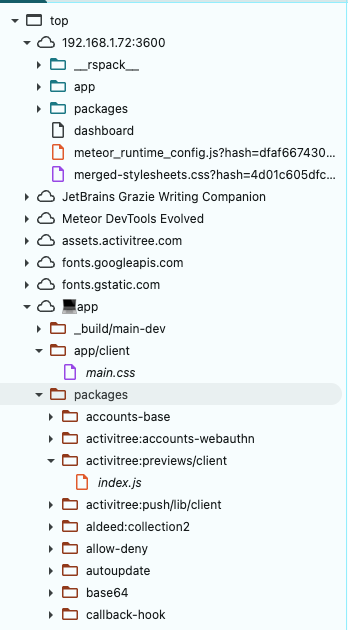
devtool: falsein my rspack.config.js, this is what I see in sources (keep an eye on what comes after Meteor DevTools Evolved.)
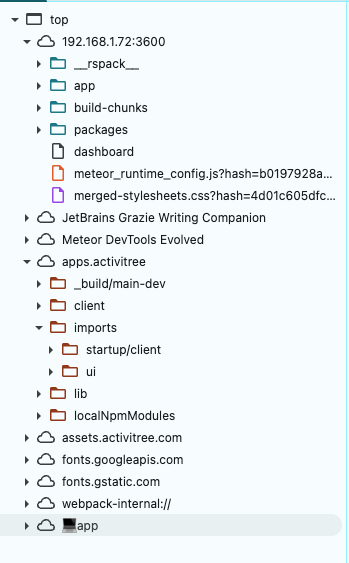
When I remove any settings for devtool, I get this (keep an eye on what comes after Meteor DevTools Evolved.):
I found this setting on the web, for a faster generation of sourcemaps: devtool: Meteor.isProduction ? 'source-map' : 'eval-cheap-module-source-map'
- I don’t use TS. However I see that for TS you might need to add this to your tsconfig.json:
{
  "compilerOptions": {
    "sourceMap": true
  }
}
- VS Code (with KiloCode as AI assist)
1 Like
I tried that but it didn’t work  . I am trying to use breakpoint in the server side code (within VSCode/Cursor). Any thoughts?
We’ll launch the official Meteor 3.4 release on January 30.
Before that, we’ll ship more RCs to ensure direct compatibility with Rspack 1.7.x, and to address any other critical issues if needed. No new features or other changes are planned for 3.4.
We’re already working on 3.4.1, which will expand the Rspack integration and include more contributions. A beta of this first patch will be available shortly after that date.
2 Likes
I’ve taken note to review the debug environment configs more deeply, I only surfaced over them. I understand how important this is for setups, and knowing others have already worked on it, like @paulishca guidance on debugging, makes me thankful that people are already experimenting and covering edge cases in the new bundler integration.
I will start testing debugging configurations, also across IDEs next week. Source map configuration is key here. If something is missing and can be improved, we will move it to the core with a proper default.
3 Likes
Thanks so much!!, More feedback that I can share so far is:
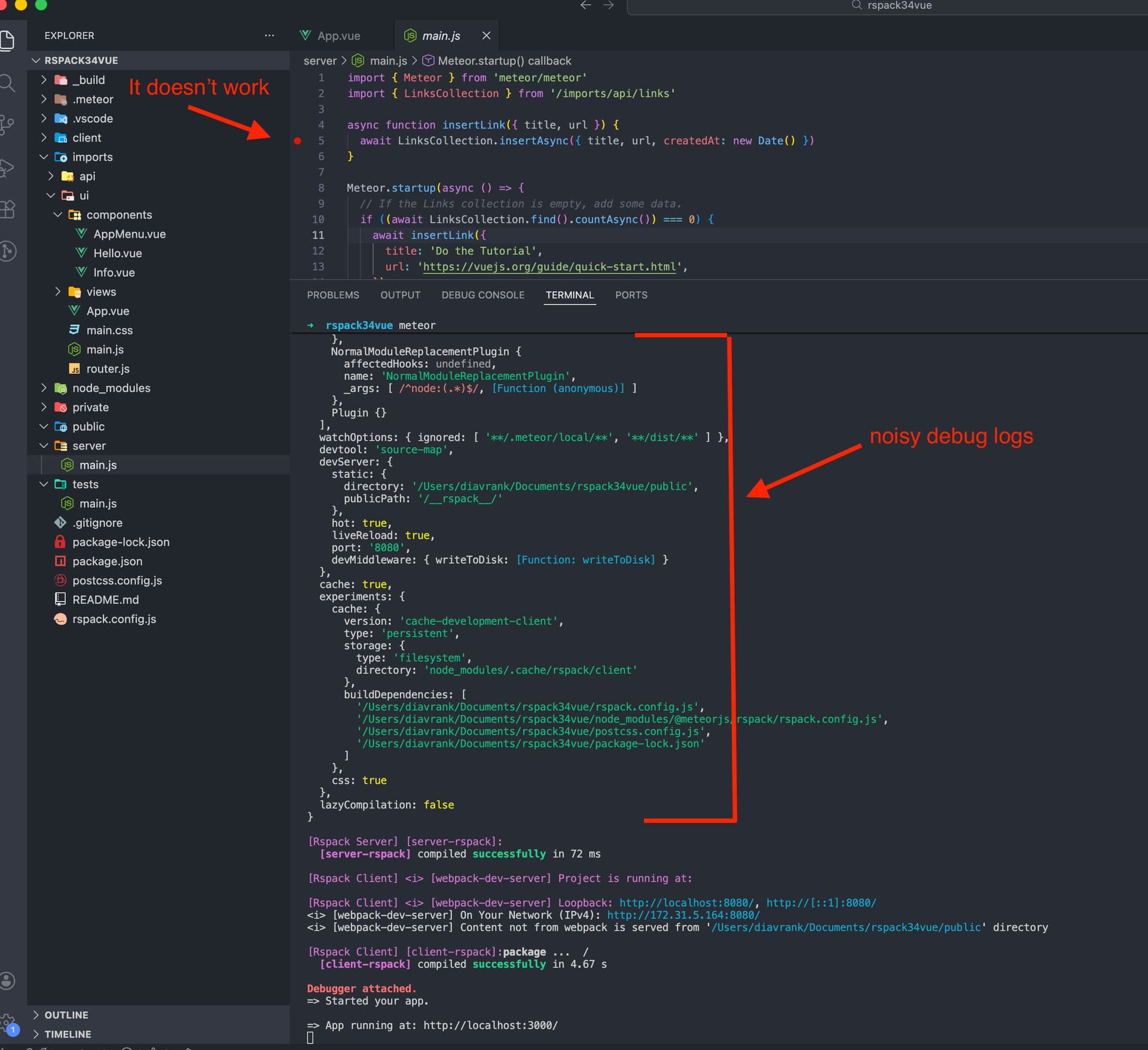
- When running in debug mode, it prints a lot of logs of rspack when loading the app. It would be nice to silence all those logs by default, as it’s the current behavior with other Meteor apps.
- If I install dependencies with
yarncommand, it throws an error thatwebpackis not installed. I have to install it via npm to mitigate the error. Withmeteor npm idoesn’t happen such issue (no webpack need to be installed). This doesn’t happen with Meteor Vite.
Looking forward to seeing the new rc update, I can support testing this.
Thanks again for this.
Fantastic. Meteor 3.4 is an amazing leap forward. I’ve been using it in production for several weeks without glitches.
2 Likes
@nachocodoner is there a way to only enable rspack for server bundle? I have vite for client bundle and want to continue using it
2 Likes
In this version of Meteor-Rspack, I don’t think this will work. The Meteor Rspack integration is built to take full responsibility for compiling both the client and server entry points. It’s something we can explore in later versions.
We also can’t guarantee every edge case when other tools are involved that we don’t have full context on, like meteor-vite. At a minimum, though, we could look into an option to delegate only part of the build. For example, use Rspack conditionally for either the client or the server, and leave the other side to the Meteor bundler pipeline. Then we can see how that behaves with meteor-vite.
If you’re interested, please open a new Meteor issue with this suggestion. It would help a lot if you can include a working meteor-vite app we can use to reproduce and test quickly later.
@nachocodoner Hi, wanted to know if you have any updates regarding debugging tool using rspack? I just noticed that the official v3.4 has been released but the debugger is not working yet on my app (a TypeScript app).
More details:
- Mac OS Tahoe
- Cursor/VS Code
- Vue 3
1 Like
No update yet, sorry.
Similarly to other issues reported after 3.4 RCs, these will be pushed to the 3.4.x series. We had plenty of time with betas and first RCs, and while I could debug it simply and others seem to have done so as well, no issues were mentioned during that time. So 3.4 should move on after all these reports and tests, and we will handle last-moment reports later. While Meteor 3.4 has been released at this point, we have not finished verifications or the final recommendation yet. We are working on that to announce it properly tomorrow.
I have not forgotten about this, I just have not had the time to focus on it as I would like. I will let you know once I can do so. I also plan to add debugging guidance to the docs if needed, and provide facilities in a longer-tested beta version within the 3.4.x series.
So, to understand it better, do you have problems on debug the client or the server? I see above @paulishca shared client-side debug config, and you mention later you can’t add breakpoints to the server side. Does it work for you in any side?
Is debugging issues happening to you all time, even in other kinds of app (like a simple one from new meteor create skeletons)?
Could I ask to open a new issue around debugging issues with specific details on the failing scenarios? I have few on the new changes with modern-build-stack I will look them soon.
do you have problems on debug the client or the server?
It’s on the server.
Does it work for you in any side?
Yes, the debugger on Chrome browser is working correctly. The issue is on the server.
Is debugging issues happening to you all time, even in other kinds of app (like a simple one from new
meteor createskeletons)?
No, this is the first time that I get issues in debug mode with my Meteor apps, and it’s because of rspack since with vite bundler is working well (even with the last version of Meteor, v3.3.2). I am using Meteor since 2019.
The issue is happening with any skeletons from meteor create command, even with JS (not just TS Meteor apps). Here are a few steps to reproduce it:
- Create the app:
meteor create rspack34vue --vue --release 3.4 - Open the app folder with VSCode and open JavaScript Debug Terminal
- Put a breakpoint on line 5 of
/server/main.js. - Run
meteorcommand on the debug terminal - Verify how the Editor changes the border color to Orange and then returns to black (the original one).
- Verify the breakpoint is not working when starting the app. The process should stop there when loading the app.
- You can create more meteor methods and a brief implementation on the FE to test it out manually and verify the server-side breakpoint is not working.
If yo create a meteor app that don’t uses rspack (e.g. meteor create meteorvue --vue), it works. Here is the evidence:
With Rspack (not working):
With Vite (working):
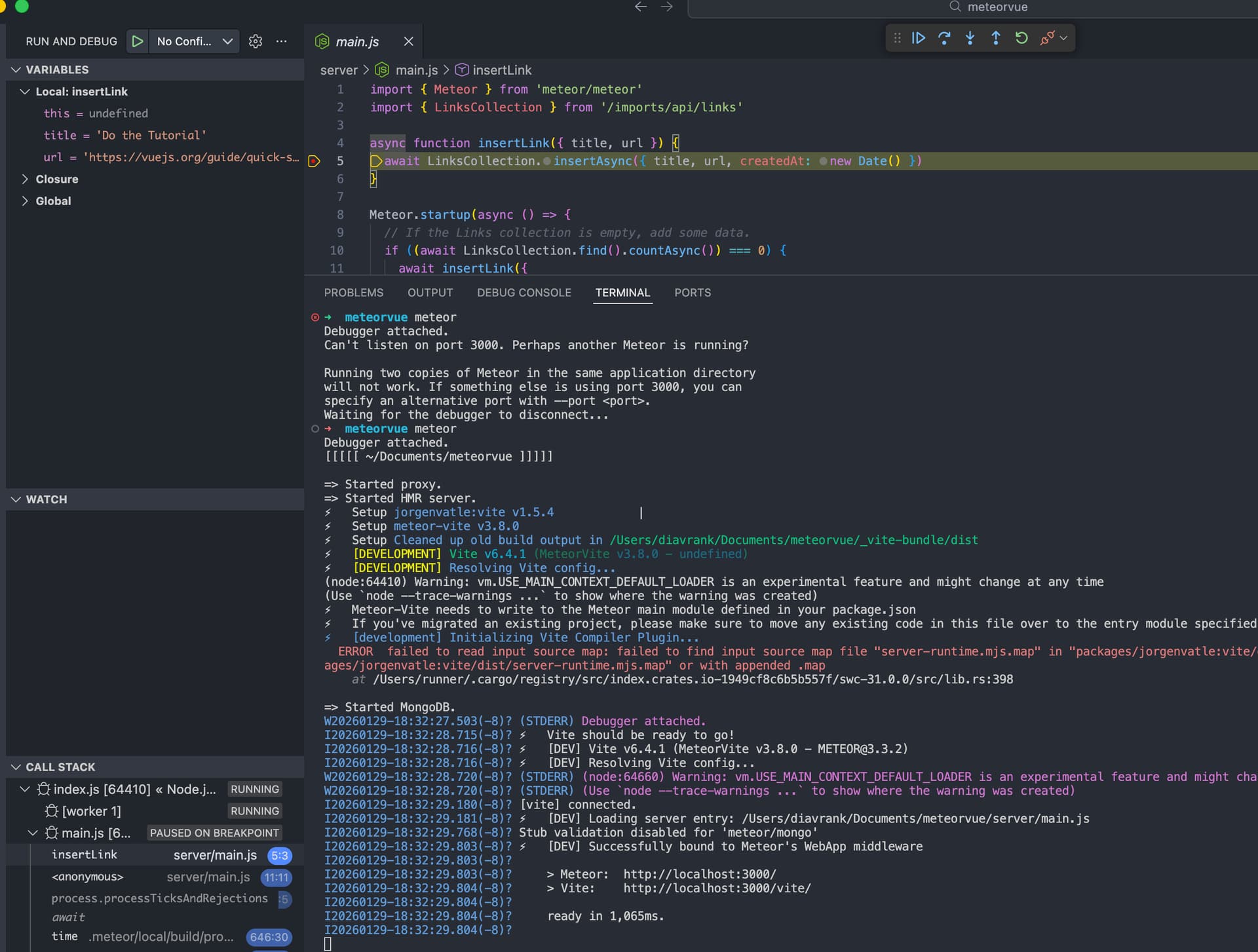
I was trying to solve on my end (changing the configuration on the rspack.config.ts file) but I didn’t have luck, even with AI help so I guess the issue is coming from the meteor package of rspack.
O.S: Mac OS Tahoe
Would it be worth considering using an IDE such as Webstorm?
1 Like
thanks for the suggestion, just tested and it works but with a small issue, that the Step over button doesn’t work as expected. It should jump to the next line in code but it’s having the same behavior as the Continue button.
Also, I was trying to replicate the same run configuration from Webstorm to VSCode/Cursor and this is a summary:
Open a normal terminal in VS Code and run:
MONGO_URL=mongodb://localhost:27017/theory-swe meteor --settings ./settings/settings-development.json --inspect-brk=52094
Configure a Meteor Attach config on launch.json as shown:
 {
      "name": "Meteor: Attach (52094)",
      "type": "pwa-node",
      "request": "attach",
      "port": 52094,
      "restart": true,
      "autoAttachChildProcesses": true,
      "justMyCode": false,
      "smartStep": true,
      "sourceMaps": true,
      "resolveSourceMapLocations": [
        "${workspaceFolder}/**",
        "!**/node_modules/**"
      ],
      "outFiles": [
        "${workspaceFolder}/.meteor/local/build/programs/server/**/*.js",
        "${workspaceFolder}/_build/**/*.js"
      ],
      "sourceMapPathOverrides": {
        "meteor://%F0%9F%92%BBapp/webpack://yourapp/./*": "${workspaceFolder}/*",
        "meteor://%F0%9F%92%BBapp/webpack://yourapp/*": "${workspaceFolder}/*",
        "meteor://%F0%9F%92%BBapp/*": "${workspaceFolder}/*",
        "meteor://💻app/webpack://yourapp/./*": "${workspaceFolder}/*",
        "meteor://💻app/webpack://yourapp/*": "${workspaceFolder}/*",
      },
      "skipFiles": [
        "<node_internals>/**",
        "<node_internals>/packages/meteor.js",
        "<node_internals>/packages/**",
        "**/packages/meteor.js",
        "${workspaceFolder}/packages/**",
        "**/node_modules/**",
        "**/.meteor/packages/**"
      ]
    }
I’ve been using Webstorm with Meteor for years. There is an annoying glitch where sometimes the debugger becomes unattached on the server, requiring a restart of the app, but other than that breakpoints, stepping, etc work as expected. I can do a screen share if that would be helpful to see if I can get your app working on Webstorm
1 Like
For sure, that would help me a lot. Also, I’m curious if you are debugging server code well with rspack (3.4) and TypeScript in Webstorm. But yes, I’d appreciate the help!
Very good. Yes, I’m debugging server code (3.4) with rspack. But not typescript. Please DM me your time zone and email address and we will coordinate.
1 Like