Nice!!, thanks so much @harry97 , will check it out today or maybe tomorrow, and will let you know  . Hope you have a Happy New Year all of you guys!!!

2 Likes
lol what’re you referring to?
Hi @harry73 , I tried your rspack config on my Meteor app but I have the same error of Vue Loader. I also tried to replicate on a small meteor app example and I found something that if I add the meteor package called harry97:ssr , I get the Vue Loader error:
packages:
# Meteor packages used by this project, one per line.
# Check this file (and the other files in this directory) into your repository.
#
# 'meteor add' and 'meteor remove' will edit this file for you,
# but you can also edit it by hand.

meteor-base@1.5.2                    # Packages every Meteor app needs to have
mobile-experience@1.1.2              # Packages for a great mobile UX
mongo@2.2.0-rc340.2                          # The database Meteor supports right now
reactive-var@1.0.13                   # Reactive variable for tracker

standard-minifier-css@1.10.0-rc340.2          # CSS minifier run for production mode
standard-minifier-js@3.2.0-rc340.2           # JS minifier run for production mode
es5-shim@4.8.1                       # ECMAScript 5 compatibility for older browsers
ecmascript@0.17.0-rc340.2                     # Enable ECMAScript2015+ syntax in app code
typescript@5.9.3-rc340.2                     # Enable TypeScript syntax in .ts and .tsx modules
shell-server@0.7.0-rc340.2                   # Server-side component of the `meteor shell` command
hot-module-replacement@0.5.4         # Update client in development without reloading the page

static-html@1.5.0-rc340.2                    # Define static page content in .html files

rspack@1.0.0-rc340.2                  # Integrate Rspack into Meteor for client and server app bundling


zodern:types
harry97:ssr
rspack.config.js
const { defineConfig } = require('@meteorjs/rspack');
const { VueLoaderPlugin } = require('vue-loader');

const projectRoot = process.cwd();
/**
 * Rspack configuration for Meteor projects.
 *
 * Provides typed flags on the `Meteor` object, such as:
 * - `Meteor.isClient` / `Meteor.isServer`
 * - `Meteor.isDevelopment` / `Meteor.isProduction`
 * - …and other flags available
 *
 * Use these flags to adjust your build settings based on environment.
 */
module.exports = defineConfig(Meteor => {
  return {
    ...Meteor.isClient && {
      plugins: [new VueLoaderPlugin()],
      module: {
        rules: [
          {
            test: /\.vue$/,
            loader: 'vue-loader',
            options: {
              // Note, for the majority of features to be available, make sure this option is `true`
              experimentalInlineMatchResource: true,
            },
          },
          { test: /\.scss$/, type: 'css/auto' },
          { test: /\.css$/, type: 'css' },
          {
            test: /\.(png|jpe?g|gif|svg|webp|ico)$/i,
            type: 'asset/resource',
            generator: { filename: 'assets/images/[name].[hash][ext]' },
          },
          {
            test: /\.(ts)$/,
            exclude: /node_modules/,
            loader: 'builtin:swc-loader',
            options: {
              // Merge the configuration from swc.config.js with specific options
              jsc: {
                //...swcConfig.jsc,
                // Ensure baseUrl is an absolute path (SWC requires an absolute path)
                baseUrl: projectRoot,
                parser: {
                  syntax: 'typescript',
                  decorators: true,
                },
                //target: 'es2020',
                transform: {
                  legacyDecorator: true,
                  decoratorMetadata: true,
                },
              },
            },
          },
        ],
      },
      resolve: {
        extensions: ['.ts', '.vue', '.json'],
        alias: {
          '@components': '/imports/ui/components',
          '@views': '/imports/ui/views',
          '@layouts': '/imports/ui/layouts',
          '@routes': '/imports/ui/routes',
          '@mixins': '/imports/ui/mixins',
          '@typings': '/imports/ui/typings',
        },
        // Improve module resolution stability
        symlinks: true,
        fullySpecified: false,
      },
    },
  };
});
If I remove that package, the small app example works correctly.
On the other hand, should I have a .swcrc file?, I guess no, because that config can be defined in the rspack.config.js file, right?
I was able to load my app correctly with Rspack, this was the configuration that I used:
const { defineConfig } = require('@meteorjs/rspack');
const { VueLoaderPlugin } = require('vue-loader');
const { rspack } = require('@rspack/core');

const projectRoot = process.cwd();
/**
 * Rspack configuration for Meteor projects.
 *
 * Provides typed flags on the `Meteor` object, such as:
 * - `Meteor.isClient` / `Meteor.isServer`
 * - `Meteor.isDevelopment` / `Meteor.isProduction`
 * - …and other flags available
 *
 * Use these flags to adjust your build settings based on environment.
 */
module.exports = defineConfig(Meteor => {

	if (Meteor.isServer) {
		return {
			plugins: [],
			module: {
				rules: [
					{
						test: /\.(ts)$/,
						exclude: /node_modules/,
						loader: 'builtin:swc-loader',
						options: {
							// Merge the configuration from swc.config.js with specific options
							jsc: {
								//...swcConfig.jsc,
								// Ensure baseUrl is an absolute path (SWC requires an absolute path)
								baseUrl: projectRoot,
								parser: {
									syntax: 'typescript',
									decorators: true,
								},
								transform: {
									legacyDecorator: true,
									decoratorMetadata: true,
								},
							},
						},
					},
				],
			},
			resolve: {
				extensions: ['.ts', '.json'],
				alias: {
					'@api': '/imports/api',
					'@server': '/imports/startup/server',
				},
				// Improve module resolution stability
				symlinks: true,
				fullySpecified: false,
			},
		}
	}

	return {
		...Meteor.isClient && {
			plugins: [new VueLoaderPlugin(),
			new rspack.DefinePlugin({
				__VUE_OPTIONS_API__: JSON.stringify(true),
				__VUE_PROD_DEVTOOLS__: JSON.stringify(false),
				__VUE_PROD_HYDRATION_MISMATCH_DETAILS__: JSON.stringify(false),
			})],
			module: {
				rules: [
					{
						test: /\.vue$/,
						loader: 'vue-loader',
						options: {
							// Note, for the majority of features to be available, make sure this option is `true`
							experimentalInlineMatchResource: true,
						},
					},
					{
						resourceQuery: /lang=sass/,
						type: 'css/auto',
						use: [
							{
								loader: 'sass-loader',
								options: {
									// using `modern-compiler` and `sass-embedded` together significantly improve build performance,
									// requires `sass-loader >= 14.2.1`
									api: 'modern-compiler',
									implementation: require.resolve('sass-embedded'),
									sassOptions: {
										syntax: 'indented',
									},
								},
							},
						],
					},
					{
						test: /\.sass$/,
						type: 'css/auto',
						use: [
							{
								loader: 'sass-loader',
								options: {
									// using `modern-compiler` and `sass-embedded` together significantly improve build performance,
									// requires `sass-loader >= 14.2.1`
									api: 'modern-compiler',
									implementation: require.resolve('sass-embedded'),
									sassOptions: {
										syntax: 'indented',
									},
								},
							},
						],
					},
					{ test: /\.css$/, type: 'css' },
					{
						test: /\.(png|jpe?g|gif|svg|webp|ico)$/i,
						type: 'asset/resource',
						generator: { filename: 'assets/images/[name].[hash][ext]' },
					},
					{
						test: /\.(ts)$/,
						exclude: /node_modules/,
						loader: 'builtin:swc-loader',
						options: {
							// Merge the configuration from swc.config.js with specific options
							jsc: {
								//...swcConfig.jsc,
								// Ensure baseUrl is an absolute path (SWC requires an absolute path)
								baseUrl: projectRoot,
								parser: {
									syntax: 'typescript',
									decorators: true,
								},
								//target: 'es2020',
								transform: {
									legacyDecorator: true,
									decoratorMetadata: true,
								},
							},
						},
					},
				],
			},
			resolve: {
				extensions: ['.ts', '.vue', '.json'],
				alias: {
					/* '@api': '/imports/api',
					'@server': '/imports/startup/server', */
					'@components': '/imports/ui/components',
					'@views': '/imports/ui/views',
					'@layouts': '/imports/ui/layouts',
					'@routes': '/imports/ui/routes',
					'@mixins': '/imports/ui/mixins',
					'@typings': '/imports/ui/typings',
				},
				// Improve module resolution stability
				symlinks: true,
				fullySpecified: false,
			},
		},
	};
});
So far, I just have an issue, which is to run the app debug mode. I am using VSCode/Cursor and I am opening a JavaScript Debug Terminal to run the app, but the breakpoints are not working. Anyone knows how to solve it? I tried by setting this in rspack but it didn’t work:
devtool: isDev ? 'source-map' : false,
2 Likes
In all my projects (tried rc1 and rc2), updating these two packages:
"@rspack/cli": "1.6.8",
"@rspack/core": "1.6.8",
to 1.7.0 results in the following errors:
In the browser page:
ERROR Problem communicating active modules to the server at http://192.168.1.72:3600/build-chunks/imports_startup_client_routes_js_lazy-compilation-proxy.js:32:11 at Set.forEach (<anonymous>) at activeEventSource.onerror (http://192.168.1.72:3600/build-chunks/imports_startup_client_routes_js_lazy-compilation-proxy.js:30:21)
In the browser console:
EventSource's response has a MIME type ("text/html") that is not "text/event-stream". Aborting the connection.Understand this error loadable.esm.mjs:146 loadable-components: failed to asynchronously load component Object (anonymous) @ loadable.esm.mjs:146Understand this error lazy-compilation-web.js:29 Uncaught Error: Problem communicating active modules to the server at lazy-compilation-web.js:29:1 at Set.forEach (<anonymous>) at activeEventSource.onerror (lazy-compilation-web.js:27:1)
I use @loadable/component for my dynamic imports:
import loadable from '@loadable/component'

const Component = loadable(() => import('./SomePath/Component.js'))
Downgrade back to 1.6.8 and everything works fine.
I opened this to see some opinions there: [Bug]: @loadable/component no longer works with v 1.7.0 · Issue #12606 · web-infra-dev/rspack · GitHub
Hi @diavrank95,
not a solution for your question, but I also struggled with SCSS a lot in 3.4 and I finally abandoned it and grabbed the compiled CSS from 3.3 and dropped SCSS.
I am curious if you run Meteor with a launch.json file in VS Code.
not a solution for your question, but I also struggled with SCSS a lot in 3.4 and I finally abandoned it and grabbed the compiled CSS from 3.3 and dropped SCSS.
I think you can use this config for SCSS:
{
						resourceQuery: /lang=scss/,
						type: 'css/auto',
						use: [
							{
								loader: 'sass-loader',
								options: {
									// using `modern-compiler` and `sass-embedded` together significantly improve build performance,
									// requires `sass-loader >= 14.2.1`
									api: 'modern-compiler',
									implementation: require.resolve('sass-embedded'),
									sassOptions: {
										syntax: 'scss',
									},
								},
							},
						],
					},
That is a rule for Vue Single components (style section with lang=scss). But should be similar for .sass files.
I am curious if you run Meteor with a launch.json file in VS Code.
I guess this is for my debugging session issue, no yet, will give a try today. But also, I’d like to know if anyone know if there’s an rspack config to hide all the verbose preload logs when running the app in debug mode.
I know that Rspack 1.7.0 introduced the lazyCompilation setting by default, which is incompatible with the Meteor–Rspack integration.
I will create the next RC and the official 3.4 release with lazyCompilation set to false for us.
For the moment, to verify it fixes it you can disable lazyCompilation: false in your rspack.config.js.
PD: I will attend the answers to the other reports sometime next week, after my rest time. Keep them coming.
2 Likes
3.4 full release wen?
I tried to run the app in debug mode with launch.json file but it didn’t work either. @nachocodoner I think is essential for any dev to have debug mode working correctly. Could you orient me how to get this working? I tried on a skeleton example but it didn’t work.
I will try your SCSS config, tx.
This is what my launch.json for VS Code looks like:
{
  "version": "0.2.0",
  "configurations": [
    {
      "type": "node",
      "request": "launch",
      "name": "Meteor: Run (from app/)",
      "runtimeExecutable": "meteor",
      "runtimeArgs": [
        "run",
        "--port",
        "3600",
        "--settings",
        "${workspaceFolder}/app/settings.json"
      ],
      "restart": true,
      "timeout": 30000,
      "stopOnEntry": false,
      "cwd": "${workspaceFolder}/app",
      "console": "integratedTerminal",
      "internalConsoleOptions": "neverOpen",
      "env": {
        "PORT": "3600",
        "ROOT_URL": "http://192.168.x.x:3600",
        "AWS_ACCESS_KEY_ID": "xxxx",
        "AWS_S3_REGION": "eu-central-1",
        "AWS_SECRET_ACCESS_KEY": "yyyy",
       // .. all other env variables
      }
    },
    {
      "type": "node",
      "request": "attach",
      "name": "Meteor: Attach Server",
      "port": 9229,
      "restart": true,
      "timeout": 30000,
      "cwd": "${workspaceFolder}/app",
      "skipFiles": [
        "<node_internals>/**"
      ]
    },
    {
      "type": "chrome",
      "request": "launch",
      "name": "Meteor: Debug Client",
      "url": "http://192.168.x.x:3600",
      "webRoot": "${workspaceFolder}/app",
      "sourceMapPathOverrides": {
        "meteor://💻app/*": "${workspaceFolder}/app/*"
      }
    }
  ],
  "compounds": [
    {
      "name": "Meteor: Full Stack",
      "configurations": [
        "Meteor: Attach Server",
        "Meteor: Debug Client"
      ]
    }
  ]
}
1 Like
@paulishca I tried your config but it didn’t work. Some questions that I have:
- What Node version are you using?
- Do you have any specific rspack config for debug mode? (any sourcemaps config)
- Are you using TypeScript?
- Which editor or IDE are you using?
- Node version is given by the Meteor version so that would be, I believe 22.21.1 for Meteor 3.4-rc2
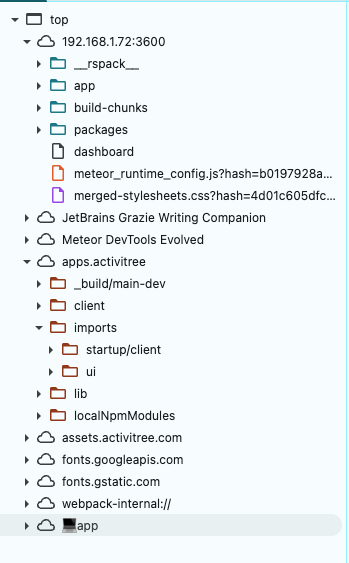
- My understanding: source maps in development mode are ON by default. When I add
devtool: falsein my rspack.config.js, this is what I see in sources (keep an eye on what comes after Meteor DevTools Evolved.)
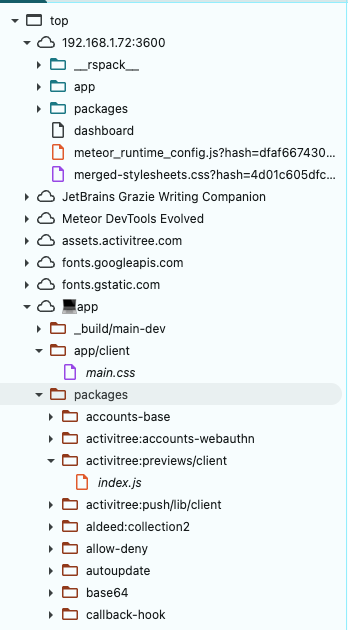
When I remove any settings for devtool, I get this (keep an eye on what comes after Meteor DevTools Evolved.):
I found this setting on the web, for a faster generation of sourcemaps: devtool: Meteor.isProduction ? 'source-map' : 'eval-cheap-module-source-map'
- I don’t use TS. However I see that for TS you might need to add this to your tsconfig.json:
{
  "compilerOptions": {
    "sourceMap": true
  }
}
- VS Code (with KiloCode as AI assist)
1 Like
I tried that but it didn’t work  . I am trying to use breakpoint in the server side code (within VSCode/Cursor). Any thoughts?
We’ll launch the official Meteor 3.4 release on January 30.
Before that, we’ll ship more RCs to ensure direct compatibility with Rspack 1.7.x, and to address any other critical issues if needed. No new features or other changes are planned for 3.4.
We’re already working on 3.4.1, which will expand the Rspack integration and include more contributions. A beta of this first patch will be available shortly after that date.
2 Likes
I’ve taken note to review the debug environment configs more deeply, I only surfaced over them. I understand how important this is for setups, and knowing others have already worked on it, like @paulishca guidance on debugging, makes me thankful that people are already experimenting and covering edge cases in the new bundler integration.
I will start testing debugging configurations, also across IDEs next week. Source map configuration is key here. If something is missing and can be improved, we will move it to the core with a proper default.
3 Likes
Thanks so much!!, More feedback that I can share so far is:
- When running in debug mode, it prints a lot of logs of rspack when loading the app. It would be nice to silence all those logs by default, as it’s the current behavior with other Meteor apps.
- If I install dependencies with
yarncommand, it throws an error thatwebpackis not installed. I have to install it via npm to mitigate the error. Withmeteor npm idoesn’t happen such issue (no webpack need to be installed). This doesn’t happen with Meteor Vite.
Looking forward to seeing the new rc update, I can support testing this.
Thanks again for this.
Fantastic. Meteor 3.4 is an amazing leap forward. I’ve been using it in production for several weeks without glitches.
2 Likes
@nachocodoner is there a way to only enable rspack for server bundle? I have vite for client bundle and want to continue using it
2 Likes
In this version of Meteor-Rspack, I don’t think this will work. The Meteor Rspack integration is built to take full responsibility for compiling both the client and server entry points. It’s something we can explore in later versions.
We also can’t guarantee every edge case when other tools are involved that we don’t have full context on, like meteor-vite. At a minimum, though, we could look into an option to delegate only part of the build. For example, use Rspack conditionally for either the client or the server, and leave the other side to the Meteor bundler pipeline. Then we can see how that behaves with meteor-vite.
If you’re interested, please open a new Meteor issue with this suggestion. It would help a lot if you can include a working meteor-vite app we can use to reproduce and test quickly later.