Galaxy Node.js version outdated

Just a clarification: meteor npm --version being 10.9.2 isn’t too old. It matches what you’d expect with Meteor 3 and Node 22.x.x. Also, Node and NPM version numbers don’t correspond, so don’t treat them as equivalent.

That said, seeing meteor npm --version as 6.14.18 is definitely NPM version old, and it likely corresponds to an older Node version too. It also doesn’t seem to respect your app’s expected toolchain for some unknown reason. I’ve reported this to the Galaxy platform team.

Could you try exporting a new PATH as part of your build command?

export PATH=/home/mt/.meteor/packages/meteor-tool/3.1.2/mt-os.linux.x86_64/dev_bundle/bin:$PATH

Does this help on seeing a different Node and NPM version?


Update: Updating the PATH likely won’t work. You’re already using meteor npm install/meteor node --version, which prefixes commands to use Meteor’s bundled Node and NPM. The issue is probably elsewhere.

PATH fix should just work if you do npm install or node --version. Considering /home/mt/.meteor/packages/.. is an existing PATH (I think could be in Galaxy, I used this before on Galaxy Push To Deploy image), you could find proper if doesn’t exist.

1 Like

Oh oops, yeah true. I was thinking node --version. It’s lwaaaaay past my bedtime right now. Cramming for an event.

Trying again on 3.4-rc.3, Galaxy still says 6.14.18, and ends with an error like

npm ERR! Cannot read property '@babel/runtime' of undefined

When I try to run npm --version in build command (without meteor) that also shows 6.14.18.

How exactly may we work around it?

EDIT: I tried adding npm i -g node in the build command, and it fails showing the already-existing node:

echo $PATH in build command shows:

/usr/local/v14.21.4/bin:/usr/local/sbin:/usr/local/bin:/usr/sbin:/usr/bin:/sbin:/bin

Hi,

Could you set these configurations in your push to deploy and try a new deployment?

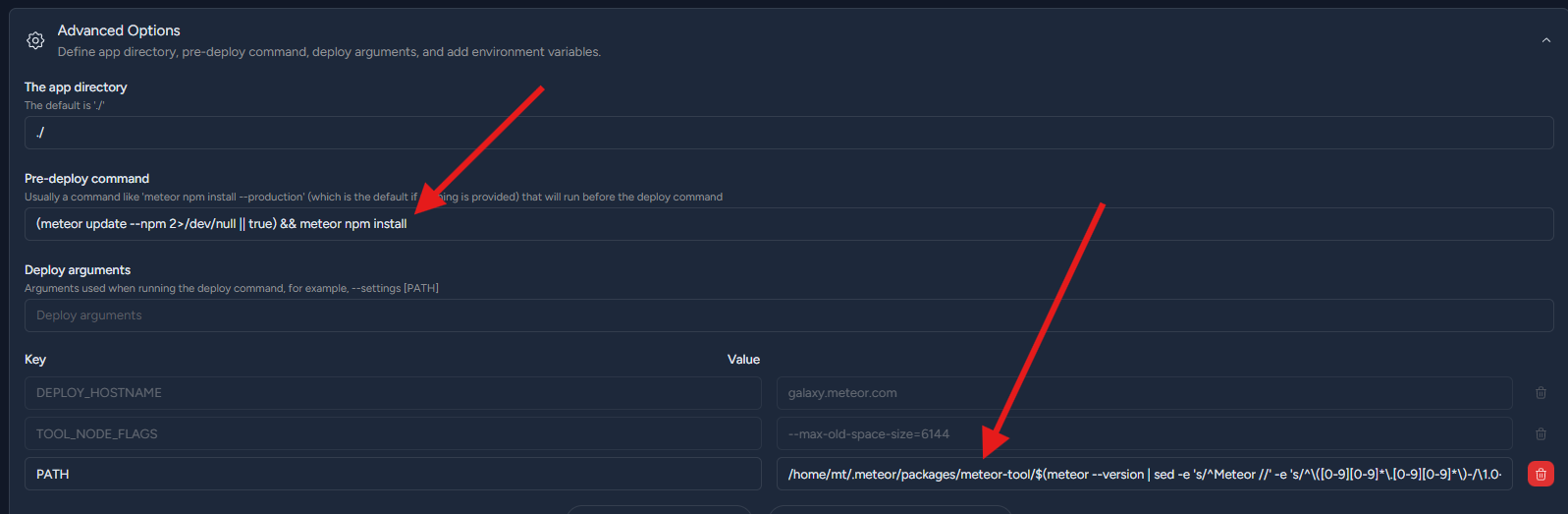
Pre Script: (meteor update --npm 2>/dev/null || true) && meteor npm install

ENV PATH /home/mt/.meteor/packages/meteor-tool/$(meteor --version | sed -e 's/^Meteor //' -e 's/^\([0-9][0-9]*\.[0-9][0-9]*\)-/\1.0-/' -e 's/^\([0-9][0-9]*\.[0-9][0-9]*\)$/\1.0/')/mt-os.linux.x86_64/dev_bundle/bin:$PATH

If you need faster assistance, our support chat is available directly inside Galaxy. Just message us there and we’ll continue helping you.

Thanks, tried that, but no luck:

Can we configure the container to use a newer image?

For the Push To deploy image, no. For the Galaxy images where your app runs, yes it’s possible!

We’ve already brought this issue to our development team, and they will be making an improvement to the entire push-to-deploy system, which will eliminate these errors

2 Likes

Does that mean I should wait, and the push to deploy setup will start to use latest Node/npm? Estimates on timeline?

I’m currently not having luck deploying with either push-to-deploy, or with meteor deploy and am stuck.

How exactly do can we deploy a .tar.gz file that I built locally? The docs (meteor help deploy) don’t mention anything about that.

If I can at least deploy that way, I’ll be good, because I can untar the file, remove all the fat that’s causing the upload-too-large error with regular meteor deploy, and deploy the updated tar.gz.

Similar to what was recommended previously, I updated my build command to:

(meteor update --npm 2>/dev/null || true) && export PATH="/home/mt/.meteor/packages/meteor-tool/$(meteor --version | sed -e 's/^Meteor //' -e 's/^\([0-9][0-9]*\.[0-9][0-9]*\)-/\1.0-/' -e 's/^\([0-9][0-9]*\.[0-9][0-9]*\)$/\1.0/')/mt-os.linux.x86_64/dev_bundle/bin:$PATH" && npm --version && npm clean-install && npm run build && npm clean-install --omit=dev

I put the meteor update command first, because that needs to execute before the export statement will use the correct version right?

The deploy seems to be currently working, however now I see this error in the output:

Error: MONGO_URL must be set in environment
...
The container has crashed. A new container will be started to replace it.

I see that the app is working, so I assume it is using the previous container, as the current one is crashing with that error.

Has anything been updated on the Galaxy end?

Hello,

Checking your Galaxy settings.json file, I see that a MONGO_URL hasn’t been defined.

Is your settings located in the repository? If so, it’s ideal to define the correct path in the P2D Deploy arguments.

I never had the MONGO_URL before, it was simply working with the free mongo and P2D as-is.

With the P2D issue still happening (P2D going away, having to reconfigure), I’m not sure if I’m supposed to check this each time:

Maybe I need to check it each time to enable the implicit mongo. Trying now…

EDIT:

Confirmed, P2D is working now (with that updated build command for custom Node version in place, from the above comment). And there’s no MONGO_URL error (I selected the free mongo checkbox).

I would love for production DBs to be as easy as that free shared mongo option too. In fact, why not just make that option production ready, then charge people for upgrades via UI, to make it zero-config easy? win-win.

Btw any progress on the Node.js version update? I’ll keep an eye out here for when to try without the custom upgrade script.

Hello, Happy Friday! Any news on the P2D env meteor/node version update?

I still see Step 1/6 : FROM meteor/meteor-base:node14.21.4-10.2023 in the outputs.

Hello y’all, any update? I see my apps migrated to the new Metal, and I don’t see any command line configuration in the new Push To Deploy UI. It isn’t clear whether this problem is fixed or not. Can you please advise?

Is there anyone here?

Which meteor version are you on?

.meteor/release has METEOR@3.4-rc.3

But Meteor version was not the problem (see above), the hosting environment had outdated Node.js v6, and for some reason the deployment would use (running meteor node --version would still show an outdated version of node even if I have specified Meteor 3.4).

I have not had luck getting deployment to work on Metal, and have been stuck. I’ll try again today.

After Galaxy team added the needed input fields for custom build commands, I was able to get unblocked and verify that the new environment has updated Node.js versions.
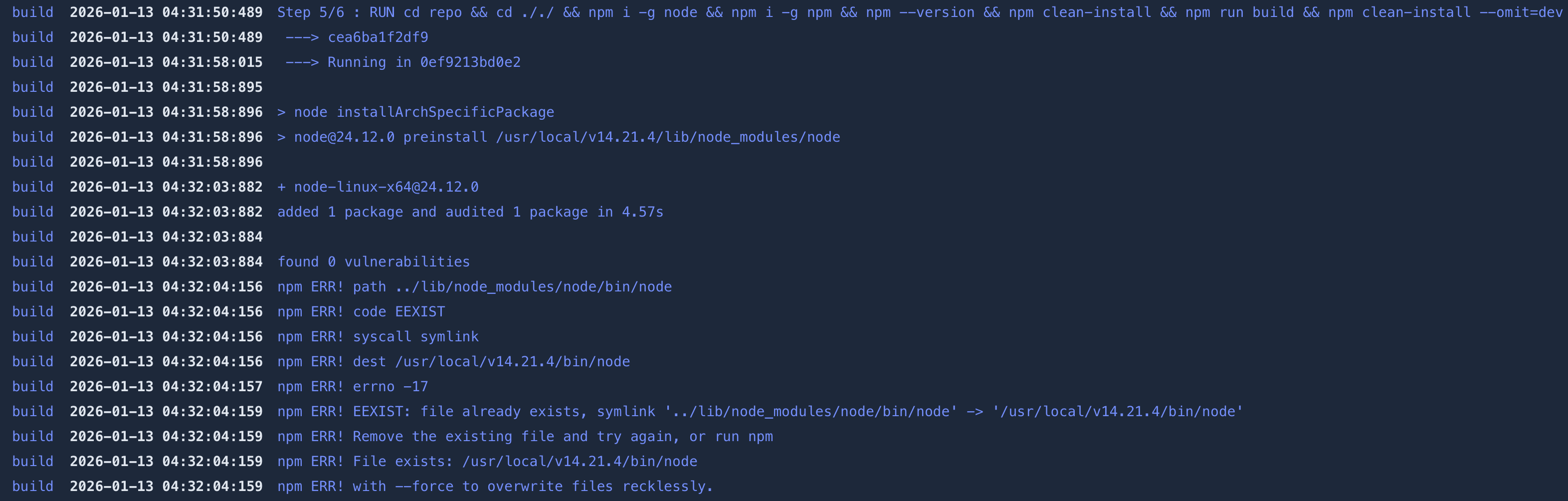
1 Like