Faster Builds, Smaller Bundles and Extended Setups in Meteor 3.4 with Rspack Integration

Meteor 3.4 is out!

Meteor 3.4 introduces the Rspack bundler into Meteor core, cutting build times, reducing bundle size, and enabling modern bundler features from the wider JS ecosystem.

This release completes the bundler work started in Meteor 3.2 and 3.3. After adding profiling tools and optimizing the existing bundler with SWC, Meteor 3.4 delegates app compilation to a modern Rust-based tool while keeping Meteor’s handling of Atmosphere packages.

Meteor 3.4 delivers faster builds, much smaller client bundles through tree shaking, full ESM support, efficient HMR, and modern setup support. This release also includes community contributions across Meteor React packages, suspense improvements, core package integrations, Cordova modernization, and CLI refinements.

Hands on

To start using Meteor 3.4 and the Modern Build Stack.

Create a New App

# Create a new Meteor app using Meteor 3.4
meteor create my-app --release 3.4

All improvements introduced in Meteor 3.3 and 3.4, including the Rspack integration, are enabled by default for new apps and applied to all skeleton examples. Check meteor create --help to see the available skeletons.

Update Your App

# Update your existing Meteor app to version 3.4
meteor update --release 3.4

Add this to your package.json to enable Meteor bundler optimizations:

"meteor": {
  "modern": true
}

This setting is enabled by default for new apps.

Check out the requirements for Meteor Bundler optimizations on existing apps.

Add rspack package to enable the Rspack Bundler integration:

meteor add rspack

Check out the requirements for Rspack Bundler integration on existing apps.

If you find any issues, please report them to the Meteor issues tracker


For full details on what’s included in Meteor 3.4, see the changelog.

Check out our latest post for the highlights of this release.

For more insights into the release, watch the release video.

Big up contributors

We want to highlight how important community contributions have been in delivering Meteor 3.4.

Thanks to our core contributors:
@nachocodoner, @italojs, @Grubba27, @welkinwong, @harryadel, @vparpoil, @StorytellerCZ, @turoar23, @DipakHalkude, @sanki92, @evolross, @malua, @tmeyer24, @jeetburman, @copleykj.

Thanks to all community members for testing and feedback on Meteor 3.4.

What’s Next?

For the upcoming releases, we have the following priorities.

  • Stability and patches. Collect feedback and fix issues. Planned Meteor 3.4.x patches.
  • Change streams. Unified MongoDB change notifications. Planned on Meteor 3.5 release./
  • Node 24. Align with newer Node LTS releases.
  • Native. Move toward a modern native solution beyond Cordova.

For more details on upcoming work and priorities, see the Meteor roadmap.

13 Likes

I’m glad to see the attention Meteor 3.4 and the Rspack integration received, not only from active community members, but also from people who were active in the past or got interested due to the new features.

After 13 betas and 4 RCs, the Meteor Rspack integration is in good shape and live in official Meteor 3.4. We will still address improvements reported by users.

If you have more questions about Meteor 3.4, please refer to this new forum post.

Since we started working on the Meteor Rspack integration in June 2025, feedback was handled across two forum threads, covering the initial announcement and then the first betas up to the final release.
In total, these two posts reached: Replies: 314 · Views: 15,900 · Users: 53 · Likes: 411 · Links: 85.

Thank you for the support on this work and on the framework we all enjoy building with. Lets keep improving Meteor every day.

7 Likes

It’s great to see Meteor evolving, great work @nachocodoner and everyone on the core team :tada:

6 Likes

Probably the biggest highlight of this release is to see you here on the forums, Leo. Hope life is working out alright for you <3

3 Likes

Thank you, saw the news and I came to see it. Yes, it’s working alright, thanks sir! Hope the same <3

1 Like

some problems with rspack - hard to tell what but suddenly after few file changes i made i get error

sockjs-1.6.1-min-.js:2 WebSocket connection to ‘ws://localhost:3000/sockjs/077/k5ojse2h/websocket’ failed: Invalid frame header. I had to restart project.

I’ll check if it i can reproduce the problem

now the proccess was automatically killed

node:internal/child_process:877
const ex = new ErrnoException(err, ‘write’);
^

Error: write EPIPE

now server crashes but didnt kill the proccess

=> Client modified – refreshing
[Rspack Client Error] node:events:497 -
throw er; // Unhandled ‘error’ event
^

Error: read ECONNRESET
at TCP.onStreamRead (node:internal/stream_base_commons:216:20)
Emitted ‘error’ event on Socket instance at:
at emitErrorNT (node:internal/streams/destroy:170:8)
at emitErrorCloseNT (node:internal/streams/destroy:129:3)
at process.processTicksAndRejections (node:internal/process/task_queues:90:21) {
errno: -4077,
code: ‘ECONNRESET’,
syscall: ‘read’
}

Could you try one of these at the rspack.config.js of your project and see if it helps?

Force native WebSocket (avoid SockJS fallback):

devServer: {
  webSocketServer: "ws",
  client: {
    webSocketTransport: "ws",
  },
}

Enable client reconnect (so dropped connections don’t cascade):

devServer: {
  client: {
    reconnect: 10, // some versions accept true/number
  },
}

This kind of ECONNRESET/invalid frame header usually happens when the browser connects to something that isn’t actually the dev server WebSocket (port conflict / proxy misroute) or when a network/security layer resets WS connections.

A couple quick checks:

  • Is anything else listening on localhost:3000 when it breaks? (port conflict / zombie process) I guess you run your app using --port 3000, right?
  • Do you have a reverse proxy or backend sharing the same origin/port that might be catching /sockjs or WS upgrade requests?
  • If you use a service worker/PWA, try unregistering it and clearing site data (DevTools > Application > Clear storage + Unregister SW).

Also, on Windows: are you running VPN/AV/firewall/corporate security software that inspects traffic? Those can reset WebSockets. If yes, try temporarily disabling it or whitelisting node.exe / the dev port to confirm.

@nachocodoner you mean like this? I still got EPIPE error

module.exports = defineConfig(Meteor => {
  return {
    devServer: {
      webSocketServer: "ws",
      client: {
        webSocketTransport: "ws",
        reconnect: 10, // some versions accept true/number
      },
    },
  };
});

Meteor 3.4 also stucks when files are removed.

node:fs:560:18: ENOENT: no such file or directory, open '/imports/api/Stuff/server/doStuff.ts'

I renamed that file and now server cannot run until i restart it. Older meteor handled those fine.

Did you try the other suggestions? I’d like to know more about your Windows setup.

Are you running a VPN, AV, firewall, or corporate security software that inspects traffic?

I’m not sure what the cause is, but this morning I tested Rspack on my Windows machine with a few apps, making changes, renaming files, etc., and I don’t see the issues you do.

Could you send me a screen recording showing the issue, along with:

  • the contents of .meteor/packages
  • package.json
  • rspack.config.js
  • the terminal output showing the full process: starting the app, waiting for rebuilds, and what happens after changes

If you prefer, feel free to DM me privately on the forums.

i had to remove rspack so the server wont crash. But here are the screenshots

.meteor/packages
# Meteor packages used by this project, one per line.
# Check this file (and the other files in this directory) into your repository.
#
# 'meteor add' and 'meteor remove' will edit this file for you,
# but you can also edit it by hand.

meteor-base@1.5.2             # Packages every Meteor app needs to have
mobile-experience@1.1.2       # Packages for a great mobile UX
mongo@2.1.2                   # The database Meteor supports right now
reactive-var@1.0.13            # Reactive variable for tracker

standard-minifier-css@1.9.3   # CSS minifier run for production mode
standard-minifier-js@3.1.0    # JS minifier run for production mode
es5-shim@4.8.1                # ECMAScript 5 compatibility for older browsers
ecmascript@0.16.11              # Enable ECMAScript2015+ syntax in app code
typescript@5.6.4              # Enable TypeScript syntax in .ts and .tsx modules
shell-server@0.6.1            # Server-side component of the `meteor shell` command
hot-module-replacement@0.5.4  # Update client in development without reloading the page


static-html@1.4.0             # Define static page content in .html files
react-meteor-data       # React higher-order component for reactively tracking Meteor data
zodern:types            # Pull in type declarations from other Meteor packages
aldeed:collection2
accounts-password@3.2.0
alanning:roles
universe:i18n
accounts-2fa@3.0.1
reywood:publish-composite
matb33:collection-hooks

package.json
{
  "name": "meteor-app",
  "private": true,
  "scripts": {
    "start": "meteor run --settings settings.json",
    "test": "meteor test --once --driver-package meteortesting:mocha",
    "test-app": "TEST_WATCH=1 meteor test --full-app --driver-package meteortesting:mocha",
    "visualize": "meteor --production --extra-packages bundle-visualizer"
  },
  "dependencies": {
    "@babel/runtime": "^7.20.7",
    "@emotion/is-prop-valid": "^1.3.1",
    "@swc/helpers": "^0.5.17",
    "@tailwindcss/postcss": "^4.0.9",
    "@tippyjs/react": "^4.2.6",
    "ag-grid-react": "^33.1.1",
    "bcrypt": "^5.1.1",
    "body-parser": "^2.2.2",
    "crypto-js": "^4.2.0",
    "date-fns": "^4.1.0",
    "helmet": "^8.1.0",
    "i18next": "^24.2.2",
    "i18next-browser-languagedetector": "^8.2.0",
    "meteor-node-stubs": "^1.2.5",
    "moment": "^2.30.1",
    "motion": "^12.5.0",
    "mqtt": "^5.15.0",
    "postcss": "^8.5.3",
    "postcss-load-config": "^6.0.1",
    "qrcode.react": "^4.2.0",
    "react": "^18.2.0",
    "react-big-calendar": "^1.18.0",
    "react-csv": "^2.2.2",
    "react-dom": "^18.2.0",
    "react-error-boundary": "^5.0.0",
    "react-i18next": "^15.4.1",
    "react-router-dom": "^6.30.0",
    "react-select": "^5.10.1",
    "react-toastify": "^11.0.5",
    "simpl-schema": "^3.4.6",
    "tailwindcss": "^4.0.9",
    "twilio": "^5.12.0",
    "zustand": "^5.0.4"
  },
  "devDependencies": {
    "@meteorjs/rspack": "^1.0.0",
    "@rsdoctor/rspack-plugin": "^1.2.3",
    "@rspack/cli": "^1.7.1",
    "@rspack/core": "^1.7.1",
    "@rspack/plugin-react-refresh": "^1.4.3",
    "@types/body-parser": "^1.19.6",
    "@types/meteor": "^2.9.8",
    "@types/mocha": "^8.2.3",
    "@types/node": "^18.13.0",
    "@types/react": "^18.0.26",
    "@types/react-dom": "^18.0.10",
    "react-refresh": "^0.17.0",
    "typescript": "^5.8.3"
  },
  "meteor": {
    "mainModule": {
      "client": "client/main.tsx",
      "server": "server/main.ts"
    },
    "testModule": "tests/main.ts",
    "modern": true
  }
}

rspack.config.js
const { defineConfig } = require('@meteorjs/rspack');

/**
 * Rspack configuration for Meteor projects.
 *
 * Provides typed flags on the `Meteor` object, such as:
 * - `Meteor.isClient` / `Meteor.isServer`
 * - `Meteor.isDevelopment` / `Meteor.isProduction`
 * - …and other flags available
 *
 * Use these flags to adjust your build settings based on environment.
 */
module.exports = defineConfig(Meteor => {
  return {
    devServer: {
      webSocketServer: "ws",
      client: {
        webSocketTransport: "ws",
        reconnect: 10, // some versions accept true/number
      },
    },
  };
});

no VPN
only windows stupid firewall
no security softwares - only annoying windows defender and tamper protection on

Thank you very much guys for this! Huge great work! Finally it’s time to switch from Meteor 2 to 3 (including Vue3) - I really hated that Vite integration :raised_hands: Really hope that Cordova works - will be testing these days… And ElectronJS is still dead, right?
2 Likes

Good to see users coming back to Meteor 3 after the last releases.

That is basically the idea: encourage people to use Meteor again or discover it by adding new capabilities and better standards to the experience.

Regarding ElectronJS, there have been community efforts to support it, though I am not sure about the current state.

One of the next core projects after the bundler work is to revamp the native experience. The plan is to move away from the not maintained CordovaJS and favor a more modern tool and succesor like CapacitorJS. While this mainly targets mobile, it also opens room to think about cross-platform support in general (including desktop), or future decisions around it. CapacitorJS provides an extension to deploy apps using Electron, so we may get this almost for free and as part of the Meteor core experience once the native update is done. Or we will handle it ourselves if easy (Electon? Tauri integration?). We will verify this when the time comes.

4 Likes

Yes, I’ve been reading through the docs and everything looks very much promising and super tasty! Capacitor would be just wonderful! Meteor rocks! :raised_hands:

4 Likes

I’ve managed to resolve the issues by either updating the computer or as described here: Vue3 does not work with Cordova? - #10 by vblagomir

Now double checked - the skeleton vue app works flawlessly! :raised_hands:

4 Likes

Loving the new rspack experience!

My only critique is, Meteor is a fully integrated framework, maybe the server logs should be branded with Meteor instead of rspack.

i.e. instead of

[Rspack Client] [client-rspack]:
  [client-rspack] compiled successfully in 99 ms

just

[meteor-client] compiled in 99ms

This has been the biggest pain point for me and when I used to freelance… felt like more time went on building Cordova rather than the app at times. As soon as we’d get a config working, it would be like, no updates, no packages, don’t risk changing anything. And it’s painful since you can’t just add these tools via npm. Capacitor and Electron would be huge wins.

ChangeStreams are exciting as well, especially as I lean on building more conservative real-time apps. But getting ChangeStreams to work for other scenarios via the internal Mongo driver has been working great overall.

3 Likes

I was thinking the same when working on the integration. Then I felt it was important to mention Rspack, because this time it is not tightly coupled to the Meteor tool. You can upgrade your own Rspack version in your Meteor app’s package.json and receive updates without waiting for Meteor.

Rspack is now integrated in a looser way. In my view, it is good to be transparent about the tools behind the scenes. Users can then evolve them independently, understand what complements the Meteor experience, and know that any future Rspack plugin or feature can benefit their Meteor app.

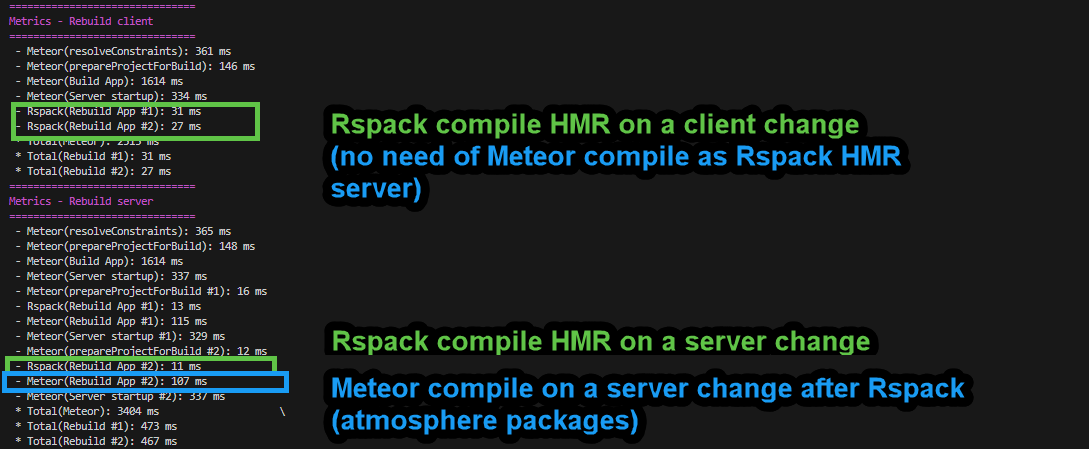
This message is not fully accurate. The Meteor client usually involves more than 99ms. The 99ms refers to the Rspack HMR step that enables fast reload. The Meteor bundler still needs to link Atmosphere packages with the Rspack output. client-rspack refers to the client configuration for the app written within the rspack.config.js. All this is why the distinction matters.

If you run meteor profile, you can see the stages for each tool. In development, the client side looks simpler because Rspack HMR handles quick refresh. On the server, both bundlers act separately.

This distinction allowed us to deliver Meteor bundler optimizations in Meteor 3.3 and measure what was saved with Meteor bundler internal changes and other improvements. It also helped us understand how offloading app bundling work to Rspack brought most of the gains in Meteor 3.4.


With all this, my intention in mentioning Rspack is to help users understand the tools behind the improvements. Clear references to what each tool does make the system easier to grasp and extend. It is also fair to acknowledge the Rspack OSS community whose work helps us move faster. For accuracy on the process, I would keep mentioning the tool behind the scenes that makes the gains possible.

I understand that for marketing or Meteor identity purposes, we may want to present everything as part of Meteor and its benefits. But as technical users, we should also allow ourselves to know more about the tools behind it.

What others think about this?

PD: This is something we can update later, and even move the rspack config to meteor.config.js. But the above is my take on preserving the specific mention of each tool.

4 Likes