Faster Builds, Smaller Bundles and Extended Setups in Meteor 3.4 with Rspack Integration

Did you try the other suggestions? I’d like to know more about your Windows setup.

Are you running a VPN, AV, firewall, or corporate security software that inspects traffic?

I’m not sure what the cause is, but this morning I tested Rspack on my Windows machine with a few apps, making changes, renaming files, etc., and I don’t see the issues you do.

Could you send me a screen recording showing the issue, along with:

  • the contents of .meteor/packages
  • package.json
  • rspack.config.js
  • the terminal output showing the full process: starting the app, waiting for rebuilds, and what happens after changes

If you prefer, feel free to DM me privately on the forums.

i had to remove rspack so the server wont crash. But here are the screenshots

.meteor/packages
# Meteor packages used by this project, one per line.
# Check this file (and the other files in this directory) into your repository.
#
# 'meteor add' and 'meteor remove' will edit this file for you,
# but you can also edit it by hand.

meteor-base@1.5.2             # Packages every Meteor app needs to have
mobile-experience@1.1.2       # Packages for a great mobile UX
mongo@2.1.2                   # The database Meteor supports right now
reactive-var@1.0.13            # Reactive variable for tracker

standard-minifier-css@1.9.3   # CSS minifier run for production mode
standard-minifier-js@3.1.0    # JS minifier run for production mode
es5-shim@4.8.1                # ECMAScript 5 compatibility for older browsers
ecmascript@0.16.11              # Enable ECMAScript2015+ syntax in app code
typescript@5.6.4              # Enable TypeScript syntax in .ts and .tsx modules
shell-server@0.6.1            # Server-side component of the `meteor shell` command
hot-module-replacement@0.5.4  # Update client in development without reloading the page


static-html@1.4.0             # Define static page content in .html files
react-meteor-data       # React higher-order component for reactively tracking Meteor data
zodern:types            # Pull in type declarations from other Meteor packages
aldeed:collection2
accounts-password@3.2.0
alanning:roles
universe:i18n
accounts-2fa@3.0.1
reywood:publish-composite
matb33:collection-hooks

package.json
{
  "name": "meteor-app",
  "private": true,
  "scripts": {
    "start": "meteor run --settings settings.json",
    "test": "meteor test --once --driver-package meteortesting:mocha",
    "test-app": "TEST_WATCH=1 meteor test --full-app --driver-package meteortesting:mocha",
    "visualize": "meteor --production --extra-packages bundle-visualizer"
  },
  "dependencies": {
    "@babel/runtime": "^7.20.7",
    "@emotion/is-prop-valid": "^1.3.1",
    "@swc/helpers": "^0.5.17",
    "@tailwindcss/postcss": "^4.0.9",
    "@tippyjs/react": "^4.2.6",
    "ag-grid-react": "^33.1.1",
    "bcrypt": "^5.1.1",
    "body-parser": "^2.2.2",
    "crypto-js": "^4.2.0",
    "date-fns": "^4.1.0",
    "helmet": "^8.1.0",
    "i18next": "^24.2.2",
    "i18next-browser-languagedetector": "^8.2.0",
    "meteor-node-stubs": "^1.2.5",
    "moment": "^2.30.1",
    "motion": "^12.5.0",
    "mqtt": "^5.15.0",
    "postcss": "^8.5.3",
    "postcss-load-config": "^6.0.1",
    "qrcode.react": "^4.2.0",
    "react": "^18.2.0",
    "react-big-calendar": "^1.18.0",
    "react-csv": "^2.2.2",
    "react-dom": "^18.2.0",
    "react-error-boundary": "^5.0.0",
    "react-i18next": "^15.4.1",
    "react-router-dom": "^6.30.0",
    "react-select": "^5.10.1",
    "react-toastify": "^11.0.5",
    "simpl-schema": "^3.4.6",
    "tailwindcss": "^4.0.9",
    "twilio": "^5.12.0",
    "zustand": "^5.0.4"
  },
  "devDependencies": {
    "@meteorjs/rspack": "^1.0.0",
    "@rsdoctor/rspack-plugin": "^1.2.3",
    "@rspack/cli": "^1.7.1",
    "@rspack/core": "^1.7.1",
    "@rspack/plugin-react-refresh": "^1.4.3",
    "@types/body-parser": "^1.19.6",
    "@types/meteor": "^2.9.8",
    "@types/mocha": "^8.2.3",
    "@types/node": "^18.13.0",
    "@types/react": "^18.0.26",
    "@types/react-dom": "^18.0.10",
    "react-refresh": "^0.17.0",
    "typescript": "^5.8.3"
  },
  "meteor": {
    "mainModule": {
      "client": "client/main.tsx",
      "server": "server/main.ts"
    },
    "testModule": "tests/main.ts",
    "modern": true
  }
}

rspack.config.js
const { defineConfig } = require('@meteorjs/rspack');

/**
 * Rspack configuration for Meteor projects.
 *
 * Provides typed flags on the `Meteor` object, such as:
 * - `Meteor.isClient` / `Meteor.isServer`
 * - `Meteor.isDevelopment` / `Meteor.isProduction`
 * - …and other flags available
 *
 * Use these flags to adjust your build settings based on environment.
 */
module.exports = defineConfig(Meteor => {
  return {
    devServer: {
      webSocketServer: "ws",
      client: {
        webSocketTransport: "ws",
        reconnect: 10, // some versions accept true/number
      },
    },
  };
});

no VPN
only windows stupid firewall
no security softwares - only annoying windows defender and tamper protection on

Thank you very much guys for this! Huge great work! Finally it’s time to switch from Meteor 2 to 3 (including Vue3) - I really hated that Vite integration :raised_hands: Really hope that Cordova works - will be testing these days… And ElectronJS is still dead, right?

2 Likes

Good to see users coming back to Meteor 3 after the last releases.

That is basically the idea: encourage people to use Meteor again or discover it by adding new capabilities and better standards to the experience.

Regarding ElectronJS, there have been community efforts to support it, though I am not sure about the current state.

One of the next core projects after the bundler work is to revamp the native experience. The plan is to move away from the not maintained CordovaJS and favor a more modern tool and succesor like CapacitorJS. While this mainly targets mobile, it also opens room to think about cross-platform support in general (including desktop), or future decisions around it. CapacitorJS provides an extension to deploy apps using Electron, so we may get this almost for free and as part of the Meteor core experience once the native update is done. Or we will handle it ourselves if easy (Electon? Tauri integration?). We will verify this when the time comes.

4 Likes

Yes, I’ve been reading through the docs and everything looks very much promising and super tasty! Capacitor would be just wonderful! Meteor rocks! :raised_hands:

4 Likes

I’ve managed to resolve the issues by either updating the computer or as described here: Vue3 does not work with Cordova? - #10 by vblagomir

Now double checked - the skeleton vue app works flawlessly! :raised_hands:

4 Likes

Loving the new rspack experience!

My only critique is, Meteor is a fully integrated framework, maybe the server logs should be branded with Meteor instead of rspack.

i.e. instead of

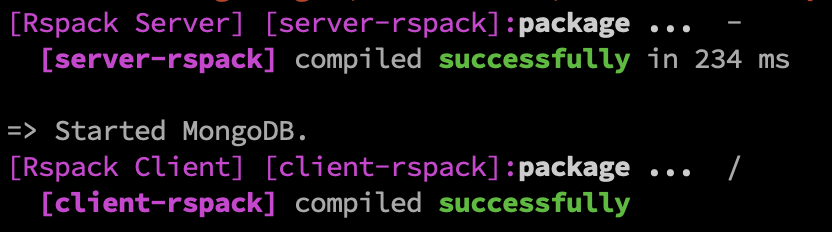
[Rspack Client] [client-rspack]:
  [client-rspack] compiled successfully in 99 ms

just

[meteor-client] compiled in 99ms

This has been the biggest pain point for me and when I used to freelance… felt like more time went on building Cordova rather than the app at times. As soon as we’d get a config working, it would be like, no updates, no packages, don’t risk changing anything. And it’s painful since you can’t just add these tools via npm. Capacitor and Electron would be huge wins.

ChangeStreams are exciting as well, especially as I lean on building more conservative real-time apps. But getting ChangeStreams to work for other scenarios via the internal Mongo driver has been working great overall.

3 Likes

I was thinking the same when working on the integration. Then I felt it was important to mention Rspack, because this time it is not tightly coupled to the Meteor tool. You can upgrade your own Rspack version in your Meteor app’s package.json and receive updates without waiting for Meteor.

Rspack is now integrated in a looser way. In my view, it is good to be transparent about the tools behind the scenes. Users can then evolve them independently, understand what complements the Meteor experience, and know that any future Rspack plugin or feature can benefit their Meteor app.

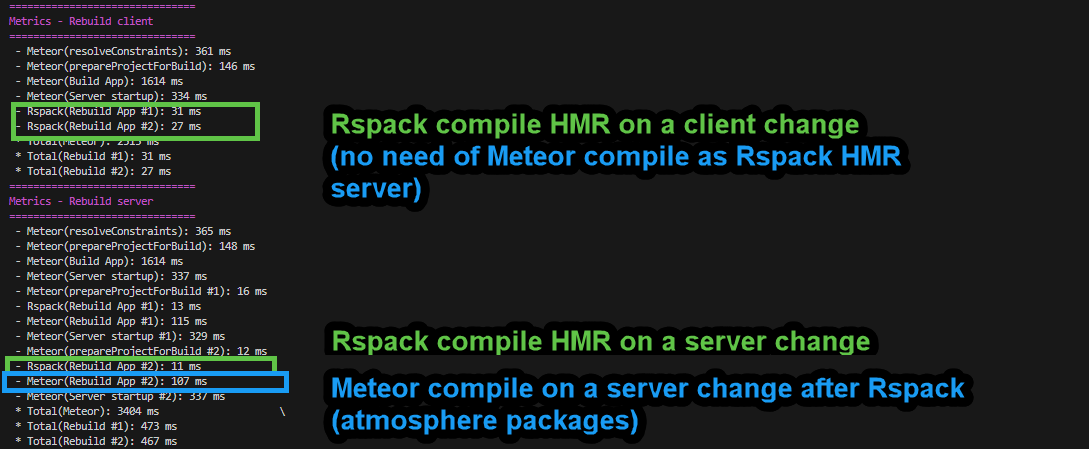
This message is not fully accurate. The Meteor client usually involves more than 99ms. The 99ms refers to the Rspack HMR step that enables fast reload. The Meteor bundler still needs to link Atmosphere packages with the Rspack output. client-rspack refers to the client configuration for the app written within the rspack.config.js. All this is why the distinction matters.

If you run meteor profile, you can see the stages for each tool. In development, the client side looks simpler because Rspack HMR handles quick refresh. On the server, both bundlers act separately.

This distinction allowed us to deliver Meteor bundler optimizations in Meteor 3.3 and measure what was saved with Meteor bundler internal changes and other improvements. It also helped us understand how offloading app bundling work to Rspack brought most of the gains in Meteor 3.4.


With all this, my intention in mentioning Rspack is to help users understand the tools behind the improvements. Clear references to what each tool does make the system easier to grasp and extend. It is also fair to acknowledge the Rspack OSS community whose work helps us move faster. For accuracy on the process, I would keep mentioning the tool behind the scenes that makes the gains possible.

I understand that for marketing or Meteor identity purposes, we may want to present everything as part of Meteor and its benefits. But as technical users, we should also allow ourselves to know more about the tools behind it.

What others think about this?

PD: This is something we can update later, and even move the rspack config to meteor.config.js. But the above is my take on preserving the specific mention of each tool.

4 Likes

You sound reasonable mentioning rspack (I would personally disagree, because the strength of Meteor is in its opinionated approach, but I respect others opinions and if mentioning would allow to attract more users, then we can live with it).

But I also firstly felt it was too verbose… original Meteor bundler was quiet and elegant, but Vite and rspack shout on you in console, multiple times…

Usually when I do any console outputs I think very carefully how to show the maximum info with least symbols, to not to spam it, even which color would mean what… It would be wonderful if we could limit the rspack output to one line (right now it is two). Or give possibility to configure it to one line? Minimalism for the win! :raised_hands:

3 Likes

Rspack already documents how to control the logs it outputs. https://rspack.rs/config/stats#stats-presets

For instance, adding this to rspack.config.js would silence the output.

stats: 'none',
infrastructureLogging: {
  level: 'none',
},

That said, while infrastructureLogging (HMR server logs) can be disabled entirely in Meteor 3.4, stats are currently needed for the Meteor-Rspack integration to understand when Rspack finishes, so we can properly profile the time spent on Meteor’s side. Sadly, if you silent stats now your Meteor-Rspack app doesn’t load properly.

I’ll work on Meteor 3.4.1 so stats: 'none' can be used, or any acceptable value. That way, people who want minimal or no log messaging can get it, while those who want profiling will still get the needed stats value automatically for proper metrics extraction on Meteor’s side.

We could also default rspack.config.js to stats: 'errors-only'. But I’d like to think a bit more about making [client-rspack] compiled successfully in xx ms a single line, not two as it is now. infrastructureLogging.level = none is something may be good to add as default.

This is possible because we already know Rspack is the tool behind the scenes. Anything configurable in Rspack, including log control, can be handled in Meteor. I think it’s fine to keep that knowledge visible, and avoid creating another repeated config layer in the Meteor API.

For now, I’ll make sure stats: 'none' is workable, since it’s a limitation I just ran into thanks to your report.

2 Likes

I have double checked my current setup - the very first time I saw rspack.config.js I wanted to limit it so GPT suggested at least:

       infrastructureLogging: {
         level: 'error',
       },
       stats: 'errors-warnings',

…which I kept so far, but also added > NODE_OPTIONS='--no-deprecation' meteor run --settings settings/development.json when running it - because Node also spammed there. So far did not have time/interest to read through the configuration of rspack in more details though, maybe there are some nice settings.

But all this does not resolve the main problem:


This is garbage. Instead of just providing 2 lines for 2 actions, it provides 4 lines and in each line the rspack is mentioned 3 times - this is VERY bad logging. VERY.

It must be just this (I’ve deliberately omitted the “=> Starting your app” from there because it is also too verbose - the last line tells you the same):
=> Started proxy.
=> Started HMR server.
=> Started MongoDB.
=> Server rspack compiled successfully in 234 ms
=> Client rspack compiled successfully
=> App running at: http://localhost:3000/

See - consistent, nice - all the info is there and the console does not stutter or shout at you.

And there must be no unnecessary coloring… why it is there now? Does it bring any meaning at the moment? I do coloring in my custom errors logging - where I color differently the file name vs path vs the line number - there it makes sense to visually grasp everything quickly, and here in this rspack logging - it is just useless and annoying…

This is definitely something we can improve. About coloring, this is added by Rspack as far as I know. We can likely intercept it and remove the colors, but the simplest integration follows the tool conventions, in this case Rspack logging.

I will consider tidying it up a bit, but I will preserve the options for everyone to get as much of the Rspack specific logging or colors as they like when they opt in to stats or infrastructureLogging from Rspack.

Lets see what can be adjusted.

1 Like

I’ve been fighting with this upgrade for the last week, and think I’ve come out the other end mostly now, but still have some lingering issues.

Once the project builds, it is great, amazingly fast, really a game-changer for productivity as advertised! However, the “just upgrade with a few commands” advertisement has certainly not been true for us thus far, albeit we do have a complicated project and could have worked more on testing the RC builds along the way.

Here are the struggles we’ve had:

Dev package breaking CI
In CI, we’ve been using this script to start our server

  PORT="3400" \
  NODE_ENV="testing" \
  MONGO_URL="mongodb://mongo:27017/meteor?directConnection=true" \
  METEOR_SETTINGS="$(cat ./settings/settings-ci-app.json)" \
  node "$CI_PROJECT_DIR/bundle/main.js" &

That no longer works, due to this issue. After trying various hacks, which broke in other ways, we ended up changing NODE_ENV to “production”, but that required us to change a whole bunch of checks for isTest/isDevelopment all over the place. It works now, but it could be an idea to have test suites for built applications with different flags.

Node packages not being compiled correctly
We’ve had a hell of a time configuring rspack.config to ignore stuff and wrestle our existing packages into compiling outside rspack. The Stylus atmosphere package we used broke in many different ways, and we needed to replace it with stylus-loader, which now compiles our stylus in a different order than before, breaking a bunch of layouts. Tedious but managable. At least it is much faster.

There are a bunch of nested node packages in our node dependencies that refuse to compile, like mongoose, svg-captcha, jsdom and a few others, that needed excluding. Not sure how much of a difference this makes for tree-shaking and compile time, and not sure why they don’t compile like other packages.

Multiple meteor apps in same folder
Perhaps the most breaking change for us, running multiple apps from the same folder with different ports broke completely. We run the same app with different ENV options, in app mode and worker mode for example on different ports but connecting to the same database. This needed a bunch of configurations to have each app ignore the others’ build directories, and build to separate folders so they didn’t override each other’s bulds, or got triggered to rebuild as the other apps built.

It would have been nice if this worked without any hassle like before, but I understand it is hard when there is this dynamic build folder. Maybe have a separate one per port or something by default?

PANIC
We do have very frequent panics still, where the rspack cache gets corrupted and we have to manually clear it if something goes wrong. This is quite annoying. We have a script to delete the rspack-cache on every restart, but even that doesn’t fully fix the issue during rebuilds. Stuff like this:

[app] [Rspack Client Error] Panic occurred at runtime. Please file an issue on GitHub with the backtrace below: https://github.com/web-infra-dev/rspack/issues: panicked at crates/rspack_core/src/module_graph/mod.rs:722:26:
[app] ModuleGraphModule with identifier Identifier(u!("builtin:react-refresh-loader!builtin:swc-loader??ruleSet[1].rules[1].use[0]!/home/user/src/ourapp/app/imports/modules/instructor/ui/tutorials/TutorialUI.jsx")) not found

That’s what I could tink of right now, maybe it is helpful in some way. I am still glad for the performance upgrades we are getting, and that meteor is moving forward on this critical issue, thank you for your hard work y’all :pray:

2 Likes

Yeah, this is a bit too optimistic. I always mention that, depending on the project, it can take more effort, and I try to link to the requirements and migration notes to help.

Agreed. I have this on my todo list, and I plan to ship a fix in Meteor 3.4.1.

Yes, and this is a big part of the effort: replacing Meteor build plugins with the standard alternatives used by Rspack.

Do you mean setting them as externals, or using Meteor.compileWithMeteor? Some dependencies include native parts and bundlers don’t handle them well, so externals or compileWithMeteor is usually the right approach, depending on how they’re used.

If you can, could you DM me on the forums with your rspack.config.js? I’d like to test smaller projects with those deps and learn what config patterns work best.

We can look at extending support for more use cases. I’m not sure how common this is in Meteor dev, but I get that it worked for your setup before and now feels like a regression. I’ll try to test it locally and see what we can do.

Got it. The hard part with these is that they can be difficult to reproduce on our side, so we often need a specific repo to learn what’s triggering it. I also know Rspack 2.0 is aiming to fix several persistent cache stability issues.

If you can reproduce it in a minimal repo, that would help a lot. In the meantime, you can disable the persistent cache (or use an in-memory cache) to reduce the frequency (rspack’s cache docs). Not ideal, but it may help until we have a proper fix upstream or in Meteor.

Thanks for the comments, appreciate it. I’d like to add on another issue we have sometimes

Memory issues
We did not have memory related crashes before, but they happen in e2e testing and when running our app normally, usually if we have a lot of changes going on and repeated rebuilds.

[app] <--- Last few GCs --->                                        
[app]                                                               
[app] [677396:0x23d0e000]  4159680 ms: Scavenge (interleaved) 8076.3 (8215.3) -> 8074.8 (8225.0) MB, pooled: 0 MB, 270.89 / 0.00 ms  (average mu = 0.571, current mu = 0.484) allocation failure; 
[app] [677396:0x23d0e000]  4162819 ms: Mark-Compact 8086.2 (8225.0) -> 8081.6 (8240.5) MB, pooled: 0 MB, 3125.02 / 0.00 ms  (average mu = 0.424, current mu = 0.207) allocation failure; scavenge might not succeed
[app]                                                               
[app]                                                                                                                                                                                                                                                                           
[app] <--- JS stacktrace --->                                                                                                                                                                                                                                                   
[app]                                                                                                                                                                                                                                                                           
[app] FATAL ERROR: Reached heap limit Allocation failed - JavaScript heap out of memory                                                                                                                                                                                         
[app] ----- Native stack trace -----                                                                                                                                                                                                                                            
[app]                                                                                                                                                                                                                                                                           
[app]  1: 0xe40d24 node::OOMErrorHandler(char const*, v8::OOMDetails const&) [/home/jorgen/.meteor/packages/meteor-tool/.3.4.0.1sjgcjm8yknj++os.linux.x86_64+web.browser+web.browser.legacy+web.cordova/mt-os.linux.x86_64/dev_bundle/bin/node]
[app]  2: 0x1216be0 v8::Utils::ReportOOMFailure(v8::internal::Isolate*, char const*, v8::OOMDetails const&) [/home/jorgen/.meteor/packages/meteor-tool/.3.4.0.1sjgcjm8yknj++os.linux.x86_64+web.browser+web.browser.legacy+web.cordova/mt-os.linux.x86_64/dev_bundle/bin/node]
[app]  3: 0x1216eb7 v8::internal::V8::FatalProcessOutOfMemory(v8::internal::Isolate*, char const*, v8::OOMDetails const&) [/home/jorgen/.meteor/packages/meteor-tool/.3.4.0.1sjgcjm8yknj++os.linux.x86_64+web.browser+web.browser.legacy+web.cordova/mt-os.linux.x86_64/dev_bund
le/bin/node]                                                        
[app]  4: 0x1444875  [/home/jorgen/.meteor/packages/meteor-tool/.3.4.0.1sjgcjm8yknj++os.linux.x86_64+web.browser+web.browser.legacy+web.cordova/mt-os.linux.x86_64/dev_bundle/bin/node]                                                                                         
[app]  5: 0x145e109 v8::internal::Heap::CollectGarbage(v8::internal::AllocationSpace, v8::internal::GarbageCollectionReason, v8::GCCallbackFlags) [/home/jorgen/.meteor/packages/meteor-tool/.3.4.0.1sjgcjm8yknj++os.linux.x86_64+web.browser+web.browser.legacy+web.cordova/mt-
os.linux.x86_64/dev_bundle/bin/node]                                
[app]  6: 0x14327b8 v8::internal::HeapAllocator::AllocateRawWithLightRetrySlowPath(int, v8::internal::AllocationType, v8::internal::AllocationOrigin, v8::internal::AllocationAlignment) [/home/jorgen/.meteor/packages/meteor-tool/.3.4.0.1sjgcjm8yknj++os.linux.x86_64+web.bro
wser+web.browser.legacy+web.cordova/mt-os.linux.x86_64/dev_bundle/bin/node]                                                             
[app]  7: 0x14336e5 v8::internal::HeapAllocator::AllocateRawWithRetryOrFailSlowPath(int, v8::internal::AllocationType, v8::internal::AllocationOrigin, v8::internal::AllocationAlignment) [/home/jorgen/.meteor/packages/meteor-tool/.3.4.0.1sjgcjm8yknj++os.linux.x86_64+web.br
owser+web.browser.legacy+web.cordova/mt-os.linux.x86_64/dev_bundle/bin/node]                                                            
[app]  8: 0x140c3be v8::internal::Factory::NewFillerObject(int, v8::internal::AllocationAlignment, v8::internal::AllocationType, v8::internal::AllocationOrigin) [/home/jorgen/.meteor/packages/meteor-tool/.3.4.0.1sjgcjm8yknj++os.linux.x86_64+web.browser+web.browser.legacy+
web.cordova/mt-os.linux.x86_64/dev_bundle/bin/node]                 
[app]  9: 0x186da1c v8::internal::Runtime_AllocateInYoungGeneration(int, unsigned long*, v8::internal::Isolate*) [/home/jorgen/.meteor/packages/meteor-tool/.3.4.0.1sjgcjm8yknj++os.linux.x86_64+web.browser+web.browser.legacy+web.cordova/mt-os.linux.x86_64/dev_bundle/bin/no
de]                                                                 
[app] 10: 0x7f499b66c476                                            

1 Like

Did you already set up something like TOOL_NODE_FLAGS=--max-old-space-size=8192 for your Meteor app to increase the heap?

This is likely because TOOL_NODE_FLAGS="--max-old-space-size=8192" does not automatically apply to the Rspack process, so you also need to set NODE_OPTIONS="--max-old-space-size=8192".

We documented this limitation for memory issues:

For Meteor 3.4.1, I already have a PR to make Rspack inherit TOOL_NODE_FLAGS automatically, so apps won’t need to set NODE_OPTIONS separately, and work well with your existing TOOL_NODE_FLAGS value.

2 Likes

I like seeing colors in my terminal, but agree, its too verbose. Maybe something stylish can be done. I think the HTML error pages it loads up can also be better branded so you really feel like you’re in a Meteor development experience.

I personally tried (but failed) to get colorful JSON printing working, looks much nicer than the truncated strings that get logged. I think that kind of level up on logging can be really good for that premium Meteor feel.

So I’m currently migrating a big project from Meteor2/Vue2 to Meteor3/Vue3 and see following:

  1. So far the server code is migrated relatively easy - I’ve already been using Async calls everywhere from the moment I’ve heard about them, therefore now step by step by resolving one or few errors, each pub/sub/method starts to work.
  2. Many existing core packages like simpl-schema, aldeed:collection2, tunguska:reactive-aggregate seem to work the same - which is very good - I’ve been worrying about them mostly.
  3. vue-meteor-tracker is a bit of a mess (especially given I’m doing pretty complex things with it):
    3.1. $subReady does not work within meteor computed properties anymore > fixed
    3.2. The this._subs has been removed, so I’ve added $subs
    3.3. Given the changed way of how Vue3 treats beforeCreate, certain parts of the vue-meteor-tracker must be initiated in created hook > fixed

Luckily the whole package is about 200 lines of code so it’s possible to adapt/upgrade it relatively easily, which I am currently doing for my needs (I will ensure it will work for OptionsAPI, but I don’t use Composition API yet - maybe later for some more complex components).

Question: how should we have it updated?

I could create a PR to vue-meteor-tracker , but @akryum seem to not be interested in updating it (I’ve been chasing him the last few years (! :face_with_peeking_eye: ) - no feedback and no upgrade)… I don’t want to specifically maintain it, but since it is the core functionality for my app(s) and I 100% invest into Meteor+Vue in the future anyway (from what I see - this is the most efficient toolset on the market with the most logical, leanest structure), and there seem to be not many people figured out the true elegance of Meteor+Vue, I could just publish it as a fork or a “spiritual successor”, while keeping the API.

What is important: we must update it anyway - come on, it is a joke that the official Meteor+Vue linking package is in “3.0.0-beta.7” version :slight_smile: Let’s make it 3.1!

P.S. @akryum if you read this - come back to the bright side, let’s update the ‘vue-meteor-tracker’.

2 Likes

@nachocodoner maybe I share the updated code here (once finish) and you create an official vue-meteor-data atmospherejs package out of it? It’s a shame there is no vue counterpart for what we have for react. I believe an official Meteor team maintaining this will make more sense! It’s a simple thing, won’t require much of your effort.

1 Like

Definitely. It already happened with meteor-vite in the past. To make it usable for the Meteor 3 era, Jorgen forked it and is continuing the maintenance. The MIT license allows us to proceed like this.

We would like to contact the creator, just in case we can be added as maintainers directly. Otherwise, we can fork it and continue from there. It’s important to mention we use vue-meteor-tracker as part of our Meteor 3 tutorials, and since it’s the recommended version, we should make an effort to keep it updated.

However, I’m not very familiar with Vue to maintain it properly. If you can provide the changes and test coverage, we can do a quick review, make sure we understand it, and publish it.

Let me know when you have a branch with the Meteor 3 tweaks. Thank you for the interest.