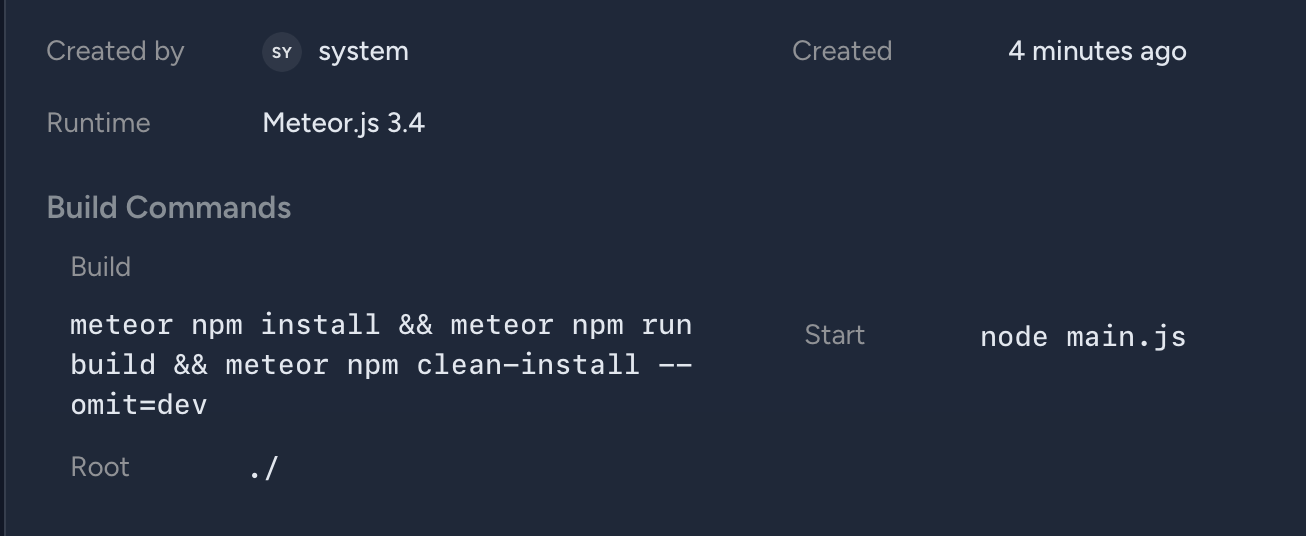
The Dockerfile is running meteor npm install and there seems to be no way to configure it.
In projects with a package-lock.json file, Metal should be running npm clean-install to ensure reproducibility, to avoid annoying deployment failures, because npm install will automatically update dependencies during deployment, which introduces the risk of things breaking.
This is getting a bit frustrating spending my Sunday on undesirable attempts at fixing an app deployment that was previously working before Metal.
I see that a custom build command is in there, somewhere, and I don’t see where to change it. When I click on the deployment version it takes me to this view, where I see a build command I cannot edit:
Hey @trusktr, we’ve already responded to your open support ticket with an update on this. Our team has worked through the deployment issue and we believe it’s been resolved on our end, but we need your confirmation to close the loop. Please check your email or the chat in your ticket and let us know if the fix worked for you. Thanks!
I’ve given it a try. First, thanks for adding the much needed feature to customize the install/build command.
It has a couple bugs:
inputting something like node --version && npm ci into the field results in the deployment trying to run the command node --version && npm ci which as you can imagine causes an error
The Install Command for one-time override in the Deploy with Custom Configuration section does not override the command from settings, and it keeps trying to run the command from settings.
I feel like some e2e/integration testing should be in place to catch these cases.
I’m still stuck, as I cannot run multiple commands. I need to do something like:
meteor npm ci && meteor npm run esbuild
otherwise output JS files won’t be available for Meteor to pick up.
The reason for custom commands is because I want to avoid limitations of Meteor’s build system: I can run my own install/build steps with npm ci && npm run whatever to do any type of custom build that I need, and then Meteor only needs to pick up my output files the default way without performing its own code transforms.
This avoids Meteor’s CommonJS-based “ES Module” system that has various limitations due to being built back in the day when ES Modules were not yet native.
EDIT: I was able to work around the command parsing issue by changing the command format, instead of this:
This seems to imply that a project is still at risk of breaking because despite a custom Install Command such as npm ci, Meteor will undo any locked dependencies by running npm install, potentially introducing a breakage.
Hey @trusktr, thanks for the careful report. All three issues are now addressed in the next release:
&& becoming &&
This was a bug caused by incorrect escaping of command input. It’s now fixed, so commands like node --version && npm ci will run as expected.
Install Command override being ignored
Overrides set in “Deploy with Custom Configuration” weren’t being applied correctly. This is now fixed, and your custom command will take effect.
Additional install step still running after a custom install
This is expected behavior. That step installs dependencies required for the built application to run and is separate from your custom install command. Your configured dependencies are still respected.
On chaining commands, your (cmd1; cmd2) workaround will keep working, and cmd1 && cmd2 will also work once the fix is live.
This would also need to be npm ci if there is a lock file, or that could break runtime if any dependencies get upgraded with an in-range breaking change.