@Atidivya I was having the same issue…stuck at Starting your app and this was a fresh download & installation (https://s3.amazonaws.com/meteor-windows/InstallMeteor.exe)
I was pointed to this is an issue related to Mongodb on stack overflow (Meteor application - Stuck at "Starting your app" when trying to run - Stack Overflow), but nothing conclusive.
So i downloaded mongodb latest msi - https://fastdl.mongodb.org/win32/mongodb-win32-x86_64-2008plus-ssl-3.2.7-signed.msi
Installed it but still stuck on Starting your App…
In Meteor app
Set the mongo url to empty to see if the trace changes… > set MONGO_URL=’ ’
run > meteor
Clearly it started showing some trace now.
So set the MONGO_URL to the path of the mongo db. set MONGO_URL=mongodb://localhost:27017/db
db is a folder I had created in my C:\data\db - which is where monogoDB looks for your database (db) by default in the data folder in the C root.
Then started mongodb seperately - it was in my C:/Program Files/MongoDB/Server/3.2/bin/ run>mongod.exe
Then tried running meteor again and vola…
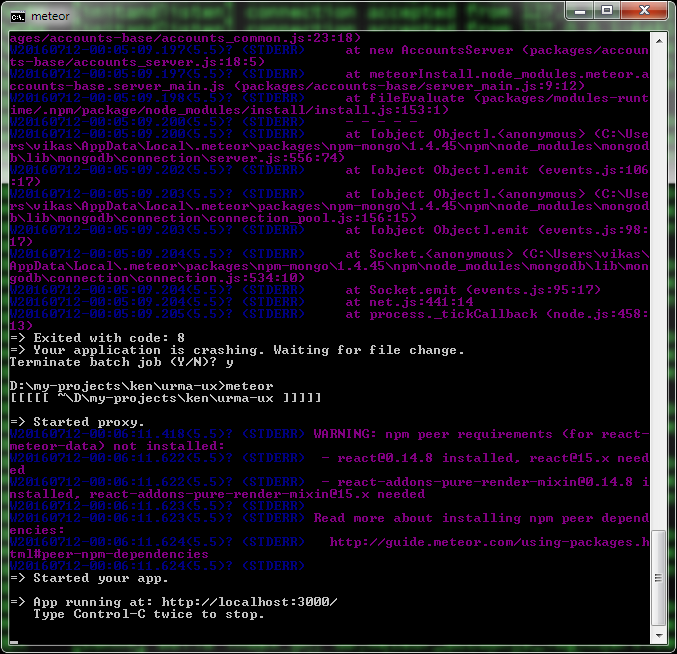
PS: I did do a couple of meteor reset and meteor update and npm install to make all this go away , but i think finally it was the meteor + mongodb combination that worked and guess i will live with it for the time being till i can figure out a way to combine the two automatically. Some have suggested a restart will help iron out this issue. Will try that too and post back.